
Beskrivelse
Have you ever been in situation where you publish post. But displayed in wrong location due to forgot setting the right tags / categories.
Or, broken blog layout because of forgot to setting featured images.
Don’t worry, this plugin will help you remember that. You could also set custom warning messages to your like.
Skjermbilder
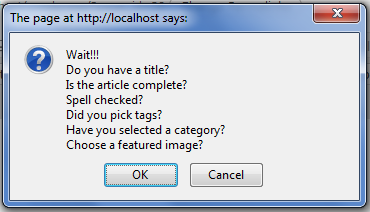
This is what you’ll see whenever you push the publish button 
This is where admin setting located 
Input your custom messages here
Installasjon
- Upload
crpostwarningdirectory to the/wp-content/plugins/directory - Activate the plugin through the ‘Plugins’ menu in WordPress
- Go to Settings »
[CR]Post Warningand set your warning messages
Ofte stilte spørsmål
- What is the minimum PHP requirement?
-
For the plugin itself, PHP4 and JAVASCRIPT activated. Right, you need javascript to be able to use this plugin.
Vurderinger
Det er ingen omtaler av denne utvidelsen.
Bidragsytere og utviklere
«[CR]PostWarning» er programvare med åpen kildekode. Følgende personer har bidratt til denne utvidelsen:
Bidragsytere
Oversett «[CR]PostWarning» til ditt språk.
Interessert i utvikling?
Bla gjennom koden, sjekk ut SVN-repositoriet, eller abonner på utviklingsloggen med RSS.