

Beskrivelse
Hexa Grid is a WooCommerce product display plugin for creating flexible product grids, lists, sliders, carousels, and tables.
Demo | Plugin Website | Documentation
Create a WooCommerce Product Grid to showcase products on your homepage, landing pages, shop sections, and other content areas. Choose a product list, slider, carousel, or table layout when a different presentation works better for your store.
The plugin uses shortcodes, allowing you to add product displays to supported WordPress content areas such as pages, posts, sidebar widgets, and custom theme templates.
Whether you want to highlight featured products, display latest products, promote sale products, or show best-selling products, Hexa Grid provides multiple WooCommerce product display options from one focused plugin.
WooCommerce Product Grid
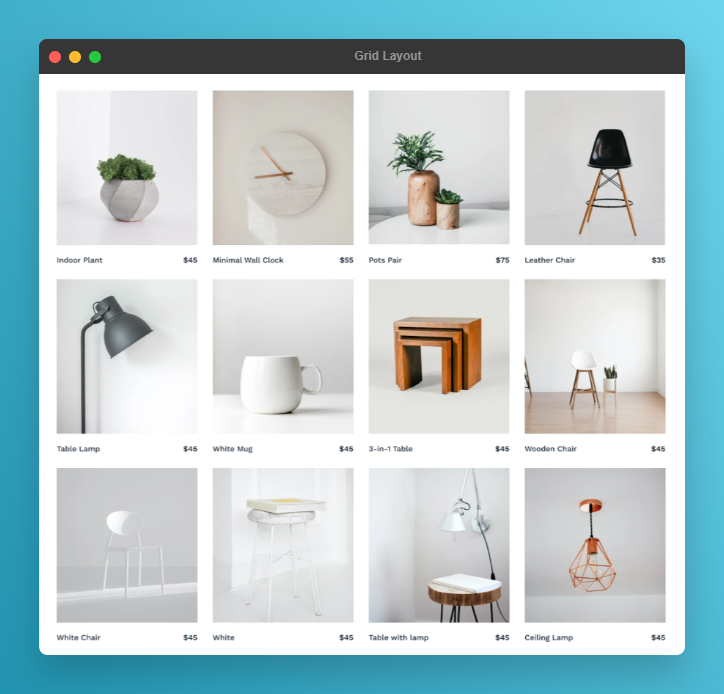
Create a responsive WooCommerce Product Grid to display multiple products in an organized grid layout.
Product grids are useful for:
- Featured products
- Latest products
- Sale products
- Best-selling products
- Products from selected categories
- Homepage product sections
- Landing page product sections
Use different product grid sections to showcase different product collections throughout your WooCommerce store.
WooCommerce Product List
Use the WooCommerce Product List layout when you want to display products in a vertical list instead of a traditional grid.
Product lists can be useful for product collections, promotional sections, catalog-style displays, and other areas where a list-based layout is more suitable.
WooCommerce Product Slider
Create a WooCommerce Product Slider to showcase products in a horizontal layout.
Product sliders are useful for featured products, latest products, sale products, and selected product collections.
Hexa Grid includes slider configuration options for navigation, dots, autoplay, and responsive product columns.
WooCommerce Product Carousel
Create a WooCommerce Product Carousel to display multiple products in a horizontally browsable layout.
Use carousel layouts for featured products, promotional sections, category-based product collections, and other areas where horizontal product browsing is useful.
WooCommerce Product Table
Create a WooCommerce Product Table when you need a structured table-based product layout.
The product table provides an alternative to grid, list, slider, and carousel layouts for presenting WooCommerce products in a structured format.
Product Filtering
Hexa Grid supports product filtering based on selected WooCommerce categories.
Create focused product sections by displaying products from specific categories.
Category-based product displays can be useful for:
- Homepage product sections
- Product collections
- Promotional sections
- Category-focused landing pages
- Featured product sections
Responsive Product Layouts
Hexa Grid provides responsive layouts for product displays.
Product grids, lists, sliders, and tables are designed to adapt to different screen sizes, helping maintain a consistent browsing experience across desktop, tablet, and mobile devices.
Shortcode-Based Product Display
Hexa Grid uses shortcodes to add product displays to your WordPress website.
You can use shortcodes in supported areas such as:
- Pages
- Posts
- Sidebar widgets
- Custom theme templates
This makes it possible to create WooCommerce product sections without requiring a page builder.
Flexible WooCommerce Product Showcase
Hexa Grid gives WooCommerce store owners multiple ways to showcase products.
Use a product grid for a standard product section, a list for compact product presentation, a slider or carousel for featured products, or a table for structured product displays.
Use Cases
Hexa Grid can be used to create:
- WooCommerce Product Grid sections
- WooCommerce Product Showcase sections
- Product sliders
- Product carousels
- Product lists
- Product tables
- Category-based product sections
- Featured product sections
- Latest product sections
- Sale product sections
- Best-selling product sections
- Homepage product sections
- Landing page product sections
Features
- WooCommerce Product Grid
- WooCommerce Product List
- WooCommerce Product Slider
- WooCommerce Product Carousel
- WooCommerce Product Table
- Product Filtering
- Responsive product layouts
- Shortcode-based product display
- Featured product display
- Latest product display
- Sale product display
- Best-selling product display
- Category-based product display
Skjermbilder
Installasjon
From WordPress Dashboard
- Go to Plugins Add New.
- Search for Hexa Grid.
- Find Hexa Grid – Product Grid, List, Slider & Table for WooCommerce.
- Click Install Now.
- Activate the plugin.
- Configure your desired product display.
- Add the shortcode to the desired content area.
Manual Installation
- Download the Hexa Grid plugin ZIP file.
- Go to Plugins Add New Upload Plugin.
- Upload the plugin ZIP file.
- Install and activate the plugin.
- Configure your product display.
- Add the shortcode where you want the display to appear.
Ofte stilte spørsmål
-
What is Hexa Grid?
-
Hexa Grid is a WooCommerce product display plugin for creating product grids, lists, sliders, carousels, and tables.
-
What is a WooCommerce Product Grid?
-
A WooCommerce Product Grid displays multiple WooCommerce products in a structured grid layout. It can be used on homepages, landing pages, promotional sections, and other areas of a WooCommerce website.
-
Can I create a WooCommerce Product Slider?
-
Yes. Hexa Grid includes a product slider layout with options for navigation, dots, autoplay, and responsive product columns.
-
Can I create a WooCommerce Product Carousel?
-
Yes. Hexa Grid includes a carousel layout for displaying product collections horizontally.
-
Can I display WooCommerce products in a list?
-
Yes. Hexa Grid includes a product list layout.
-
Does Hexa Grid support WooCommerce Product Tables?
-
Yes. Hexa Grid includes a product table layout.
-
Can I filter products by category?
-
Yes. Hexa Grid supports category-based product filtering and product displays.
-
Can I display products from selected categories?
-
Yes. Hexa Grid supports category-based product displays so you can create focused product sections using selected WooCommerce categories.
-
Can I use multiple product displays on one page?
-
Yes. You can place multiple Hexa Grid shortcodes on the same page to create different product sections.
-
Is Hexa Grid responsive?
-
Yes. Hexa Grid provides responsive product layouts for different screen sizes.
-
Do I need a page builder?
-
No. Hexa Grid uses shortcodes, so you can add product displays without requiring a page builder.
-
Can I display featured products?
-
Yes. Hexa Grid supports featured product displays.
-
Can I display sale products?
-
Yes. Hexa Grid supports sale product displays.
-
Can I display latest products?
-
Yes. Hexa Grid supports latest product displays.
-
Can I display best-selling products?
-
Yes. Hexa Grid supports best-selling product displays.
-
Is Hexa Grid translation ready?
-
Yes. Hexa Grid follows WordPress internationalization practices and is translation ready.
Vurderinger
Det er ingen omtaler av denne utvidelsen.
Bidragsytere og utviklere
«Hexa Grid – Product Grid, List, Slider & Table for WooCommerce» er programvare med åpen kildekode. Følgende personer har bidratt til denne utvidelsen:
Bidragsytere
Oversett «Hexa Grid – Product Grid, List, Slider & Table for WooCommerce» til ditt språk.
Interessert i utvikling?
Bla gjennom koden, sjekk ut SVN-repositoriet, eller abonner på utviklingsloggen med RSS.
Endringslogg
1.1.5
- Fixed: Critical error caused by the missing
includes/Wishlist/directory in the release package (classHexaGrid\Wishlist\Wishlist_Handlernot found). - Fixed: Added missing template files (Grid 3, List 2 & 3, Slider 2 & 3, Table 2 & 3) and skeleton preview icons to the package.
- Fixed: The Addons Kit settings library now guards against duplicate class declaration to avoid conflicts when other Addons Kit plugins are active.
1.1.4
- New: Added Product List Premium (List Layout 2) — a modern, information-rich catalog-style product list with contained thumbnails, compact ratings, line-clamped descriptions, stock/SKU/category metadata, and a right-aligned price + add-to-cart CTA.
- New: Added Product List Two Column (List Layout 3) — the same premium list design arranged in a responsive two-column grid that collapses to a single column on tablet and mobile.
- New: Added discount (sale) badges to the top-left of product thumbnails in List Layouts 2 & 3 (percentage off for simple products, with a «Sale!» fallback).
- New: Added admin skeleton previews for the new list variations.
- Improved: List Layout 2 & 3 share a single set of row styles, themeable via CSS variables (row border, hover border, radius).
- Fixed: Frontend asset versioning now cache-busts correctly so updated styles load after upgrades.
1.1.3
- New: Added Product Carousel Classic (slider style 2) matching the Grid Classic design.
- New: Added Product Carousel Cosmetic (slider style 3) matching the Grid Cosmetic design.
- New: Added wishlist (heart) button support to Grid 3 and Slider 3 layouts.
- New: Added slider navigation position setting (middle, top right, bottom left, bottom right).
- New: Added card-accurate skeleton previews for all slider styles in the admin.
- Improved: Carousel slides now render at equal heights with a fixed image aspect ratio.
- Improved: Price container is no longer rendered when a product has no price (Grid 2/3, Slider 2/3).
- Improved: Modernized slider pagination dots (pill-style active dot) and arrow navigation styling.
- Improved: Slider dots are enabled by default for a better out-of-the-box experience.
- Improved: Content spacing now uses margins instead of flex-grow for more predictable layouts.
- Improved: Wishlist button background now uses a semi-transparent white for better visibility.
- Fixed: Slider navigation icons now render at the correct size on all slider styles.
- Fixed: Unequal grid column widths at medium breakpoints.
- Fixed: Price and cart icon layout on mobile for Grid Layout 3.
1.1.2
- Improved: Refactored add-to-cart button system with CSS variables for consistent theming.
- Improved: Added dedicated button style classes (icon, text, border) for better customization.
- Improved: Standardized layout container classes across Grid, List, Slider, and Table layouts.
- Fixed: Renamed button icon wrapper class to avoid CSS conflicts.
1.1.1
- New: Centralized preset configuration system for easier maintenance and consistency.
- New: Added dedicated preset loader with validation, caching, and automatic cache invalidation.
- New: Added missing «Include Products (IDs)» field to the preset builder.
- Improved: Frontend scripts and styles now load only when the shortcode is used.
- Improved: Preset configuration is now cached for better performance.
- Improved: Query builder defaults are now synchronized with preset configuration.
- Improved: Shortcode wrapper IDs are now deterministic for better caching compatibility.
- Fixed: Preset Layout Type and Layout Style were being overwritten by shortcode defaults on the frontend.
- Fixed: Translated «No products found.» message in all layout templates.
1.1.0
- New: Redesigned admin interface with a modern card-based interface and branding colors.
- New: Added product layout variations (Product Grid Modern/Classic, Product List Minimal, Product Carousel Standard, Product Table Simple).
- New: Added slider configuration options including navigation, dots, and autoplay.
- New: Added conditional settings based on selected layout type.
- New: Added automatic layout variation selection.
- New: Added reusable settings builder functionality for grouped selectors and dependencies.
- New: Added width control for card selectors.
- Improved: Refactored layout variation logic for better organization and reusability.
- Improved: Enhanced JavaScript dependency handling.
- Improved: Standardized product grid CSS class naming.
- Improved: Refactored internal data-saving structure.
- Improved: Improved frontend slider configuration and responsive behavior.
- Fixed: Resolved layout settings markup issues.
- Fixed: Corrected meta box wrapper spacing.
- Fixed: Standardized template naming conventions and fallback logic.
1.0.0
- Initial release.
- Added WooCommerce Product Grid, List, Carousel, and Table layouts.
- Added responsive layouts.
- Added performance improvements.