
Beskrivelse
Want Claude or ChatGPT to actually do things on your WordPress site instead of just talking about it? Albert is the AI assistant connector for WordPress. It exposes your site through the Model Context Protocol (MCP), so AI assistants can write and edit posts, organize media, manage products, and handle day-to-day tasks — all under your control.
Every well-run site deserves a proper butler. Albert stands at the door, welcomes AI assistants like Claude and ChatGPT, checks their credentials, and puts them to work — no custom code and no complicated setup.
What your AI assistant can do
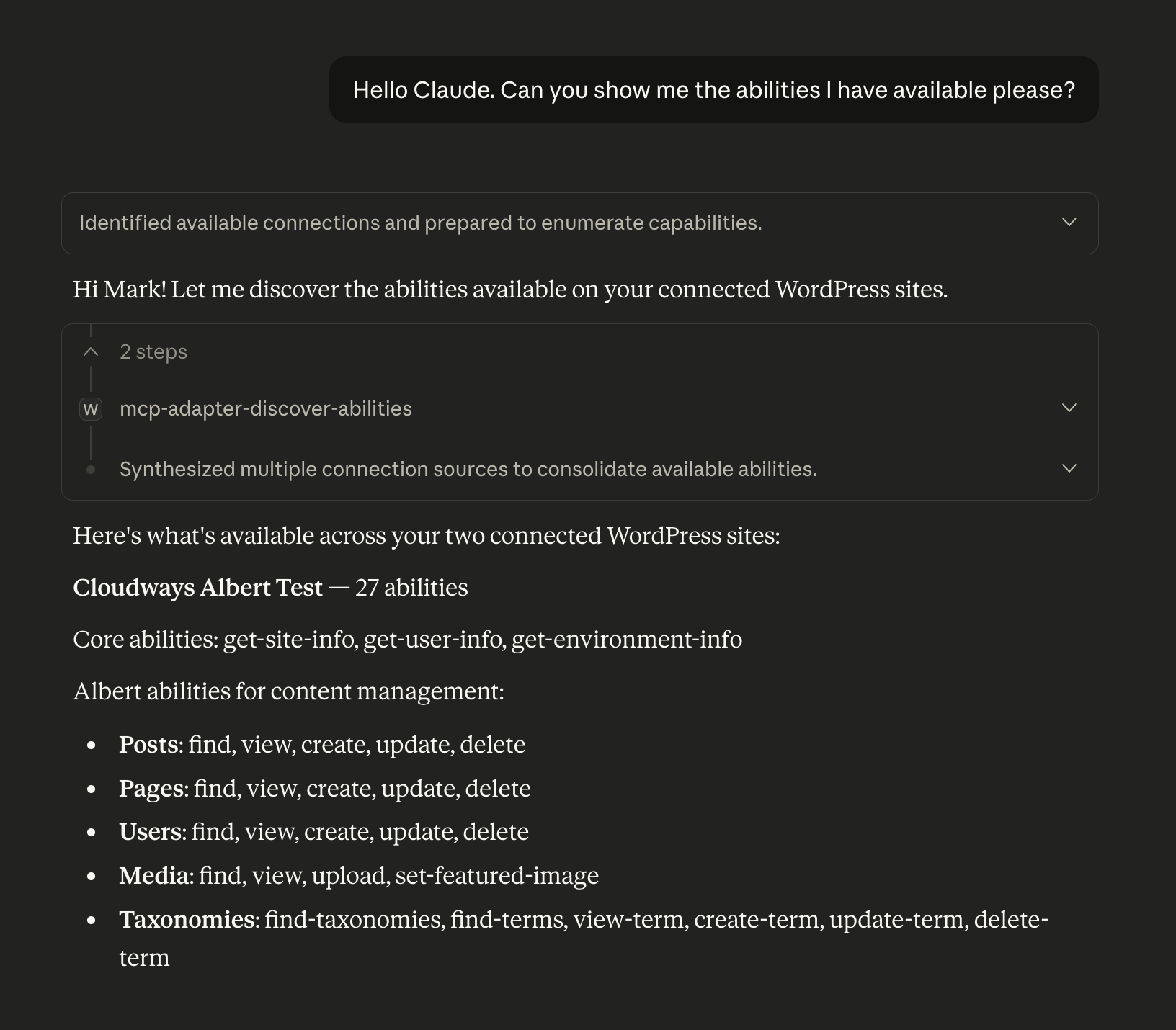
Once connected, an AI assistant can take real action on your site through a curated set of abilities:
- Write and manage content — Create, edit, find, and delete posts and pages, working directly in the block editor (headings, lists, columns, images and more) or the classic editor.
- Edit individual blocks — Change, add, move, or remove a single block without rewriting the whole page.
- Organize media — Upload images, browse the media library, and set featured images.
- Manage users and taxonomies — Find and manage users, categories, tags, and custom terms.
- Run your store — When WooCommerce is active, look up products, orders, and customers.
- Extend it yourself — Developers can register custom abilities with the WordPress Abilities API.
Works with Claude, ChatGPT and any MCP client
Albert turns your WordPress site into an MCP server. Copy the endpoint URL, paste it into Claude Desktop, ChatGPT, or any MCP-compatible AI assistant, authorize, and you’re connected. The same three steps work for every client.
You decide what AI assistants can do
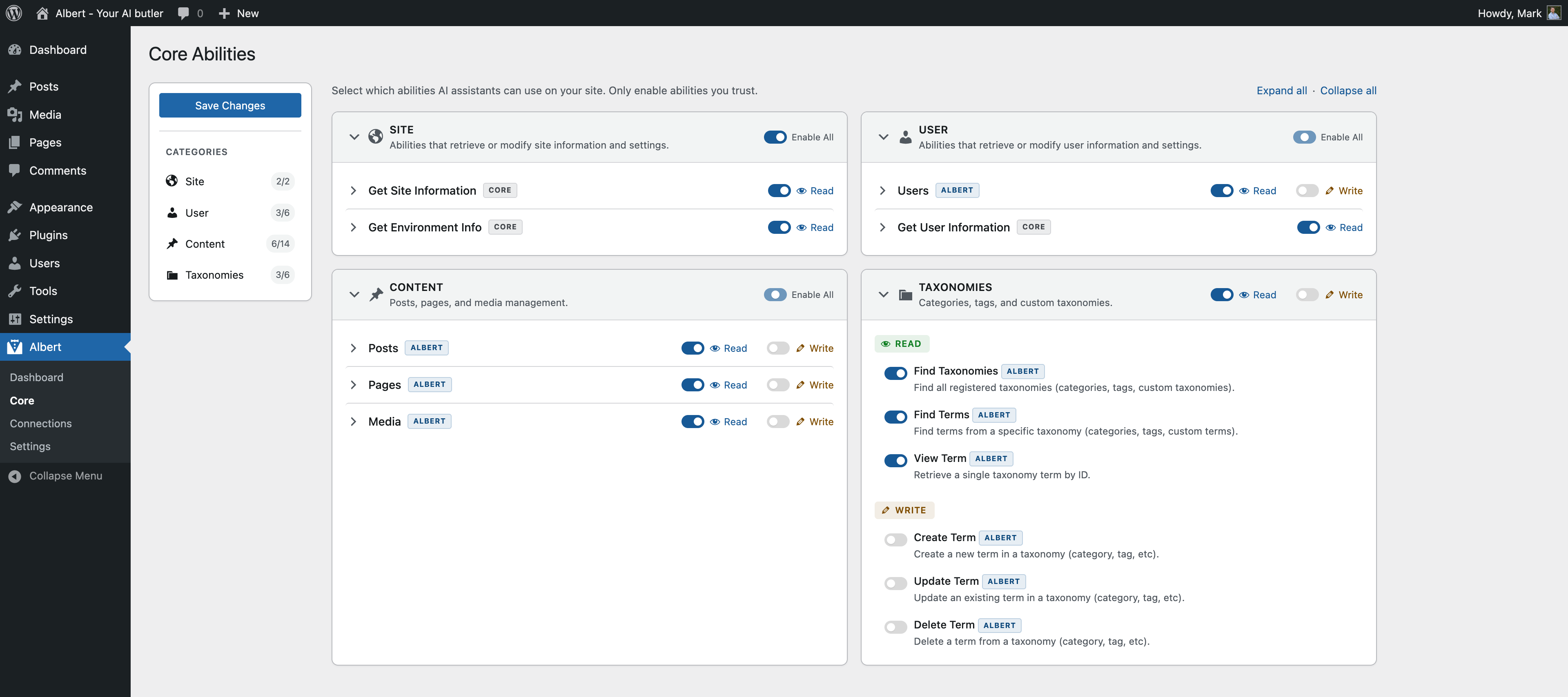
Not every guest needs access to every room. From the admin panel, you choose exactly which abilities are switched on. Write and delete abilities are off by default, and every action still respects WordPress’s own user roles and capabilities — an AI assistant can never do more than the authorized user could do by hand.
Secure by design
Every AI assistant must present proper credentials before Albert lets it in. Connections use OAuth 2.0 with time-limited, automatically refreshing tokens — no passwords are ever shared — and you can revoke any connection at any time.
Privacy Policy
Albert does not collect, store, or transmit any user data to external servers. All authentication tokens are stored locally in your WordPress database. When you authorize an AI assistant, that assistant will have access to perform actions on your WordPress site according to the permissions you grant. You control which abilities are enabled and can revoke any session at any time.
Credits
Developed by Mark Jansen – Your Mark Media
Website: https://yourmark.nl
Plugin URL: https://github.com/YourMark/albert-ai-butler
Built with:
* league/oauth2-server for OAuth 2.0 implementation
* Model Context Protocol (MCP) for AI assistant connectivity
* WordPress Coding Standards
Skjermbilder
Installasjon
From WordPress.org
- Install Albert through the WordPress plugin directory
- Activate the plugin through the ‘Plugins’ menu in WordPress
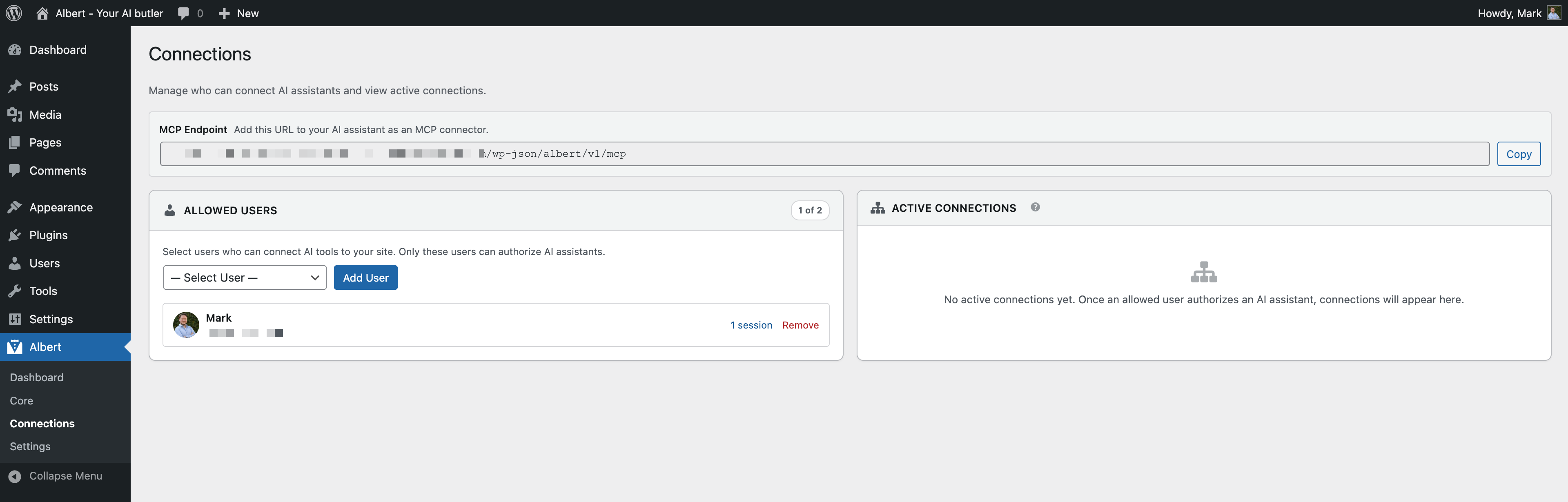
- Go to Albert > Connections and add yourself as an allowed user
- Copy the MCP endpoint URL from the dashboard
- Add the URL to Claude Desktop, ChatGPT, or another MCP-compatible assistant
- Authorize when prompted — you’re connected
Manual Installation
- Download the plugin files
- Upload the
albert-ai-butlerfolder to/wp-content/plugins/ - Activate the plugin through the ‘Plugins’ menu in WordPress
- Follow the setup steps above
Connecting Claude Desktop
- In WordPress, go to Albert > Connections and add yourself as an allowed user
- Copy the MCP endpoint URL from the Albert dashboard
- In Claude Desktop, go to Settings > MCP Servers and add a new server
- Paste the endpoint URL and save
- Claude will open a browser window to authorize — log in and approve
- Claude Desktop can now work with your WordPress site
Connecting ChatGPT
- In WordPress, go to Albert > Connections and add yourself as an allowed user
- Copy the MCP endpoint URL from the Albert dashboard
- In ChatGPT, connect to the MCP endpoint using the URL
- Authorize when prompted
- ChatGPT can now work with your WordPress site
Full setup guide available at Documentation
Ofte stilte spørsmål
-
What is MCP?
-
MCP — the Model Context Protocol — is an open standard that lets AI assistants connect to external tools and data. Albert turns your WordPress site into an MCP server, so any MCP-compatible AI assistant, like Claude or ChatGPT, can work with it.
-
What AI assistants are supported?
-
Albert works with Claude Desktop, ChatGPT, and any AI assistant that supports the Model Context Protocol (MCP). The connection process is the same for all: copy the endpoint URL, paste it into your assistant, and authorize.
-
How hard is it to set up?
-
Three steps: add yourself as an allowed user, copy the MCP endpoint URL, and paste it into your AI assistant. No technical knowledge required.
-
Is my data secure?
-
Yes. Albert uses OAuth 2.0 — the same standard used by Google, GitHub, and other major platforms. Your AI assistant receives a time-limited access token that automatically refreshes. No passwords are shared. All operations respect WordPress’s built-in capability and role system, and you control exactly which abilities are enabled.
-
What abilities are included?
-
Albert ships with 35+ abilities covering WordPress core:
- Posts — Find, view, create, update, and delete posts
- Pages — Find, view, create, update, and delete pages
- Block editing — Edit, add, move, and remove individual blocks in posts and pages
- Users — Find, view, create, update, and delete users
- Media — Find, view, upload media, and set featured images
- Taxonomies — Find taxonomies, find/view/create/update/delete terms
When WooCommerce is active, additional abilities are available for products, orders, and customers.
-
Can I control what my AI assistant is allowed to do?
-
Yes. The abilities page lists every action your AI assistant can perform on your site, clearly labelled as Read, Write, or Delete. You toggle each one on or off individually — changes save instantly, no form to submit. Filter the list by text, category, or supplier to find what you’re looking for. Write and delete abilities are off by default — you choose exactly what to enable. All actions also respect WordPress user capabilities, so your AI assistant can never do more than the authorized user could do manually.
-
Do I need WooCommerce?
-
No. Albert works with WordPress core out of the box. WooCommerce abilities appear automatically when WooCommerce is active.
-
Can I add custom abilities?
-
Yes. Developers can register custom abilities using the WordPress Abilities API to expose any functionality to AI assistants. See the documentation at GitHub.
-
Does this work with multisite?
-
Albert is designed for single-site installations. Multisite support is on the roadmap.
-
What are the system requirements?
-
- WordPress 6.9 or higher
- PHP 8.1 or higher (8.3+ recommended)
- MySQL 8.0+ or MariaDB 10.5+
- HTTPS (required for OAuth 2.0)
-
Where can I get support?
-
- Documentation: GitHub Wiki
- Support Forum: WordPress.org support forums
- GitHub: Report issues
Vurderinger


Bidragsytere og utviklere
«Albert – The AI Butler» er programvare med åpen kildekode. Følgende personer har bidratt til denne utvidelsen:
Bidragsytere

Oversett «Albert – The AI Butler» til ditt språk.
Interessert i utvikling?
Bla gjennom koden, sjekk ut SVN-repositoriet, eller abonner på utviklingsloggen med RSS.
Endringslogg
1.2.0
Albert now understands the WordPress block editor — a big step up in how AI assistants read and write your content.
Block editor support
- AI assistants now work with real WordPress blocks instead of raw HTML. They can read a post as a clean, structured outline and compose new content with proper blocks — headings, paragraphs, lists, quotes, images, buttons, columns, and groups.
- Edit one block at a time — change, add, move, or remove a single block without disturbing the rest of the page. No more rewriting a whole post to fix one paragraph.
- Cleaner content, fewer errors — Albert validates blocks as they’re written and steers the assistant to correct mistakes, so you avoid the block editor’s «this block contains unexpected content» warnings.
- Stays within your palette — assistants only use the blocks your site (and the connected user) are actually allowed to use.
Classic editor support
- Sites, posts, and pages using the classic editor are handled correctly — content is read and saved as HTML — so Albert works whichever editor you use.
Built-in guidance for assistants
- Albert now ships a built-in playbook and reference data that teach connected assistants how your site’s blocks work, so they produce better content out of the box.
Handles large content
- Long posts are paged automatically, so big content is never cut off mid-way when an assistant reads it.
Safer updates
- When a plugin update adds new abilities, they now start switched off — you decide what to turn on. An update will never silently expand what an AI assistant can do on a site you’ve already set up.
1.1.1
Bug fix release.
- Fix: OAuth discovery endpoints (
/.well-known/oauth-protected-resource,/.well-known/oauth-authorization-server) are now reachable when the request arrives with a trailing slash. Some hosts add a trailing slash at the edge, after which WordPress’s canonical redirect would strip it again, producing a redirect loop or a 404. The endpoints now respond identically with or without the slash. - Discovered by Marinus Klasen.
1.1.0
Major admin redesign, new activity logging, and a stack of reliability fixes.
New features
- Unified abilities page — one filterable list of every registered ability from WordPress core, WooCommerce, and any other plugin that registers abilities. Search, filter by category or supplier, and see read/write/delete at a glance.
- Instant save — toggle an ability on or off and it saves immediately. No more Save Changes button or lost progress.
- Activity logging — a new dashboard widget shows the most recent ability execution, and every ability now displays its «Last run» time in the expanded details.
- Plain-language labels — each ability is tagged Read, Write, or Delete (replacing developer-facing «Destructive / Idempotent / Readonly» terms). Hover or keyboard-focus a label for a full explanation.
- Supplier filtering — the filter dropdown shows branded names like «WordPress core», «Albert», and «WooCommerce» instead of raw prefixes. Third-party plugins can register their own supplier name via the
albert/abilities/suppliersfilter. - List / Paginated view — switch between one long list and 25-per-page pagination. Your choice is persisted on the server, so no flash of the wrong view on page load.
Bug fixes
- Ability categories now register at the default hook priority, preventing collisions with WordPress core’s built-in categories on WP 6.9+.
- Fixed a missing ‘user’ category that Users abilities depend on — abilities now register reliably on fresh installs.
- The
passwordfield on the Create User ability is now correctly flagged as required, so AI assistants get a clear validation error when it’s missing instead of a vague failure. - OAuth endpoints, MCP, and discovery metadata now share one consistent REST namespace reference.
Accessibility
- Keyboard-reachable tooltips on every annotation chip.
- WCAG 2.2 AA contrast on all chip colours.
- aria-live stats announcements debounced during search.
- Visible focus indicators on pagination buttons and dropdown caret indicators on filter selects.
Under the hood
- Comprehensive automated test suite covering input validation, output schema, permissions, and per-parameter behaviour on every ability.
- Continuous integration now runs against PHP 8.1–8.4, WordPress 6.9 and latest, and WooCommerce 10.5–latest.
- Removed redundant manual input validation from every ability — WordPress core validates the schema before the ability runs.
- Unified internal settings API for cleaner state management.
1.0.1
Bug fix release.
- Fix: OAuth endpoints used a different REST namespace (
albert-ai-butler/v1) than the MCP server and discovery metadata (albert/v1), causing connection failures when clients followed the OAuth discovery spec. All endpoints now usealbert/v1consistently. - New:
albert/rest_namespacefilter allows sites with a namespace collision to override the REST namespace.
1.0.0
Initial release.
- MCP server — Turns your WordPress site into an MCP endpoint. Copy the URL, paste it into Claude Desktop, ChatGPT, or any MCP-compatible assistant, authorize, and you’re connected. No configuration files or developer setup needed.
- OAuth 2.0 server — Full authentication server with PKCE support, RSA-signed access tokens, automatic token refresh, and sessions that persist up to 30 days.
- Abilities Manager — Admin interface to toggle read and write permissions per content type. Write abilities disabled by default. All actions respect WordPress capabilities.
- 25+ WordPress abilities — Posts, Pages, Users, Media, and Taxonomies with find, view, create, update, and delete operations.
- WooCommerce abilities — Products, Orders, and Customers when WooCommerce is active.
- Connections management — Control which users can connect AI assistants. View active connections, disconnect individual sessions, or end entire sessions with token revocation.
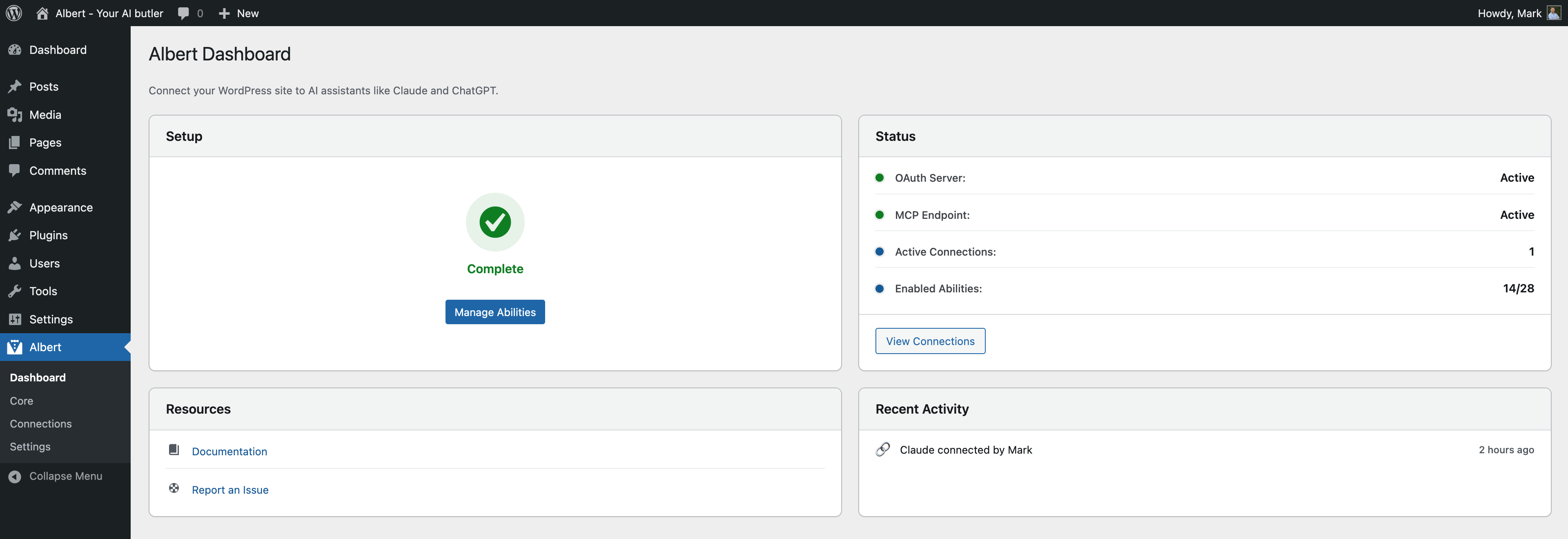
- Dashboard — Setup checklist, status overview, active connection count, and recent activity feed.
- Extensible — Register custom abilities with the WordPress Abilities API. Hookable architecture with filters and actions.