

Beskrivelse
seljeDrive Document Library for Google Drive lar deg publisere en Google Drive-mappe på WordPress‑nettstedet ditt som en enkel filutforsker.
Vil du ha en mer markedsføringsrettet, teknisk eller kortfattet variant, lager jeg gjerne flere.
Find this free plugin useful? Please support my work on this plugin by sending me a one-time donation (50% of the proceeds go to Ukraine).
Key features:
- Browse a Google Drive folder (via a shared folder link)
- Search inside the library
- Open files in a new tab or download files
- Create multiple libraries and embed each with a shortcode
- Control access per library:
- Public
- Logged-in users
- Specific roles
Find this free plugin useful? Please support my work on this plugin by making a donation.
Privacy
This plugin relies on third party services to function.
Google Drive is a trademark of Google LLC. This plugin is not affiliated with or endorsed by Google.
WordPress is a trademark of the WordPress Foundation. This plugin is not affiliated with or sponsored by, the WordPress Foundation.
Third Party Services
Google (Google OAuth + Google Drive API)
What it is used for:
- Connecting your WordPress site to Google (OAuth)
- Listing/searching files and folders from Google Drive
- Opening/downloading files via Google-hosted URLs
When data is sent:
- When an administrator clicks Connect Google and completes authorization
- When anyone views a page that contains the
[sg_doc_library]shortcode (your WordPress site fetches file/folder metadata from Google to render the library) - When a visitor uses Search / Open / Download inside the library
- When the plugin refreshes an expired access token (if you have connected with offline access)
What data is sent:
- During OAuth authorization (admin action): client ID, redirect URI, state, requested scope, and an authorization code
- During API calls to Google Drive: an OAuth access token (in an Authorization header), Google Drive file/folder IDs, and search terms entered by the user (if search is used)
- During Open/Download (visitor action): your WordPress site returns a redirect URL and the visitor’s browser is sent to a Google-hosted URL containing the file ID (for example
docs.google.comexport links ordrive.google.comdownload links)
Data flow / conditions:
- Google Drive API requests are made server-to-server (from your WordPress site to Google) using the OAuth token stored in your WordPress database.
- The visitor’s browser is only sent directly to Google when the visitor clicks Open or Download.
Endpoints contacted:
- https://accounts.google.com/o/oauth2/v2/auth
- https://oauth2.googleapis.com/token
- https://www.googleapis.com/drive/v3
Visitor browser destinations (when using Open/Download):
- https://docs.google.com/
- https://drive.google.com/
OAuth scope:
- https://www.googleapis.com/auth/drive.readonly
Google Privacy Policy:
- https://policies.google.com/privacy
Google Terms of Service:
- https://policies.google.com/terms
Google APIs Terms of Service:
- https://developers.google.com/terms
Stripe (Donate link)
What it is used for:
- Optional donations via a Stripe-hosted checkout page
When data is sent:
- Only when an administrator clicks the Donate button in the plugin admin page
What data is sent:
- The plugin itself does not send payment details. Clicking Donate opens a Stripe-hosted page in your browser. Stripe then receives the data needed to load and process the checkout (such as your IP address, browser/user agent, and any information you enter on the checkout page).
Stripe Privacy Policy:
- https://stripe.com/privacy
Stripe Terms / Legal:
- https://stripe.com/legal
Configuration
Google OAuth
- In Google Cloud Console:
- Enable Google Drive API
- Create an OAuth 2.0 Client ID (type: Web application)
- In WordPress admin:
- Go to Settings -> seljeDrive Document Library for Google Drive
- Add your Client ID and Client Secret
- Copy the Redirect URI shown on the plugin admin page
- Back in Google Cloud Console:
- Add that Redirect URI as an authorized redirect URI
- Back in WordPress:
- Click Connect Google
Create a library
- Go to Settings -> seljeDrive Document Library for Google Drive
- Under Libraries, add a library:
- Name
- Public Folder Share URL
- Access mode
- Save.
Skjermbilder
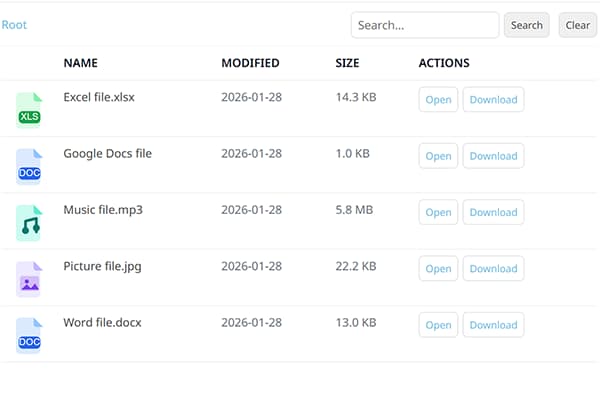
Frontend file explorer. 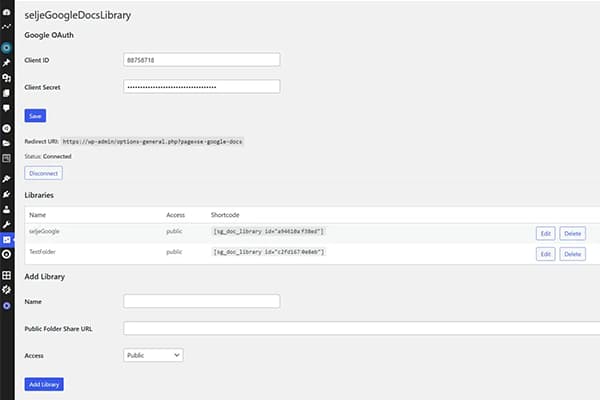
Plugin admin page.
Installasjon
- In WordPress admin, go to Plugins -> Add New.
- Search for seljeDrive Document Library for Google Drive.
- Click Install Now and then Activate.
Ofte stilte spørsmål
-
How do I embed a library on a page?
-
Use the shortcode shown in the Libraries list, for example:
[sg_doc_library id="YOUR_LIBRARY_ID"] -
What PHP version is required?
-
Minimum required PHP is 7.4.
-
Does it support Norwegian language?
-
Yes. The plugin is translation-ready and includes a Norwegian Bokmål (
nb_NO) translation source file.WordPress typically uses compiled
.mofiles at runtime.
Vurderinger
Det er ingen omtaler av denne utvidelsen.
Bidragsytere og utviklere
«seljeDrive Document Library for Google Drive» er programvare med åpen kildekode. Følgende personer har bidratt til denne utvidelsen:
Bidragsytere
“seljeDrive Document Library for Google Drive” har blitt oversatt til 2 språk. Takk til oversetterne for deres bidrag.
Oversett “seljeDrive Document Library for Google Drive” til ditt språk.
Interessert i utvikling?
Bla gjennom koden, sjekk ut SVN-repositoriet, eller abonner på utviklingsloggen med RSS.
Endringslogg
1.2.1
- Fixed missing template file and admin CSS that caused a broken admin page after the 1.2.0 update
1.2.0
- Moved settings page from Tools to Settings menu
- Admin notices now display feedback after save, connect, disconnect, and delete actions
- Client Secret is now encrypted at rest (AES-256-CBC)
- Folder listings now paginate beyond 200 files (up to 2 000)
- Added rate limiting on REST endpoints (60 requests/minute per IP)
- Stale folder cache cleared automatically when a library is deleted
- Admin page HTML extracted to a separate template file for maintainability
- Added placeholder text to the Allowed file extensions field
1.1.0
- Added per-library option to choose frontend language (installed WordPress languages)
1.0.3
- Added option to show Google Drive file preview thumbnails as icons
- Improved copied confirmation when clicking the shortcode
1.0.2
- Added option to remove header from frontend
- Added option to customize the root folder label
1.0.1
- Renamed main plugin file
- Version bump
0.70
- Backend moved to Tools menu
- Added hover tooltips in the backend
- Improved translation loading (incl. locale switch support)
- Updated donate button styling
0.64
- Removed Freemius dependency
- All features available in the single WordPress.org version (multi-library, access control, full-text search)
- Updated external service disclosures (Google APIs, Stripe)
0.63
- WordPress.org compliance fixes (text domain alignment, translation loading, security/escaping)
0.62
- Minor language update
0.61
- Added a non-intrusive Donate button in the plugin admin page
0.60
- Fixed Google Drive search error for full-text queries
- Security hardening for REST references
0.5
- Multi-library support (multiple shortcodes on one page)
- Added icons in the file list
0.1.2
- Added translations support (including Norwegian Bokmål source translation)
- Improved admin UI translations