
Beskrivelse
Lagerplasseringer for WooCommerce vil hjelpe deg med å administrere produktene dine på tvers av flere plasseringer enkelt. Hvis du har flere fysiske butikker eller lagersteder, for eksempel leverandør lager, kan denne utvidelsen hjelpe deg.
Du kan skrive ut plasseringene på en produktside på frontend, med disse kortkodene:
Produkt sider
[slw_product_locations show_qty="yes" show_stock_status="no" show_empty_stock="yes" collapsed="no" stock_location_status="enabled"]
[slw_product_variations_locations show_qty="yes" show_stock_status="no" show_empty_stock="yes" collapsed="yes" stock_location_status="all|disabled|enabled"]
[slw_product_message is_available="yes" only_location_available="no" location="location-slug"]Your custom product message/HTML here[/slw_product_message]
Handlekurv-siden
[slw_cart_message qty_from_location="location-slug" only_location_available="no"]Your custom cart message/HTML here[/slw_cart_message]
REST API
REST API endpoints (both accept GET and PUT requests):
/wp-json/wc/v3/products/id
/wp-json/wc/v3/products/id/variations/id (first ID is for parent product, the second one for the variation ID)
/wp-json/wp/v2/location/
/wp-json/wp/v2/location/id
Denne utvidelsen krever minst WooCommerce 3.4.
Funksjoner
- Ny taksonomi for lagerlokasjoner
- Fungerer på både, enkle og variable produkter
- Enkel styring av lager med flere plasseringer, både på produkt og i bestillinger
- Get and update product stock locations from the REST API
- Tillat kunder å velge plasseringer når de handler
- Automatisk ordrefordeling for lagerreduksjon for plasseringer
- Send e-postvarsler når lageret er allokert for et produkt på en plassering
- Send WooCommerce Ny Ordre med e-postkopi til elementplassering
- Compatible with WPML
Kompatibilitet
- PHP 7.2+
Skjermskudd
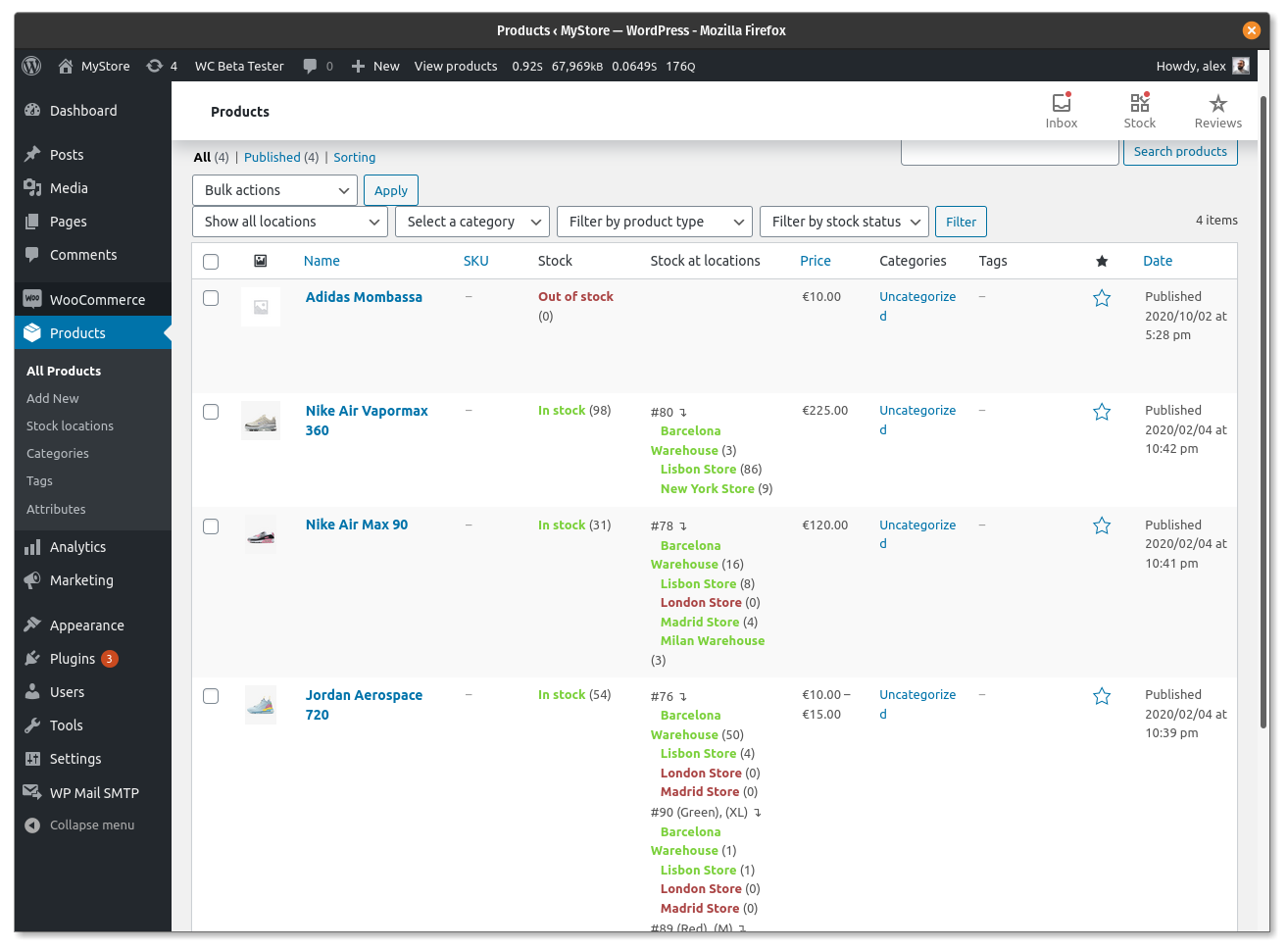
Kolonne med filter for produktliste og lagerplasseringer 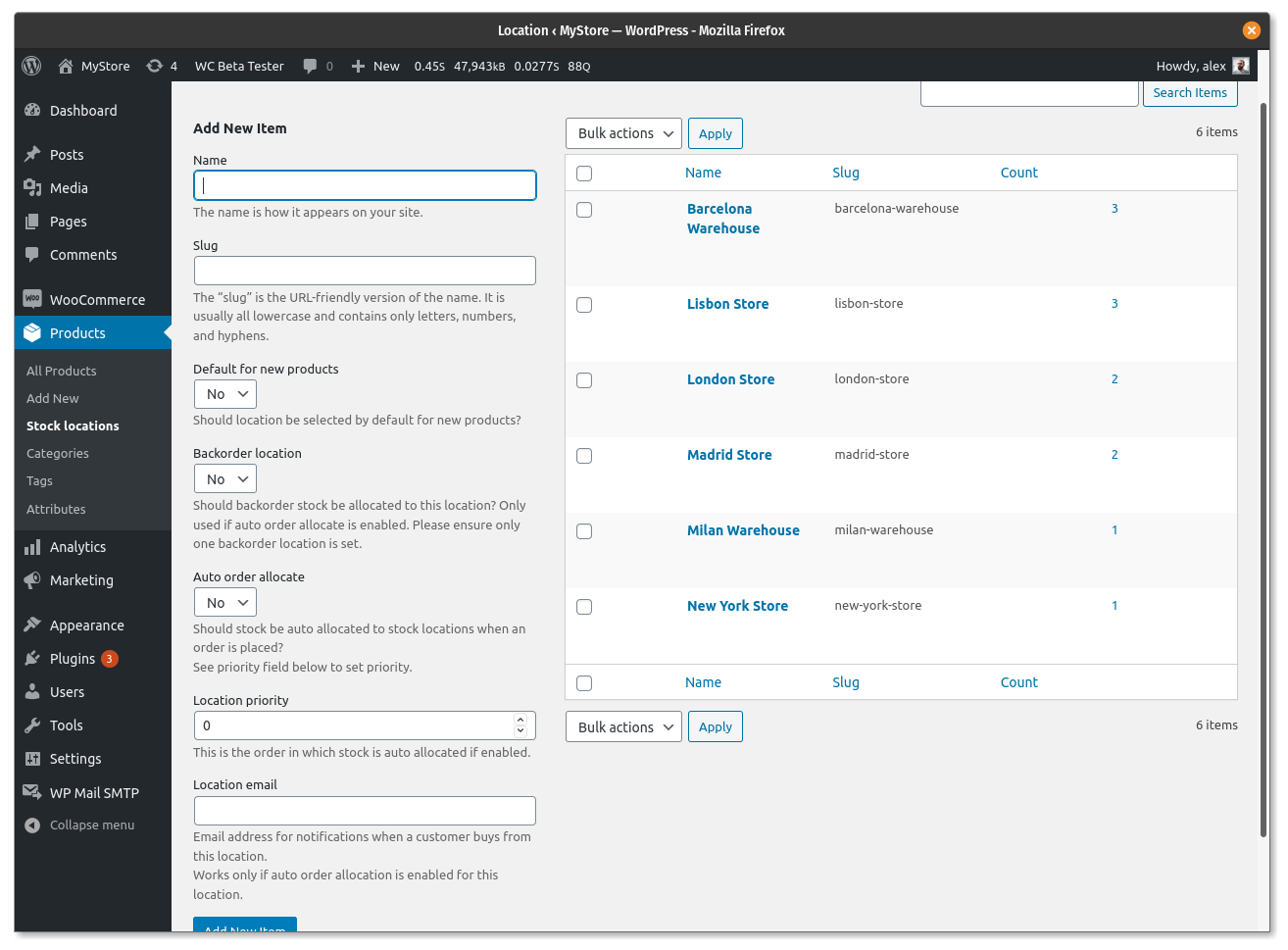
Klassifisering av lagerplasseringer 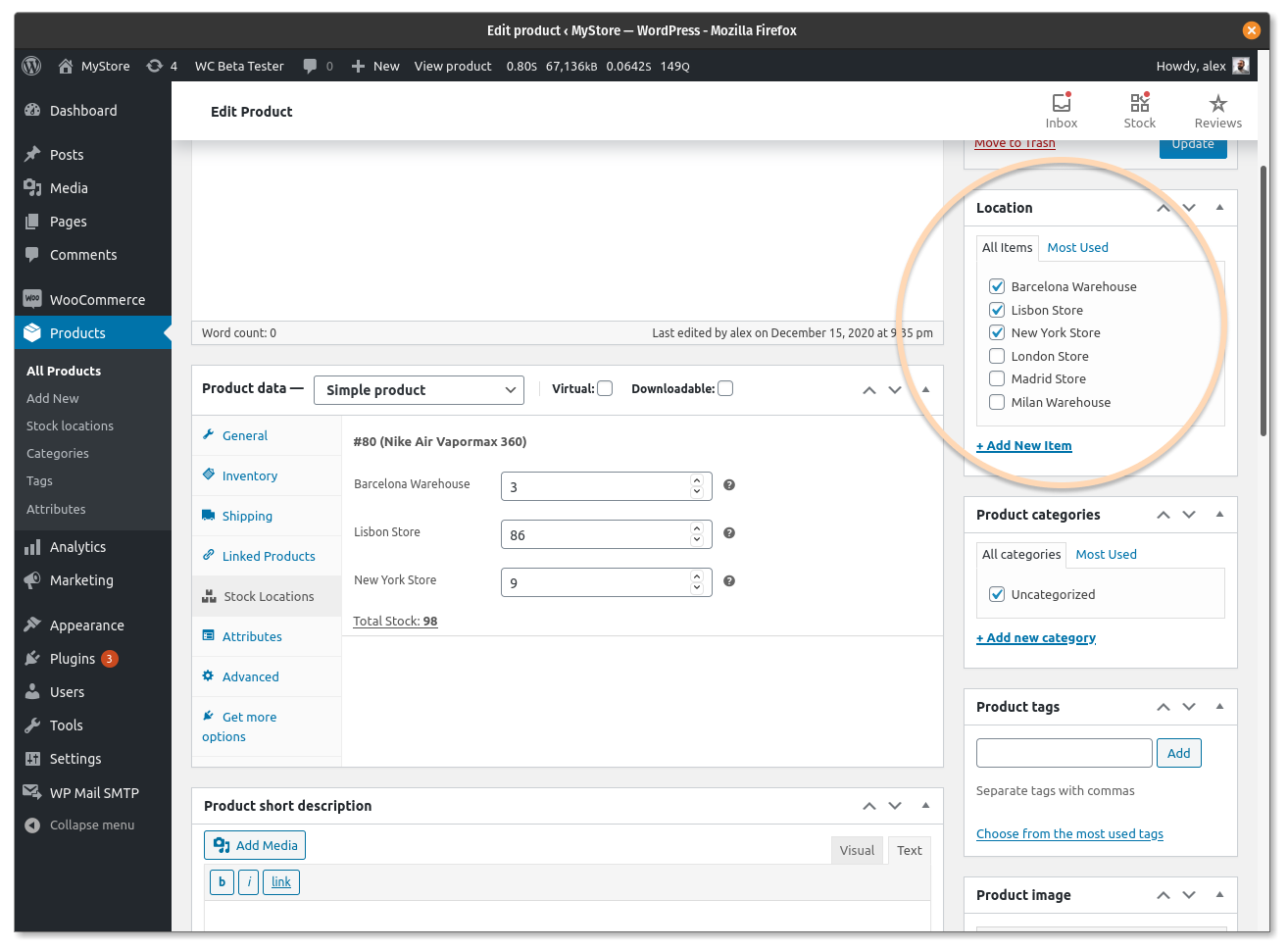
Administrer lagerplasseringer på enkel produkter 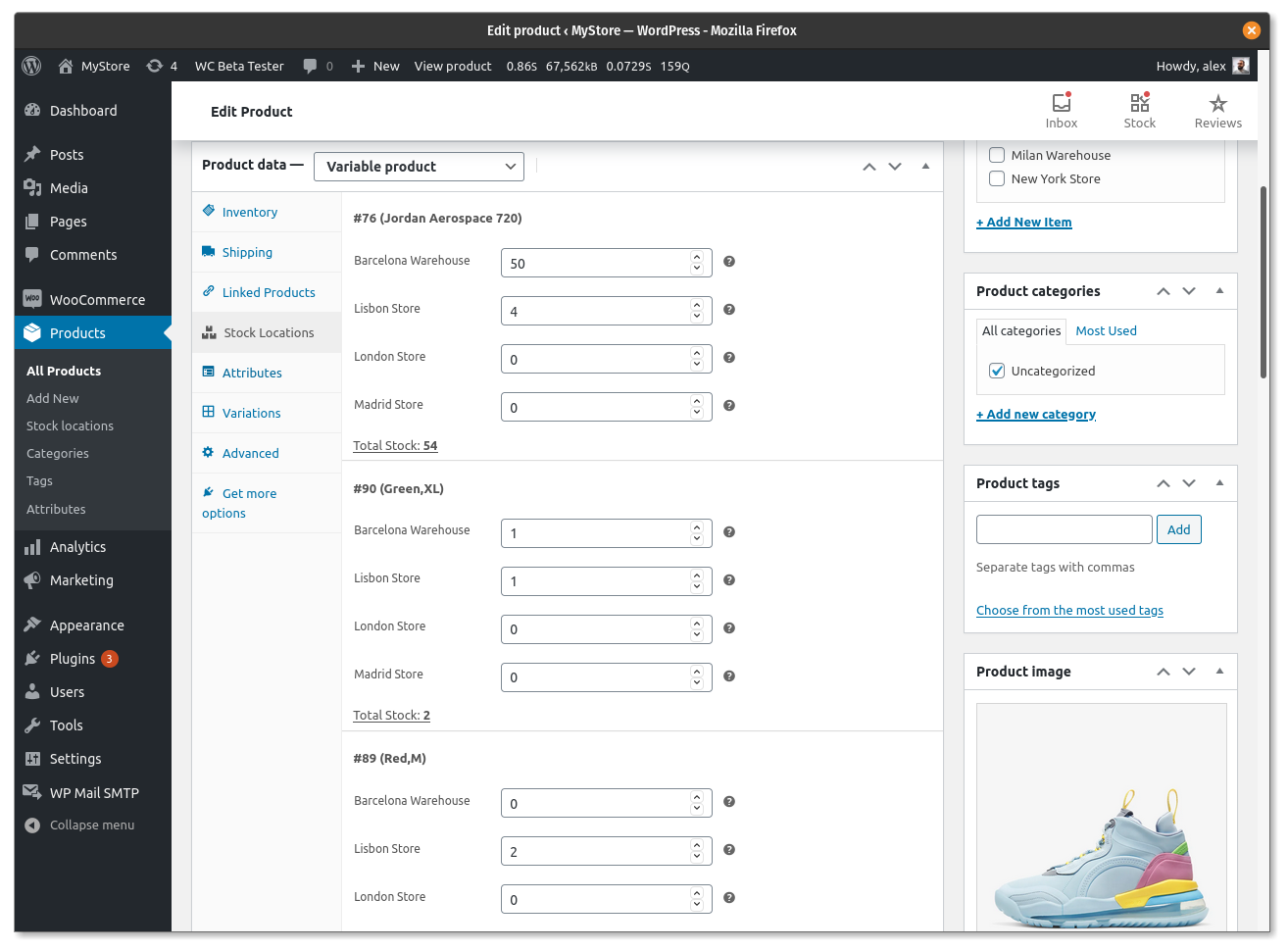
Administrer lagerplasseringer på variable produkter 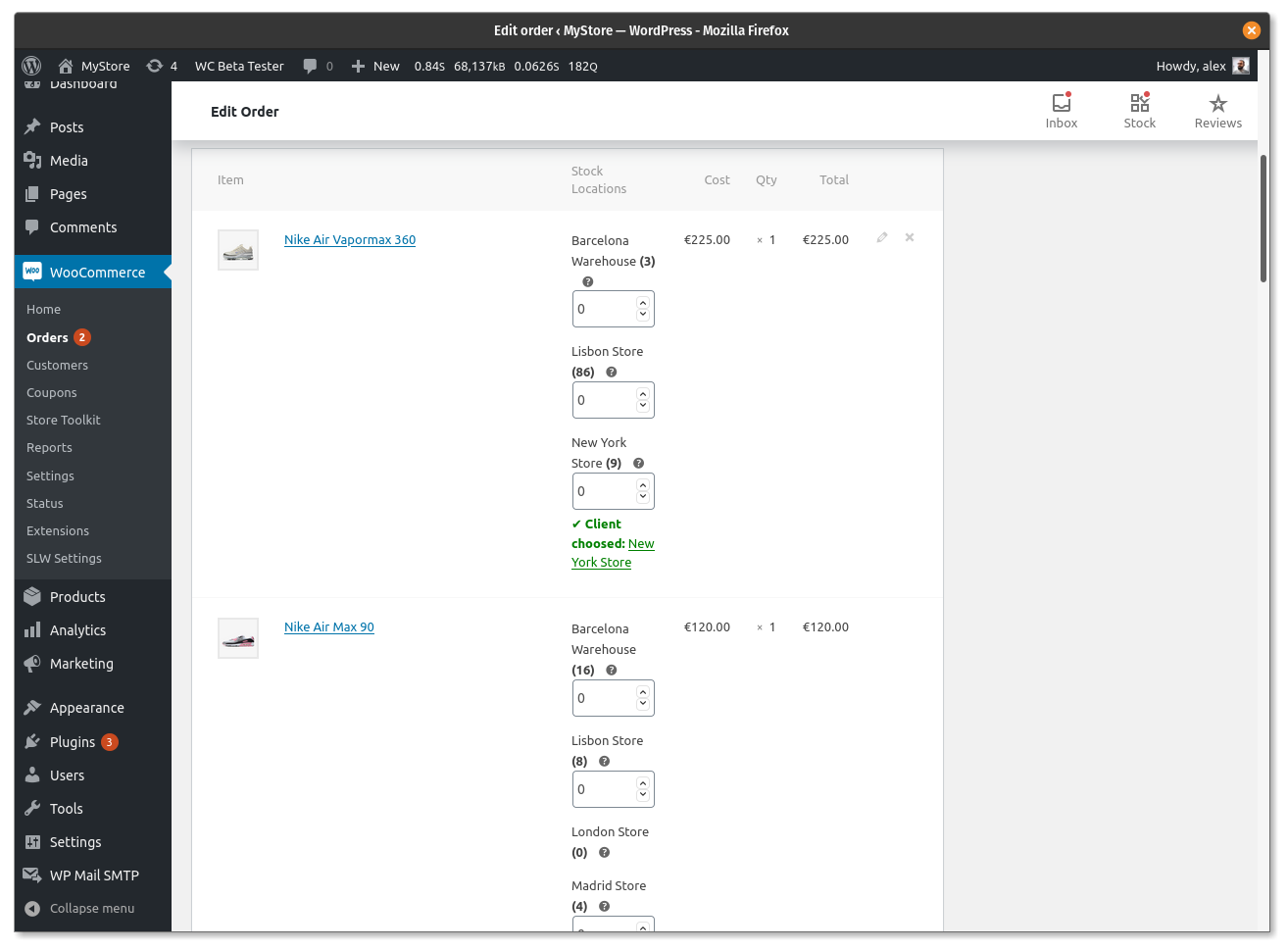
Reduser lager fra plasseringen manuelt 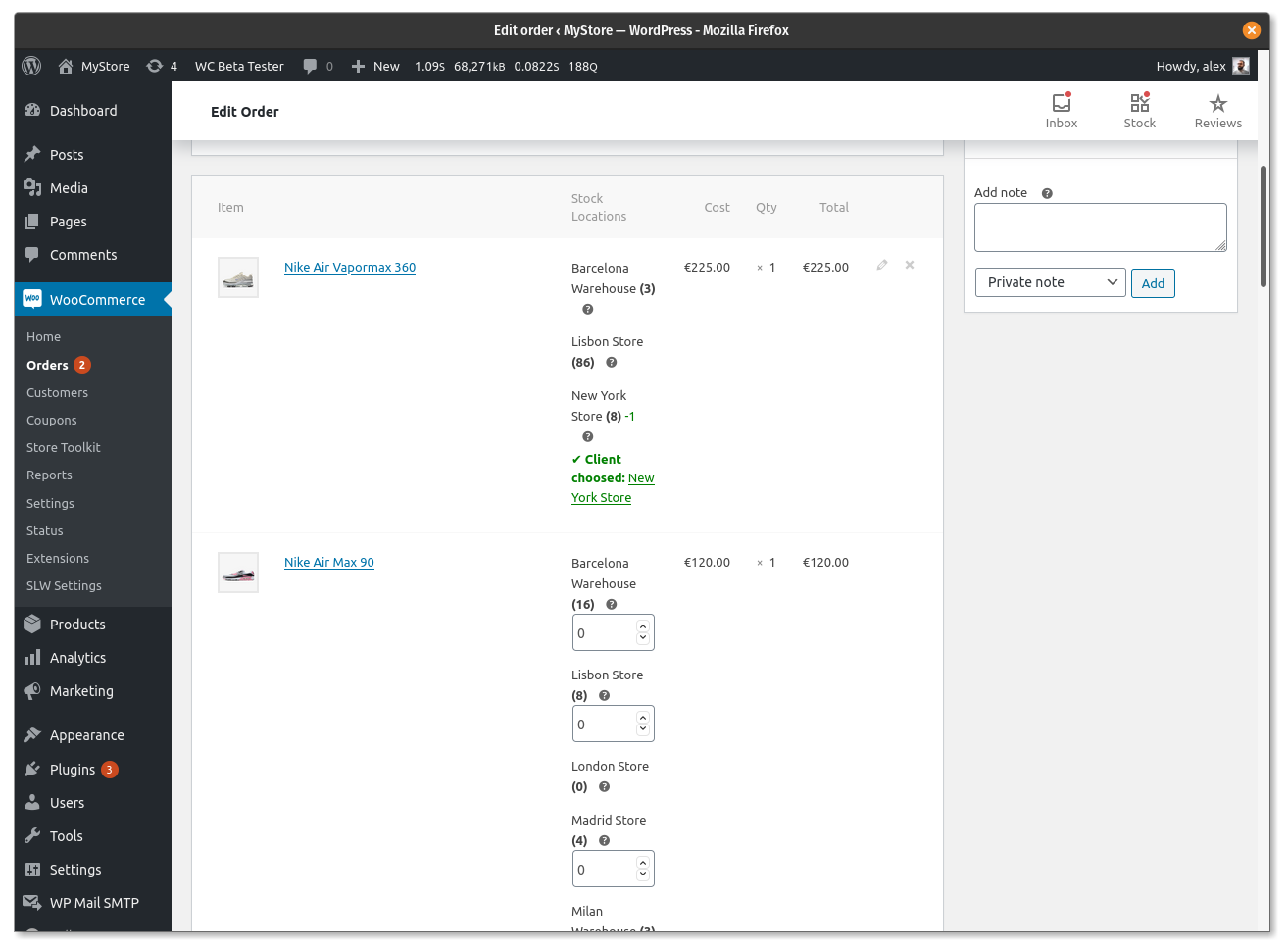
Reduser lager fra plasseringen automatisk 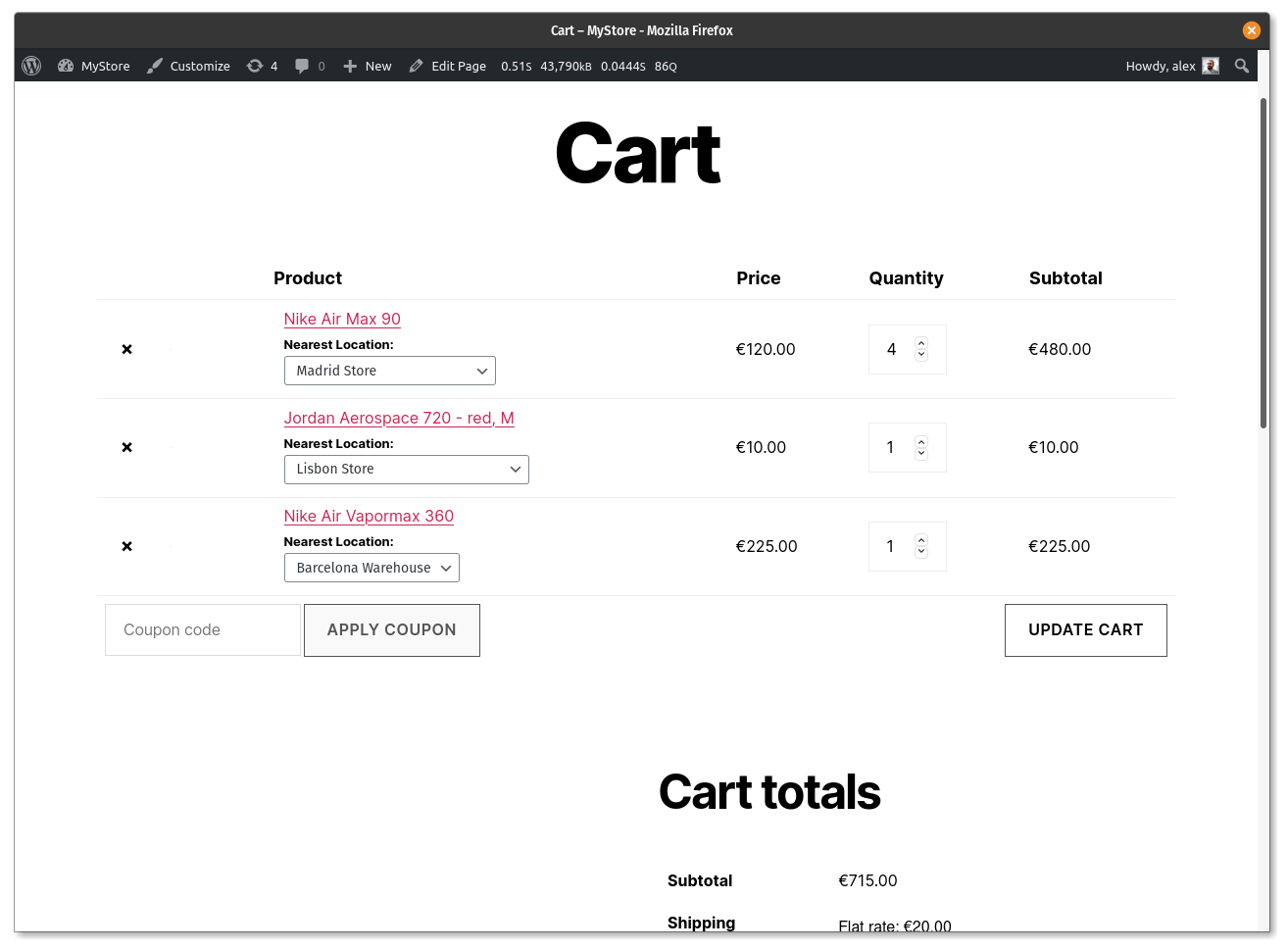
Tillat kunder å velge plasseringer på handlekurv-siden 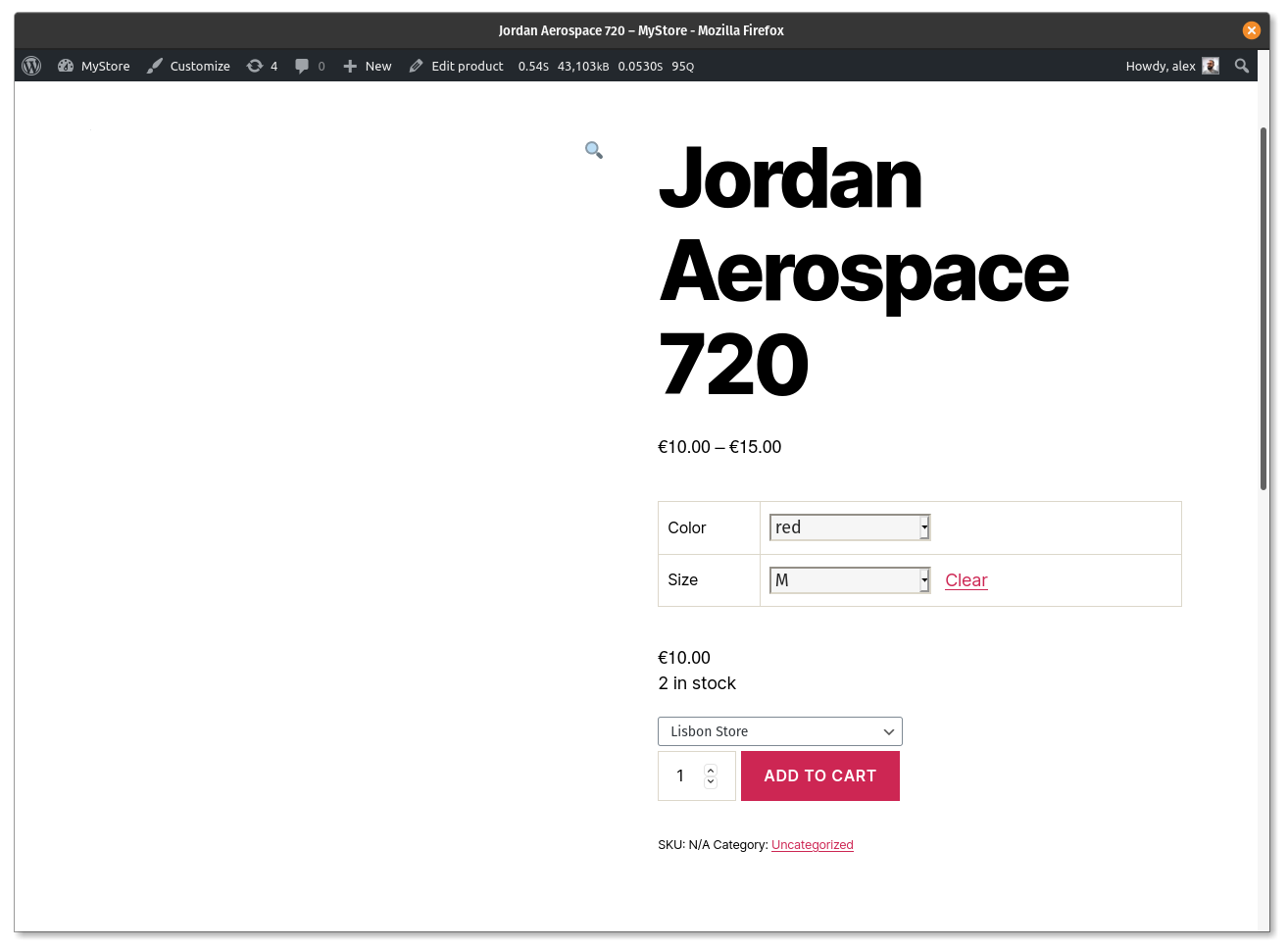
Tillat kunder å velge plassering på variabelt produkt 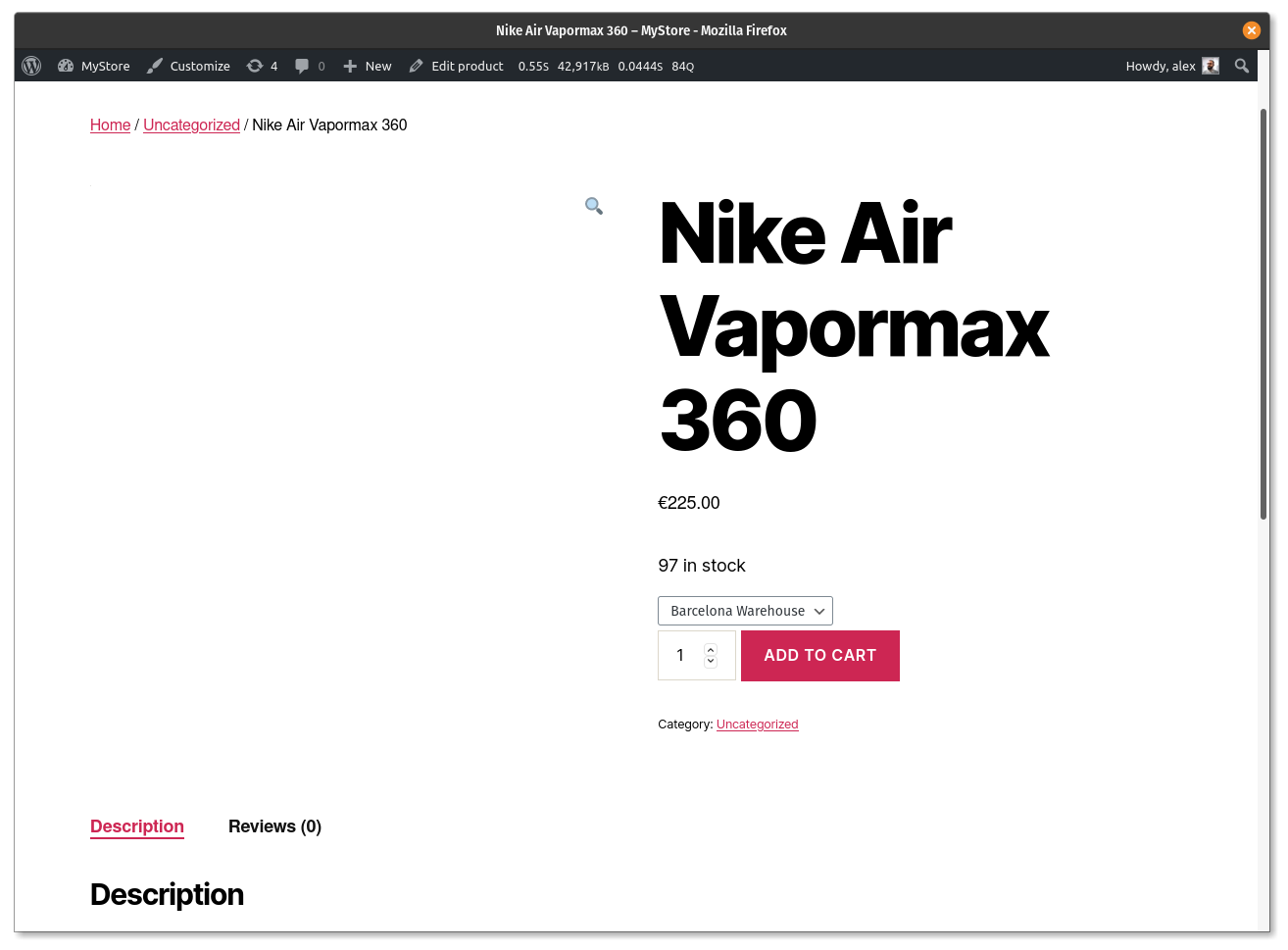
Tillat kunder å velge plassering på enkeltprodukt 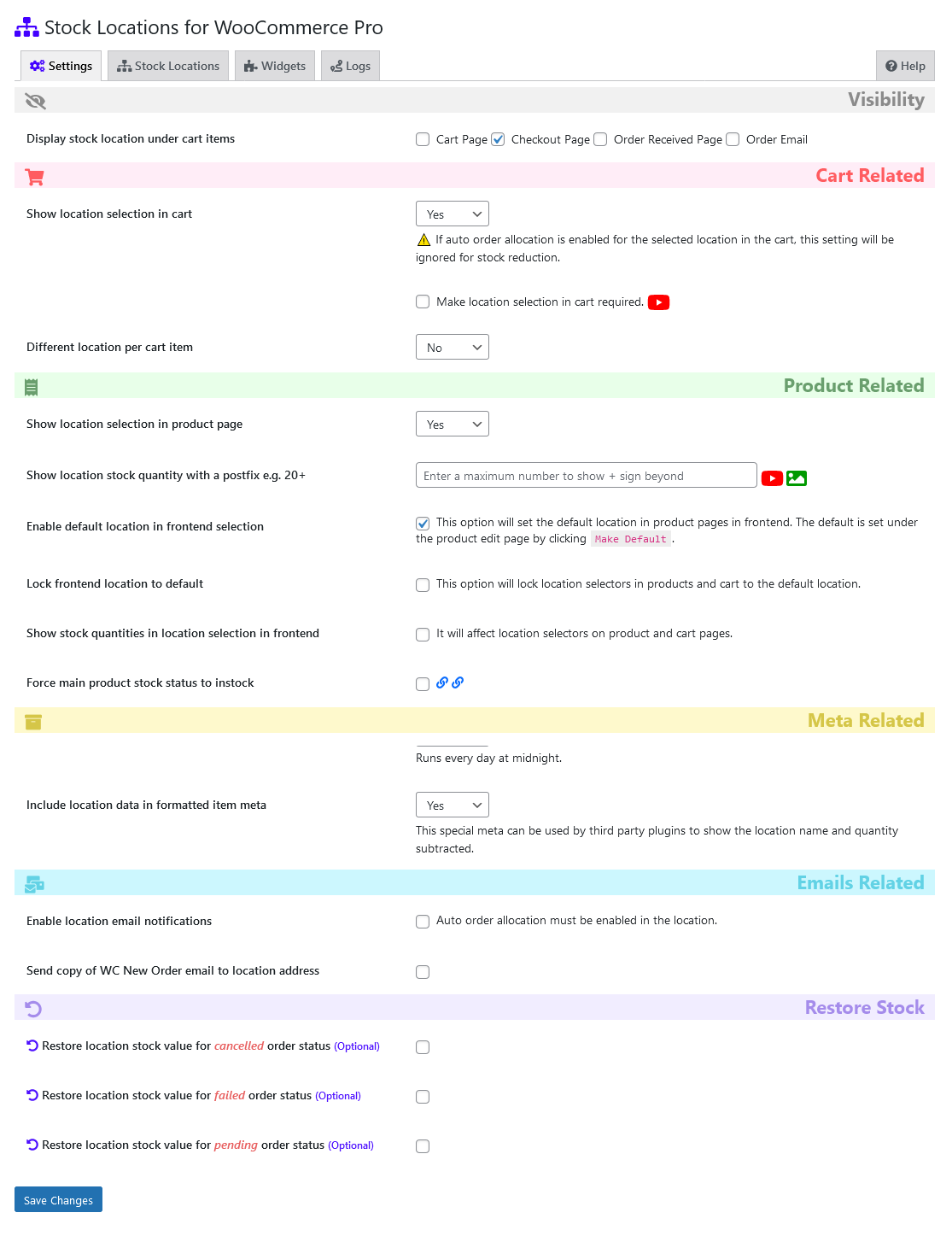
Innstillinger for utvidelsen 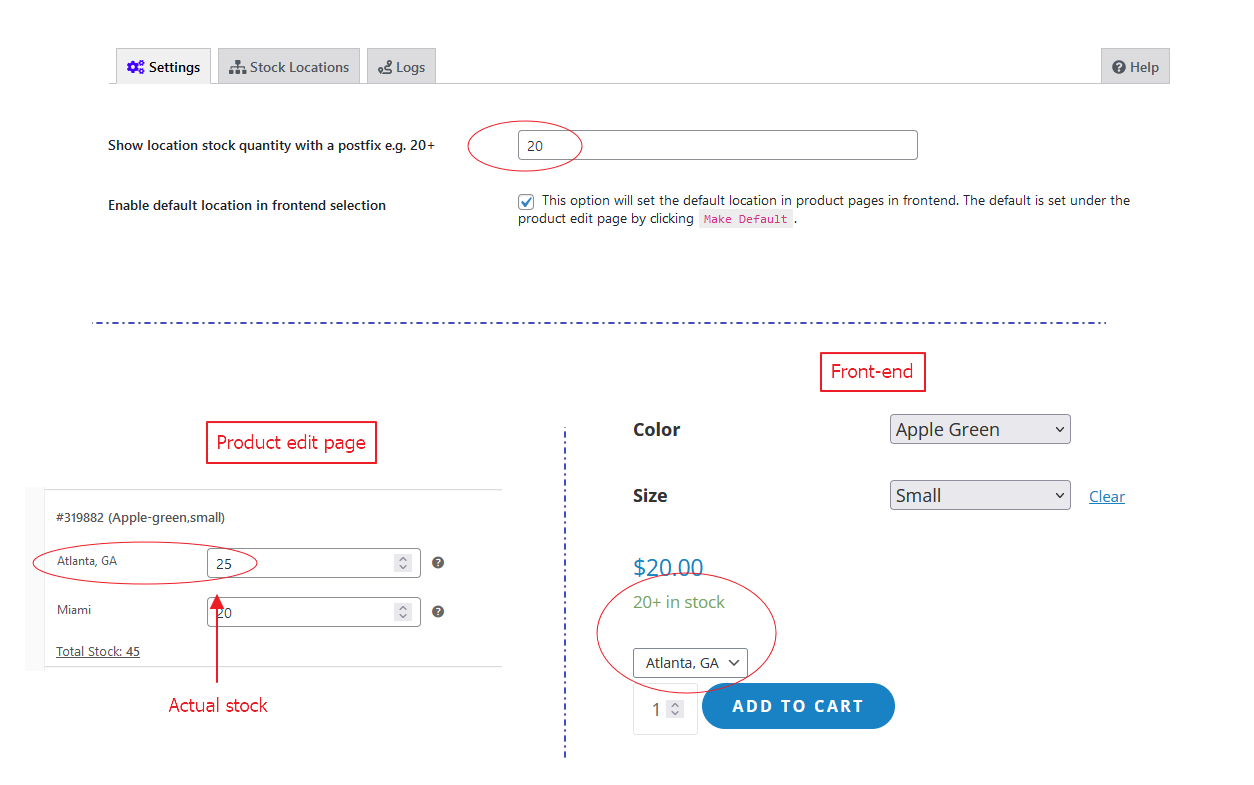
Show location stock quantity with a postfix e.g. 20+ 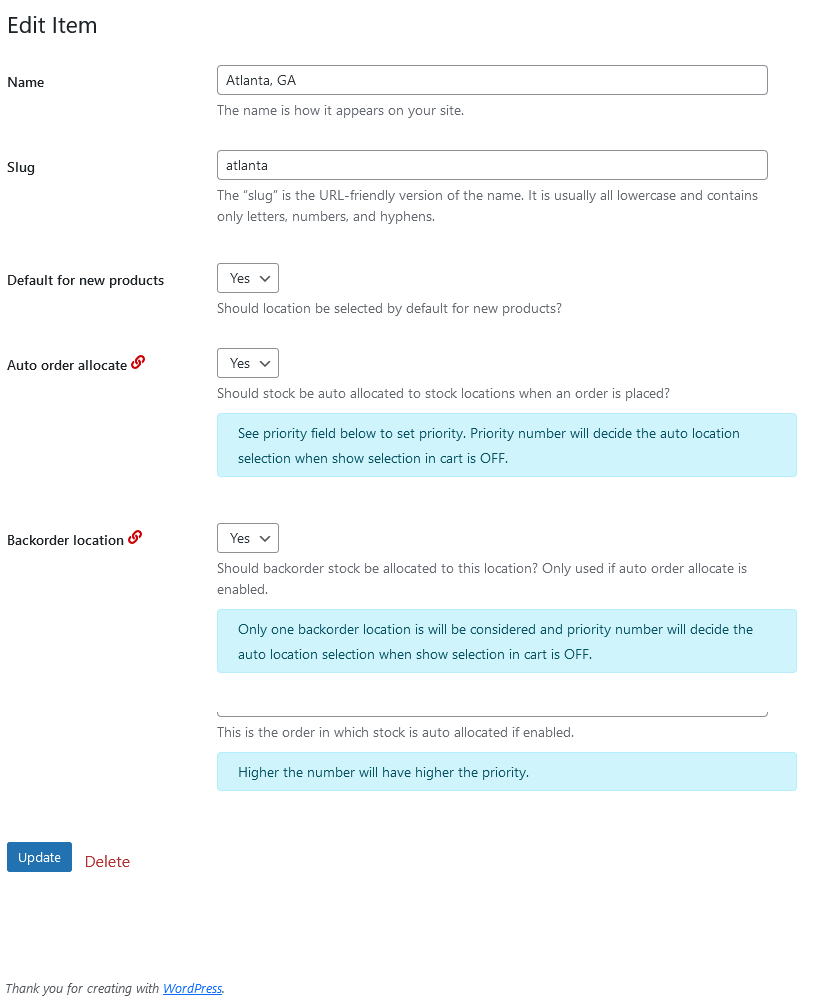
Edit Klassifisering av lagerplasseringer 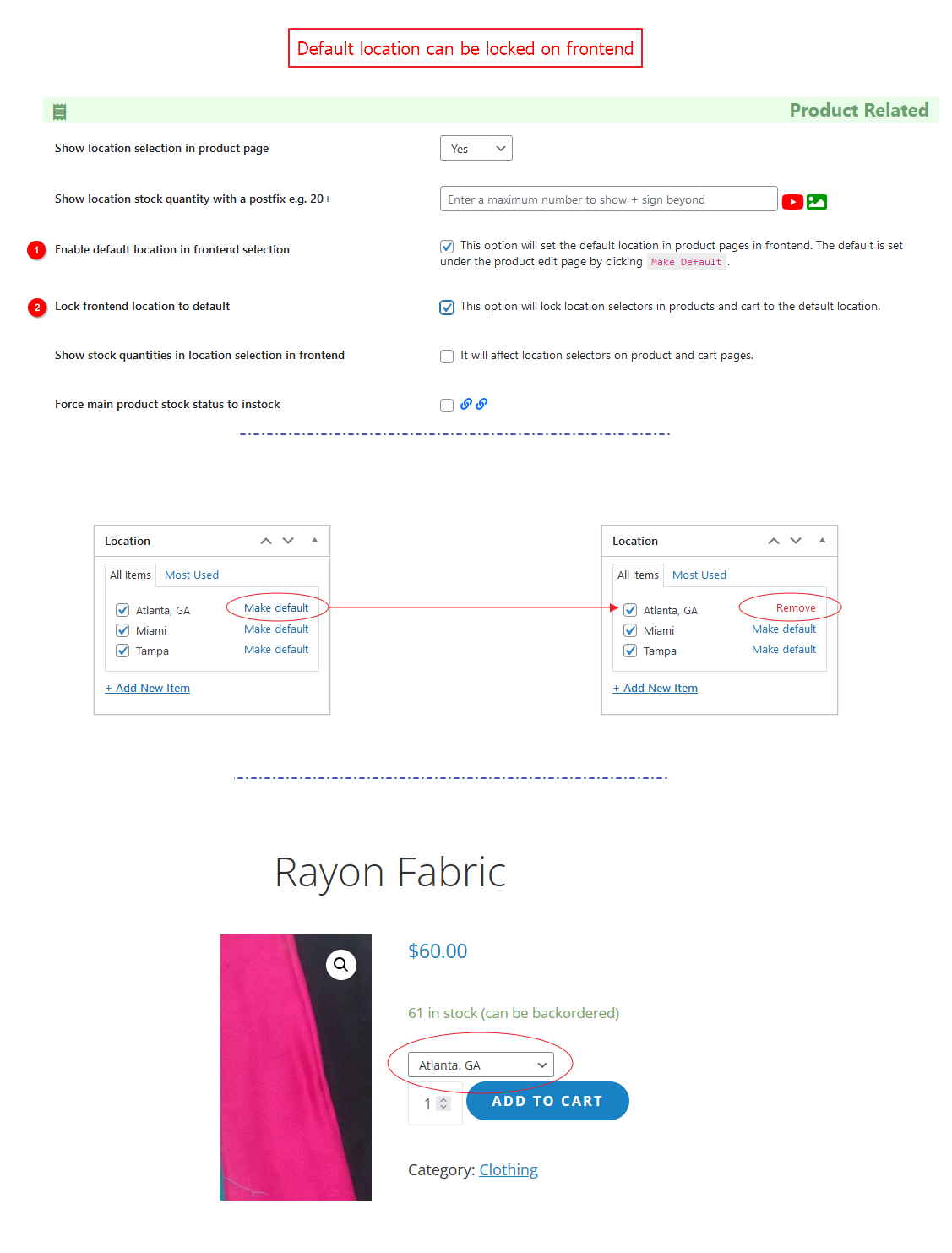
Lock default location on frontend. 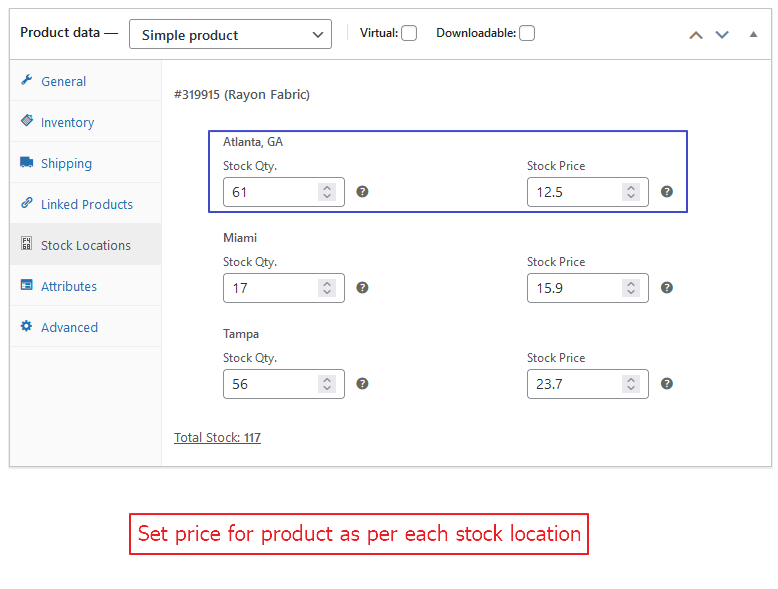
Set price for product as per each stock location. 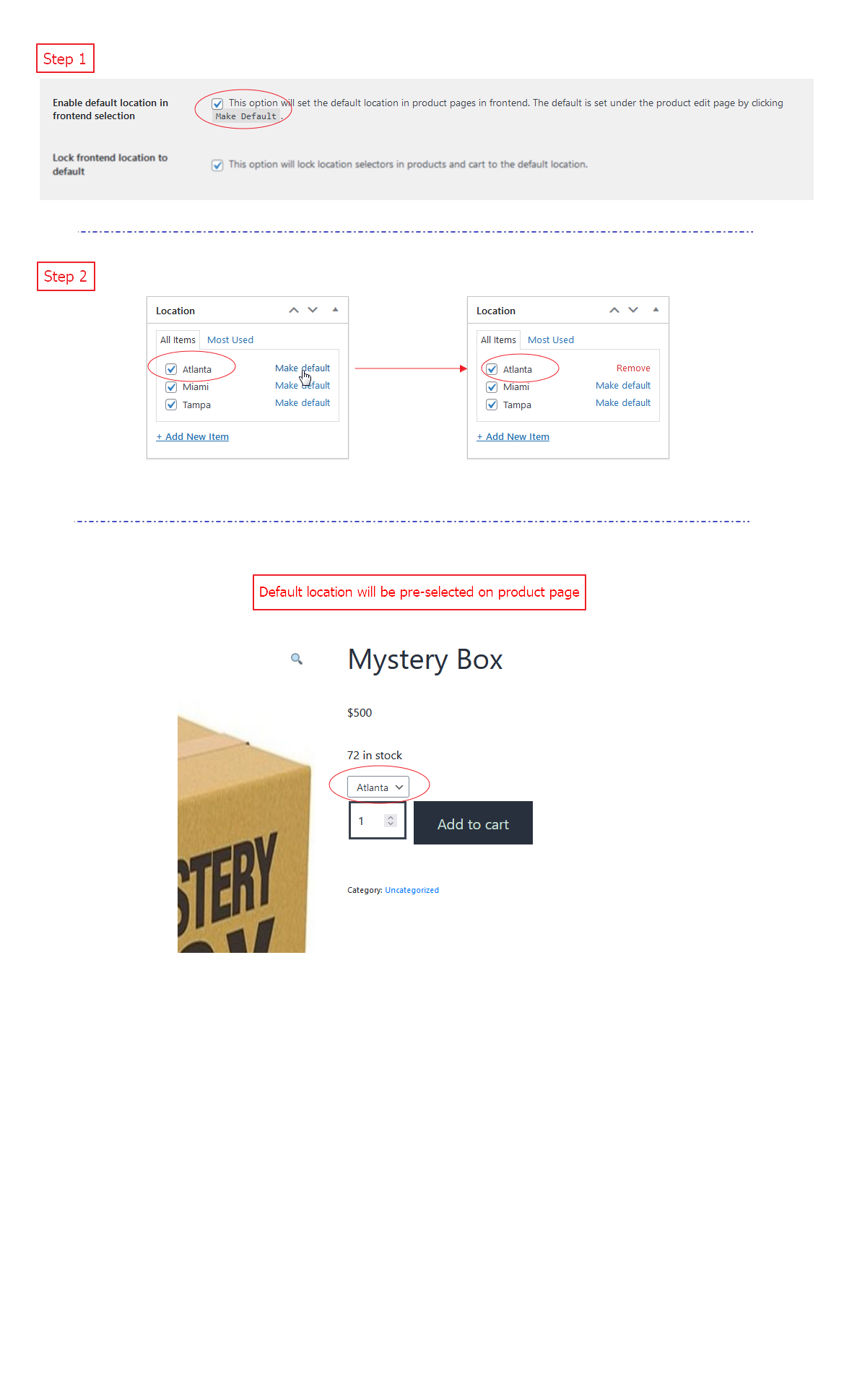
Pre-select default location on product page (frontend). 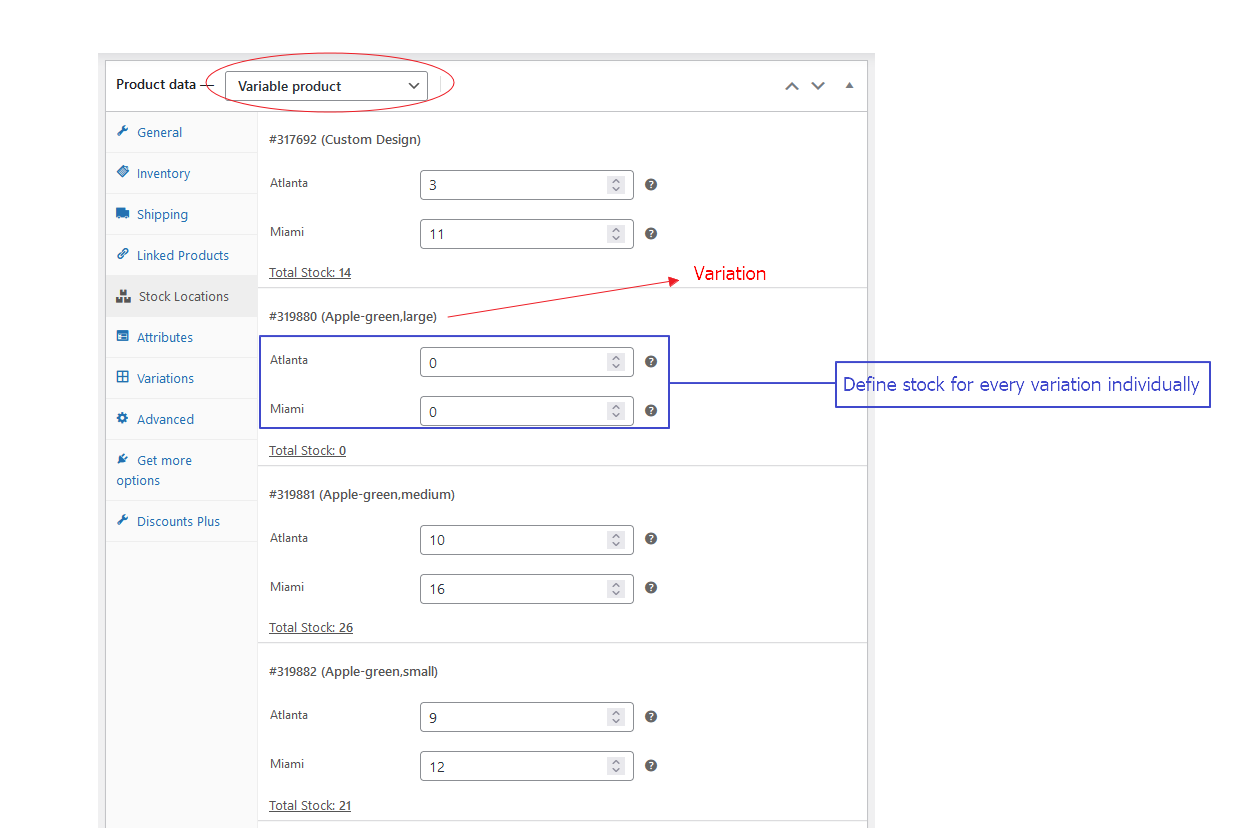
Stock locations for each variation. 
Installasjon
- Last opp «stock-locations-for-woocommerce» til katalogen «/wp-content/plugins/».
- Sjekk om du har WooCommerce 3.4 + utvidelsen aktivert
- Aktiver SLW utvidelsen gjennom «Utvidelser» -menyen i WordPress.
Enkel produkter
- Tilordne lagerlokasjoner til produktet > Oppdater innlegg
- Under Lagersaldo fanen > Aktiver Administrer Lager
- Under lagerlokasjons fanen > Administrer varebeholdning for plasseringene
Variable produkter
- Tilordne lagerlokasjoner til produktet > Oppdater innlegg
- Under Lagersaldo > Deaktiver Administrere lager?
- Under Kategorien Attributter > Opprett attributter
- Under Kategorien Varianter > Opprett varianter basert på attributter
- På hver variant > Aktiver Administrer lager og legg til pris > Oppdater innlegg
- Under Lagerplasseringer-fanen > Administrer varebeholdningen for plasseringen for hver enkel variant
FAQ
-
Stock Locations | Stock Deductions | Settings and Results
-
👉 1. How auto order allocation work with multiple stock locations?
👉 2. How location priority work with auto order stock allocation?
👉 3. What if all of my locations don’t have the sufficient stock ordered?
If order quantity is within the summation of all stock locations available stock quantity, it will be simply served. If not, auto allocation will not work so admin can decide if he want to deliver the order partially or wait for stock comes in.
👉 4. How location email works?
👉 5. Do you want to sell products from only one stock location?
👉 6. How to make location selection required on cart page?
👉 7. How does it manage the maximum qty. to order according to the stock in a location?
-
How to use Cron Job?
-
How to use REST API?
-
How to lock pre-selected location on frontend?
-
Turn ON «Enable default location in frontend selection» from WooCommerce > Stock Locations for WC. This option will allow you to select default location for a product on Product Edit page. Now turn ON «Lock frontend location to default» and it will lock frontend location which is selected as default.
-
I found a bug, where I can report it?
-
I prefer you to use the Github issues. You can submit a new one here GitHub
-
How to show location stock quantity with a postfix e.g. 20+?
-
On settings page you can define a number. If location stock value will be less than the given number, it will display the stock value else will not show the exact number but a plus sign «+» just after the maximum number given.
Vurderinger


Bidragsytere og utviklere
“Lagerplasseringer for WooCommerce” er programvare med åpen kildekode. Følgende personer har bidratt til denne utvidelsen.
Bidragsytere

“Lagerplasseringer for WooCommerce” har blitt oversatt til 7 språk. Takk til oversetterne for deres bidrag.
Oversett “Lagerplasseringer for WooCommerce” til ditt språk.
Interessert i utvikling?
Bla gjennom koden, sjekk ut SVN-repositoriet, eller abonner på utviklingsloggen med RSS.
Endringslogg
2.6.4
- Fix: Make STOCK_QTY available at LOCATION_NAME string translatable. [Thanks to @michaelw90][12/02/2024]
2.6.3
- Fix: Empty quantity to zero with typecasting for the variations on the variable product page. [Thanks to Philippos][24/01/2024]
- Fix: https://github.com/fahadmahmood8/stock-locations-for-woocommerce/issues/151 [Thanks to Chingologram][03/02/2024]
2.6.2
- Fix: Quantity always 0 – https://wordpress.org/support/topic/quantity-always-0/. [Thanks to mrmelson][21/01/2024]
2.6.1
- New: Stock location enable/disable tooltip help for stock value update with the input field. [Thanks to dennebar][07/01/2024]
2.6.0
- Fix: Sanitization ensured. [Thanks to patchstack.com / Mika][19/12/2023]
- New: Filter hook added allow_stock_allocation_notification. [Thanks to github.com / Chingologram][19/12/2023]
2.5.9
- New: Developers API updated with the price option as the item parameter. [Thanks to Tushar Tajane][22/11/2023]
2.5.8
- Fix: Location dropdown showing wrong on backorder for the variable products when actually they are not allowed for backorder. [Thanks to ŠARŪNAS RIBAKOVAS][22/11/2023]
2.5.7
- Fix: Checked the default stock value assignment from map page to cart page for the selected product with the add to cart button trigger. [Thanks to Roy Wright][04/11/2023]
2.5.6
- Fix: Product page, location selection dropdown wrapper CSS classes managed accordingly. [Thanks to Cristian][26/10/2023]
2.5.5
- Fix: CSV import related queries updated for the WooCommerce products stock status. [Thanks to Ole Straume Andersen][24/10/2023]
- New: Predefined cron job arrangements introduced for the better user experience. [Thanks to @logicinn][24/10/2023]
2.5.4
- Fix: Cron job script improved and default location required dependency removed. [Thanks to Andrew / Waterhouse][07/09/2023]
2.5.3
- Fix: CRITICAL Uncaught Error: Call to a member function get_cart() on null in. [Thanks to @faheemseedat][31/08/2023]
2.5.2
- Fix: CRITICAL Uncaught Error: Call to undefined method Automattic\WooCommerce\Admin\Overrides\OrderRefund::add_order_note(). [Thanks to Morten Hansen][10/08/2023]
2.5.1
- Fix: BlockUI related issue when selecting the location on the shop page. [Thanks to Narinder Kumar / Dfavo][01/08/2023]
2.5.0
- Fix: https://github.com/fahadmahmood8/stock-locations-for-woocommerce/issues/145. [Thanks to Nguyễn Minh Khôi][30/07/2023]
2.4.9
- New: slw_stock_allocation_notification_message filter hook added. [Thanks to Carlos][21/07/2023]
2.4.8
- Fix: Product page stock filter hook related function updated. [Thanks to Morten Hansen][19/06/2023]
2.4.7
- Fix: Product page stock quantity with a postfix related issue. [Thanks to Lisa Fadden][25/05/2023]
- New: Location selection popup widget option refined with the boolean type filter hook. [Thanks to Sage Stephens | Little Brand Box][17/05/2023]
- Fix: Product page price decimals related hook revised. [Thanks to Cristian][25/05/2023]
2.4.6
- New: Product price decimal value can be controlled with the filter hook available. [Thanks to Cristian][10/05/2023]
- Fix: Function update_cart_stock_locations() updated. [Thanks to michaelw90][11/05/2023]
- New: Location selection popup widget option added under widgets section/tab. [Thanks to Sage Stephens | Little Brand Box][16/05/2023]
2.4.5
- New: Product page, stock location qty. based notice added with the filter hook option. [Thanks to Cristian][09/05/2023]
- New: Product page, cart page, checkout page, store location based notice to show. [Thanks to Mircea Popa][10/05/2023]
2.4.4
- Fix: https://github.com/fahadmahmood8/stock-locations-for-woocommerce/issues/138 [Thanks to d2roth][01/03/2023]
- New: placement of the location selection on products page other than the standard place. [Thanks to Morten Hansen][13/03/2023]
- Fix: Make location selection in cart required option has been improved. [Thanks to Julien Villalard][18/04/2023]
- Fix: Allow backorders implemented with stock_quantity_sum for max order value input field. [Thanks to Ole Straume Andersen][19/04/2023]
- New: Assign Location with API. [Thanks to gturcalp][21/04/2023]
2.4.3
- Fix: Stock value manual update with the integer zero inclusive ensured. [Thanks to Stefan Murawski][16/02/2023]
- Fix: Fix reduce stock automatic. https://github.com/fahadmahmood8/stock-locations-for-woocommerce/pull/141 [Thanks to arwinvdv][16/02/2023]
- Fix: Adds condition to location_id setting #142 https://github.com/fahadmahmood8/stock-locations-for-woocommerce/pull/142/ [Thanks to Liopia][01/03/2023]
2.4.2
- Fix: Variable products stock value update to the parent product too. [Thanks to Stefan Murawski][16/02/2023]
2.4.1
- Fix: Products get put from out of stock to backorder automatically. [Thanks to Ole Straume Andersen][23/11/2022]
- Fix: Total Stock was wrong when stock locations has negative value. [Thanks to michaelw90][27/12/2022]
2.4.0
- Improvement: Default location will be set for the recently modified/new products. [Thanks to PHILIPP GOLOB][19/11/2022]
2.3.9
- New: Default location will be set for the recently modified/new products. [Thanks to PHILIPP GOLOB][25/10/2022]
2.3.8
- Fix: Fixes undefined index when adding a product to your cart from an archive page #136. [Thanks to @d2roth][13/10/2022]
2.3.7
- New: Filter hook refined as apply_filters( ‘slw_output_product_locations_for_shortcode’, $product, $locations, $values, $output ). [Thanks to Ole Straume Andersen][12/10/2022]
2.3.6
- New: Filter hook added as apply_filters( ‘slw_output_product_locations_for_shortcode’, $product, $locations, $values, $output ). [Thanks to privatecollection][07/10/2022]
2.3.5
- Fix: Duplicate queries due to product_id=0. [Thanks to coronastar1][06/10/2022]
2.3.4
- Fix: Auto allocate relate improvements and fatal error due to int += string for stock value. [Thanks to bbceg & Ole Straume Andersen][29/09/2022]
2.3.3
- New: Import products will work with just SKU as well and you may skip the columns if don’t to update the stock for a location. [Thanks to Ole Straume Andersen][27/09/2022]
2.3.2
- Fix: array_key_exists() related issue on the cart page for qty. section. [Thanks to Elliot Fib][15/09/2022]
2.3.1
- Fix: Product page stock_location param for cart line_items. [Thanks to Tanel][08/09/2022]
2.3.0
- Fix: WooCommerce session and get_cart using wp_loaded action hook. [Thanks to bbceg][06/09/2022]
2.2.9
- Fix: Undefined variable $postmeta in class-slw-stock-locations-tab.php. [Thanks to Tanel][05/09/2022]
2.2.8
- Fix: Return stock qty. as per stock_location_selected session value with the default priority 10. [Thanks to Jeroen de Kok][02/09/2022]
2.2.7
- New: Return stock qty. as per stock_location_selected session value with the default priority 10. [Thanks to bbceg][02/09/2022]
2.2.6
- Fix: Stock max qty. allowed on product page synchronized with the selected location from the archive page(s). [Thanks to bbceg][01/09/2022]
2.2.5
- Fix: Stock status instock/outofstock/onbackorder to instock when stock is positive. [Thanks to Mario Kremser][31/08/2022]
2.2.4
- New: Google map shortcoded improved with two new attributes as diameter-range=»100″ and distance-unit=»km/mi». [Thanks to bbceg][31/08/2022]
2.2.3
- New: Google map related action and filter hooks are updated on settings page under widgets tab. [30/08/2022]
2.2.2
- New: Google map will focus on the nearest location automatically if allowed access location. [Thanks to bbceg][30/08/2022]
2.2.1
- New: Google map will filter the location items on bounds_changed event. [Thanks to bbceg][30/08/2022]
2.2.0
- New: js/archive.js added to separate the JavaScript functions for archive pages. [Thanks to bbceg][26/08/2022]
- New: Map page, search field will filter the list items according to the diameter-in-kilometers, a numeric value, provided in the shortcode. [Thanks to bbceg][27/08/2022]
2.1.9
- Fix: https://github.com/fahadmahmood8/stock-locations-for-woocommerce/pull/133 [Thanks to Daniel/d2roth][25/08/2022]
2.1.8
- New: Different location per cart item selection as «No» will give two more options as remove the item or continue shopping. [Thanks to bbceg][25/08/2022]
2.1.7
- Fix: _manage_stock value to «yes» on import CSV. [Thanks to Ole Straume Andersen][24/08/2022]
2.1.6
- Fix: Translatable strings are updated. [Thanks to Ole Straume Andersen][23/08/2022]
2.1.5
- Fix: Variable Product: out of stock and quantity is 0 when accessing the product page. [Thanks to chalisoft][23/08/2022]
2.1.4
- Fix: The total stock does not match the sum of the locations stock conditioned with the location enabled/disabled status. [Thanks to Jesus Gonzalez][19/08/2022]
- New: Action hooks added for map page locations list, before and after shop this location button. [Thanks to Roy Wright][20/08/2022]
2.1.3
- Fix: Refresh page message on the product page for the stock update. [Thanks to Chalisoft][17/08/2022]
2.1.2
- New: Archives related shortcode added and zoom attributed for map shortcode. [Thanks to Zeeshan Sadiq & Mika Pietrus][29/07/2022]
2.1.1
- New: Compatibility ensured for another WordPress plugin «Variation Swatches for WooCommerce». [Thanks to Andrew Gortchacow][13/07/2022]
- Fix: Stock values update on shifting between simple and variable products on edit product page. [Thanks to Stefan Murawski und Helene Umiker][20/07/2022]
2.1.0
- Fix: Variations and add to cart not shown on product page for variable products #131 [Thanks to Github/keesheddes][07/07/2022]
2.0.9
- New: Import CSV will automatically turn ON stock locations where _stock_at_location-id column will be found as positive. [Thanks to Ole Straume Andersen][01/07/2022]
2.0.8
- Fix: Translation text-domain for Out of stock and in stock strings. [Thanks to stalstadens/henriksstalstadens][30/06/2022]
2.0.7
- Fix: Fatal error: Uncaught Error: Using $this when not in object context. [Thanks to stalstadens/henriksstalstadens][28/06/2022]
2.0.6
- New: Major changes regarding stock location and quantity check on archive pages and product page. [Thanks to Tanel][14/06/2022]
- New: Major changes regarding archive pages so category pages can enable location selection under the product titles. [Thanks to Tanel][13/06/2022]
2.0.5
- New: Stock locations with RadioBoxes, another option added in the dropdown. [Thanks to Tanel][10/06/2022]
2.0.4
- Fix: Select location empty index option enabled for variable product stock locations as well. [Thanks to chalisoft][06/06/2022]
- New: Stock locations column can be turned off/on from the settings page. [Thanks to bbceg][06/06/2022]
2.0.3
- Fix: Availability fitler implemented woocommerce_get_availability_text. [Thanks to Niconectado][04/06/2022]
2.0.2
- Fix: Location price units different than dollar. [Thanks to Niconectado][03/06/2022]
2.0.1
- New: Product page shortcodes improved and added a new attribute status with «enabled|disabled|all» options. [Thanks to Mik/mikmikmik][03/06/2022]
2.0.0
- New: Product page shortcodes improved and added two new attributes product_id and collapsed. [Thanks to Mik/mikmikmik][30/05/2022]
1.9.9
- Fix: wp desk omnibus related currency symbol issue resolved. [Thanks to tomkolp][30/05/2022]
1.9.8
- Fix: wp desk omnibus related currency symbol issue resolved. [Thanks to tomkolp][30/05/2022]
1.9.7
- Fix: Location price units different than dollar. [Thanks to Niconectado][28/05/2022]
1.9.6
- Fix: Location related updates on cart page interrupting other locations selection. [Thanks to Justyn Thomas][23/05/2022]
- New: Product page shortcode output improved using variation labels instead of separate attributes. [Thanks to Mik/mikmikmik][28/05/2022]
1.9.5
- Fix: Stock in/out statuses on product page logic refined, auto allocation as priority number. [Thanks to Fady Ilias][19/05/2022]
- New: There is a conflict with font awesome icons, on settings page ON/OFF option provided. [Thanks to Michal Paull][21/05/2022]
1.9.4
- Fix: Error 500 when upgrading to the latest version. Fatal error: Uncaught Error: Unsupported operand types: int + string. [Thanks to chalisoft & siriusnode][17/05/2022]
1.9.3
- Fix: Product page related improvements for stock location qty. value in the dropdown. [Thanks to Tanel][16/05/2022]
1.9.2
- Fix: Location based map page UI tweaks and location related email issue. [Thanks to Justyn Thomas][12/05/2022]
- Fix: Stock deduction from multiple stock locations if auto allocation is ON. [Thanks to fdeww & jwink123][15/05/2022]
1.9.1
- Fix: Request-URI Too Long. [Thanks to @jarvistran and @beeloudglade][12/04/2022]
1.9.0
- New: Geo Location related improvements. [Thanks to Justyn Thomas][30/04/2022]
- Fix: Location based archive page, default location selection tested. [Thanks to Justyn Thomas][07/05/2022]
1.8.9
- New: Map page related improvements. [Thanks to Justyn Thomas][29/04/2022]
1.8.8
- New: Compatibility for «PowerPack Pro for Elementor» added. [Thanks to Fady Ilias][27/04/2022]
1.8.7
- Fix: Priority based locaiton selection when default location as zero stock on product page, improved. [Thanks to Mario Kremser][26/04/2022]
- New: Everything stock status to instock option added for product page. [Thanks to Darren Lew][26/04/2022]
1.8.6
- New features are in progress. [Thanks to Roland Steinmasdl][08/04/2022]
- New: Stock location Enabled/Disabled column added on stock locations list. [Thanks to Andrew Gortchacow][21/04/2022]
- New: Stock quantity can be updated from the products list as well. [Thanks to Andrew Gortchacow][23/04/2022]
1.8.5
- Fix: Removed the extra/empty stock location qty. brackets on products list page in admin panel. [Thanks to Fady Ilias][20/04/2022]
1.8.4
- Fix: API will accept the zero qty. as well for the stock. [Thanks to kastiell93][25/03/2022]
- Fix: https://www.youtube.com/embed/HIo9X5M8A5U [Thanks to Daniel Sieff][08/04/2022]
1.8.3
- New: Stock locations tab, enable/disable feature added. [Thanks to Paul Eagles][24/03/2022]
1.8.2
- Fix: The total stock does not match the sum of the locations stock. [Thanks to Jere Seppä][24/03/2022]
1.8.1
- New: Sell products from only one stock location. [Thanks to Paul][23/03/2022]
1.8.0
- Fix: Cron job query updated for the products with recently changed timestamp. [Thanks to Riley Pollard][22/03/2022]
1.7.9
- Fix: Product page, backorder status will contribute in stock status and product availability for sale. [Thanks to Mario Kremser][22/03/2022]
1.7.8
- Fix: https://wordpress.org/support/topic/error-after-activating-the-plugin-6 [Thanks to johnmunez1][05/03/2022]
- Fix: Product page, elementor, backorder status, in stock status, out of stock status transitions ensured. [Thanks to Mario Kremser][21/03/2022]
1.7.7
- Fix: Locations map with a popup with useful information about the location/pickup. [Thanks to Justyn Thomas][04/03/2022]
- Fix: Notice: Undefined property: stdClass::$slw_backorder_location. [Thanks to Shaun Hopkins][05/03/2022]
1.7.6
- New: Locations can be turned ON/OFF for Google Map. [Thanks to Justyn Thomas][02/03/2022]
- New: Locations can be turned ON/OFF everywhere. [Thanks to Elika][02/03/2022]
- New: Action hooks added to manage archive page template.
- Fix: Issue #124 resolved on github repository. [Thanks to Wandavasquez95][02/03/2022]
1.7.5
- Fix: In stock / Out stock issue for zero value in both simple and variable products. [Thanks to Russell Field][01/03/2022]
1.7.4
- New: Locations map with a popup with useful information about the location/pickup. [Thanks to Justyn Thomas][28/02/2022]
1.7.3
- New: Crons tabs added. [Thanks to Dennis Broers – susNL][24/02/2022]
- Fix: Stock not updated correctly – https://wordpress.org/support/topic/stock-not-updated-correctly. [Thanks to Dennis Broers – susNL][24/02/2022]
1.7.2
- New: Different prices according to the inventory locations. [Thanks to Justyn Thomas][01/02/2022]
- Fix: In stock / Out stock issue for zero value in both simple and variable products. [Thanks to Petri Mustanoja][17/02/2022]
1.7.1
- New: Different prices according to the inventory locations. [Thanks to Justyn Thomas][20/01/2022]
1.7.0
- Fix: https://wordpress.org/support/topic/variation-design-issue/ [Thanks to harute125][20/01/2022]
1.6.9
- Fix: Cancelled order location was staying with -1 stock. [Thanks to Phannaline Khemdy][19/12/2021]
1.6.8
- Fix: Out of stock status not being displayed, showing 0 availabilty instead. https://wordpress.org/support/topic/out-of-stock-status-not-being-displayed-showing-0-availabilty-instead/ [Thanks to Donny Tejeda][15/12/2021]
- New: Visibility section for stock location under cart items with checkbox options. [Thanks to Phannaline Khemdy][16/12/2021]
- Fix: Show location selection in cart will not effect the user selected items. [17/12/2021]
- New: Price for different warehouse on same product? https://github.com/fahadmahmood8/stock-locations-for-woocommerce/issues/110 [Thanks to IHEnan99, Puigdemunt & oppssssss][17/12/2021]
1.6.7
- Fix: Variable product locations are empty, stock was not appearing as it was dependent on location selection. https://wordpress.org/support/topic/availability-not-displaying-after-upgrade-to-1-6-6/ [Thanks to Donny Tejeda][14/12/2021]
- Fix: Product and Varitons stock values should be editable if locations are not yet selected. [14/12/2021]
1.6.6
- New: Settings page option for restore stock for failed order status tested with the user on Google meeting. [Thanks to Jere][12/12/2021]
1.6.5
- New: Settings page updated with one more option, restore stock for failed order status. [Thanks to Jere Seppä][12/12/2021]
1.6.4
- New: Added urgent help link to help section for better support. [12/12/2021]
1.6.3
- New: Settings page updated with two more options, restore stock for cancelled and pending order statuses. [Thanks to Phannaline Khemdy][11/12/2021]
1.6.2
- Fix: Stock is not automatically allocated. https://wordpress.org/support/topic/stock-is-not-automatically-allocated/ [Thanks to weertman & freshwebno][09/12/2021]
1.6.1
- Fix: Critical error after installation. https://wordpress.org/support/topic/critical-error-after-installation-2/ [Thanks to martinnijkamp][08/12/2021]
1.6.0
- Fix: Bug on cart page – https://wordpress.org/support/topic/bug-on-cart-page/ [Thanks to designfin][08/12/2021]
1.5.9
- New: Assets updated.
1.5.8
- New: (Name change and old orders for customers) – Hide location information from old orders, solution provided on support ticket thread. [Thanks to Petri Mustanoja / pemu.se][07/12/2021]
- Fix: Can’t manage my stock anymore. [Thanks to Jelle Tempelman][07/12/2021]
- Fix: Stock at Locations set but Stock still shows 0. [Thanks to andrehlprr & leax] [07/12/2021]
- New: Change Text for quantity value – new feature added. https://wordpress.org/support/topic/change-text-for-quantity-value/ [Thanks to Gina Pelli/mediih] [07/12/2021]
- Fix: Make it possible to change location in cart #116. [Thanks to screenpartner & Michael Wilhelmsen][08/12/2021]
1.5.7
- New: Bootstrap and FontAwesome added. Assets are rearranged and simplified.
- Fix: Fatal error fixed. [Thanks to kentakofot][07/12/2021]
1.5.6
- New: Debug log tab added for better troubleshooting. [Thanks to nickdill, rivalink and tomkolp][07/12/2021]
- Fix: Infinite redirection replaced with a notice so customers can be saved from inconvenience.
1.5.5
- Fix: Update suggest by pacmanito. [20/11/2021]
1.5.4
- New: First revised commit through github. [19/11/2021]
- New: Updated authors info and removed email address. [19/11/2021]
1.5.3
- New: Plugin support team extended and repositories are relocated. [Thanks to Alexandre Faustino][08/11/2021]
- Fix: PHP warning fixed. [Thanks to dsl225/John & mustanoja][09/11/2021]
1.5.2
- New: updated compatibility for WooCommerce 5.3
- Fix: bug on order item manual stock reduction on order save
1.5.1
- Fix: bug that triggers fatal error
1.5.0
- New: stock locations table in settings with each location ID
- New: setting to define a default location to be locked in frontend
- New: locations stocks reduction on pair with WooCommerce reduce actions
- New: WPML compatibility
- New: bumps Import/Export add-on version to 1.1.0
- Fix: frontend selector style issues on variable products
- Fix: if rest location is provided with an empty array we now clear the previous allocations as you would expect to happen. Thanks to @shanerutter
- Fix: order item view, show previous stock locations when stock was allocated against a location but the location is no longer valid for that item. Thanks to @shanerutter
- Fix: showing allocate stock message, if the product no longer has stock allocations and the order line has previous stock location allocations. Thanks to @shanerutter
- Fix: missing stock or stock status in frontend selection
- Fix: bug on showing ‘outofstock’ when adding new products with stock available
1.4.5
- Fix: updates stock status on stock reduction
- Fix: marking product ‘instock’ if has stock instead of backorder
- Fix: bug that crashes WP
1.4.4
- New: branding
- New: allow third party functions to deduct WC stock on the main variation product with new hook ‘slw_allow_variation_product_stock_reduce’
- Fix: restriction on manual stock allocation if the order has stock reduced meta
- Fix: same location per cart item not being respected
- Fix: cart page location selection required not working
1.4.3
- Fix: bug of product variation WC stock not being updated when locations stock is deducted (updated)
1.4.2
- New: setting to show location stock quantities on product and cart pages on location selectors
- Fix: bug of product variation WC stock not being updated when locations stock is deducted
1.4.1
- New: POT file for languages
- New: settings tabs
- Fix: issue on WC reducing product stock on line item save
1.4.0
- New: removed barcodes feature from plugin to focus only on stock locations
- New: plugin settings moved to the WooCommerce menu
- New: restore order items stock locations on WooCommerce order restore
- New: setting to make locations selection in cart required
- New: filter ‘slw_disallow_third_party_allocate_order_item_stock’ to allow third party plugins to allocate item locations stock
- Fix: to prevent product WC stock decrease below zero
- Fix: undefined index error for plugin setting ‘location_email_notifications’
- Fix: to prevent reducing the stock twice for the product if the order was already reduced
- Fix: replace post parent_id property by get_parent_id() method stopping warnings thrown by woocommerce
- Fix: adding callable check for product method get_id() in stock allocation helper
1.3.2
- Fix: jQuery request returning 404 because of missing hook
1.3.1
- New: include ‘Out of stock’ and ‘On backorder’ locations in frontend selections
- New: filter ‘slw_allow_wc_stock_reduce’ to allow third party plugins to prevent WC stock reduction
- Fiks: jQuery feil for varianter uten plasseringer
- Fiks: jQuery feil på å fjerne plasseringsvalg i variant på produktsiden
- Fiks: jQuery feil når frontend innstillinger ikke er aktivert
- Fix: meta ‘_slw_data’ som ikke blir lagret riktig
1.3.0
- New: filter ‘slw_stock_allocation_notification_message’ to customize the email notification message
- New: send email copy of New Order WC email to location registered address
- New: send email notification when stock is allocated for a product in some location
- New: show location taxonomy in REST API
- New: setting to enable/disable the barcodes tab
- Fix: stock allocation when customer selects or not a location
- Fix: bug preventing stock deduction when using in conjugation with Point of Sale for WooCommerce plugin
1.2.4
- New: setting to include location data in formatted item meta
- Fix: several bugs showing warnings
1.2.3
- New: setting to auto delete unused product stock locations meta
- New: filter ‘slw_shortcode_product_location_stock’ for shortcodes ‘slw_product_locations’ and ‘slw_product_variations_locations’
- New: CSS classes for shortcodes ‘slw_product_locations’ and ‘slw_product_variations_locations’
- Fix: ‘outofstock’ taxonomy on product save/update
- Fix: setting ‘Different location per cart item’, values were exchanged
1.2.2
- Fix: helper ‘view’ function call, preventing colision with other plugins with the same function name
1.2.1
- New: plugin setting to lock selected location in cart for every cart item
- Fix: check if location stock is enough for the cart item, if not hide from select option
- Fix: if auto allocation exist for the location disable WC hold stock
1.2.0
- New: stock locations select in cart page
- New: settings page
- New: auto order allocation for stock
- New: shortcode ‘slw_cart_message’ to display a custom message in the cart page
- New: shortcode ‘slw_product_message’ to displaying a custom message on product page
- New: options for stock locations: Default for New Products, Backorder Location, Auto Order Allocate and Stock Location Priority
- Fix: several bugs and PHP legacy compatibilities
1.1.5
- Fixes bug on shortcodes method
1.1.4
- Improved stock locations levels products listing
- Locations added to REST API products and variations endpoints for GET and PUT requests, thanks to @shanerutter
1.1.3
- Remove flush rewrite rules, should be avoided for now
1.1.2
- Add variations stock levels to products listing column
- New shortcode ‘slw_product_variations_locations’
- Fixes on shortcode ‘slw_product_locations’
1.1.1
- New filter ‘slw_shortcode_product_location_name’
- New shortcode ‘slw_product_locations’
1.1.0
- New column in product listing with stock locations imventory
- Fix bug on getting barcodes data for shortcodes
- Fix bug reported by @sebtoombs
- Plugin structure refactoring
1.0.3
- Tested up to WordPress 5.4
- Fix – Removed condition that prevent other roles beyond the admin from accessing the plugin functionality
- Added Capabilities to the location taxonomy
- Fix – Some actions priorities and arguments number were missing
1.0.2
- Fix – Bug creating new order, trying to get items on nonexistent order
1.0.1
- Tested up to WooCommerce 4.0.1
- Fix – Added condition to check variation products in hide meta function
- Fix – Check if order item product exists before trying to hide meta
- Fix – Check if order has items before trying to hide meta
1.0.0
- Initial release