
Beskrivelse
Features:
- Multiple labelled TidyCal booking calendars with a dropdown selector.
- Accepts a TidyCal HTTPS URL, booking path or official embed snippet.
- Copyable #booking/link-id links for WordPress buttons and content.
- A [fqc_tc_widget] shortcode with a direct booking fallback.
- Configurable title, floating button label, colour and position.
- An option to hide the floating button and use content links only.
- Native modal dialog, focus containment and restoration, labelled controls, loading announcements, a close button and Escape in the parent controls.
- Vanilla JavaScript with one calendar frame at a time; no jQuery dependency.
- Freequency Booking Widget for TidyCal loads the TidyCal service only when a visitor opens the widget.
- A translation template in languages/freequency-booking-widget.pot.
Notice
This plugin is an independent integration maintained by Freequency UK. It is not affiliated with, endorsed by or an official product of TidyCal or AppSumo. The booking service and its branding belong to their respective owners. Historical authorship and GPL attribution are preserved in NOTICE.txt.
Usage
Example configuration:
Label: Piano lessons
Link ID: piano
TidyCal URL: https://tidycal.com/yourusername/piano-lesson
Acceptable booking inputs:
https://tidycal.com/yourusername/piano-lessonyourusername/piano-lesson<div class="tidycal-embed" data-path="yourusername/piano-lesson"></div>
Invalid, incomplete, duplicate or over-limit submissions preserve the entire previous configuration and display errors. Correct the entries and save again.
Only the validated path is stored. Script elements and other embed attributes are discarded. Name/email prefills, arbitrary URLs, query strings, fragments and custom embed options are not supported in this release.
Link URLs for ordinary WordPress text links or buttons on the current page:
#booking
#booking/piano
These links always open the widget. An empty booking ID reuses the visitor’s current selection, or starts with the configured default. Specific links select their calendar even if the dialog is already open. Unknown IDs open the default and announce that the requested booking is unavailable. Non-booking anchors, external links and modified clicks retain their normal behaviour.
A page URL ending in #booking/piano also opens that booking on arrival.
For a progressive-enhancement link, use:
[fqc_tc_widget booking=»piano» label=»Book a piano lesson»]
If booking is omitted, the shortcode uses the configured default. If label is omitted, it uses the saved booking label. An unknown ID produces no link. Shortcode and floating-button links go directly to TidyCal when JavaScript or native dialog support is unavailable. Hash-only content links require JavaScript. When the widget is disabled, shortcode links remain ordinary TidyCal links.
Changing the dropdown replaces the frame and resets unfinished forms. Closing and reopening the same loaded calendar preserves its state until navigation, reload or selection of another calendar. No visitor state is stored in this plugin’s database, cookies or local storage. At most one booking frame is kept.
Accessibility
The native HTML dialog makes the background inert and contains keyboard focus, including access to the embedded calendar. Focus returns to the opening link. Controls have visible labels, keyboard focus indicators and adequate target sizes. The button text colour is calculated for WCAG AA contrast. Interface text is translatable; labels supplied by the administrator are content.
Escape is handled in the widget controls and by the browser’s native dialog cancel behaviour. Keyboard events inside TidyCal’s cross-origin iframe cannot be intercepted by the plugin, so do not depend on Escape there. Shift+Tab can return from the frame to the selector and close button. The Close control stays at the top of the scrollable dialog. A direct TidyCal link is always available.
The plugin does not claim to control the accessibility of the external booking interface. It cannot inspect or alter the cross-origin frame’s contents.
Security and performance
Settings use the WordPress Settings API, its nonce protection and the manage_options capability. Inputs are validated and outputs escaped. Embed snippets are parsed using WordPress’s HTML Tag Processor; scripts are not stored. Only canonical https://tidycal.com booking URLs are constructed. Settings are per-site on multisite installations. Uninstall removes this plugin’s settings on all sites, in bounded batches, and leaves other plugins alone.
Only small local assets are enqueued on public pages when the plugin is enabled and at least one booking is configured. Admin assets load on its settings page only. No AJAX, REST endpoint, custom database table, cron job, subscription API, polling loop or author telemetry is used. The official TidyCal SDK is reused if another component has already loaded it. Frames and their resize listeners are disposed when switching bookings or abandoning an unfinished load. A failed load provides a retry action and direct booking link.
Generated HTML contains no public nonces or user-specific data and can be page cached. Clear page/CDN caches after settings changes. If a script optimiser delays all JavaScript until interaction, exclude the fqc-tc-widget handle when initial hash links must open immediately. Strict CSP installations must allow the local WordPress configuration/colour output, scripts from https://asset-tidycal.b-cdn.net and frames from https://tidycal.com.
No automatic opening timer is included. Opening on arrival occurs only when the visitor follows an explicit booking hash link.
Plugin updates use the standard WordPress.org mechanism. There is no private update server or custom update checker.
External services and privacy
TidyCal: https://tidycal.com
Official embed script: https://asset-tidycal.b-cdn.net/js/embed.js
Privacy: https://tidycal.com/privacy-policy
Terms: https://tidycal.com/tos
After the widget opens, the browser sends ordinary request information such as IP address and user agent to TidyCal and its CDN. The chosen booking path is sent to TidyCal, and booking information is entered directly into its frame. TidyCal may load further resources, cookies or payment integrations under its own policies. This plugin does not record bookings or communicate with external services. Sites that require consent before third-party loading must arrange that consent before opening this widget; it is not a consent management tool.
Translation
Text domain: freequency-booking-widget
Internal code prefix: fqc_tc_widget
Shortcode: fqc_tc_widget
Template: languages/freequency-booking-widget.pot
WordPress.org language packs load automatically. For a custom translation, place the compiled freequency-booking-widget-xx_XX.mo file (and its editable .po companion) in wp-content/languages/plugins/, substituting the required locale code. No manual translation loader is required. All plugin interface strings, including browser messages, use this text domain. Booking labels, titles and shortcode labels entered by administrators are not automatic translations; use content in the intended site language.
Notice
Maintained by Freequency UK dev@freequency.uk. A substantially rewritten fork of earlier booking-widget code by Daniel van der Velden / The Viking Webdesign. Original project details and source are preserved in NOTICE.txt.
Licence
GPL version 2 or later. Full source and licence text are included.
Author: Freequency UK dev@freequency.uk.
Original project credit: Daniel van der Velden / The Viking Webdesign.
See NOTICE.txt for the dated fork and modification statement.
Skjermbilder
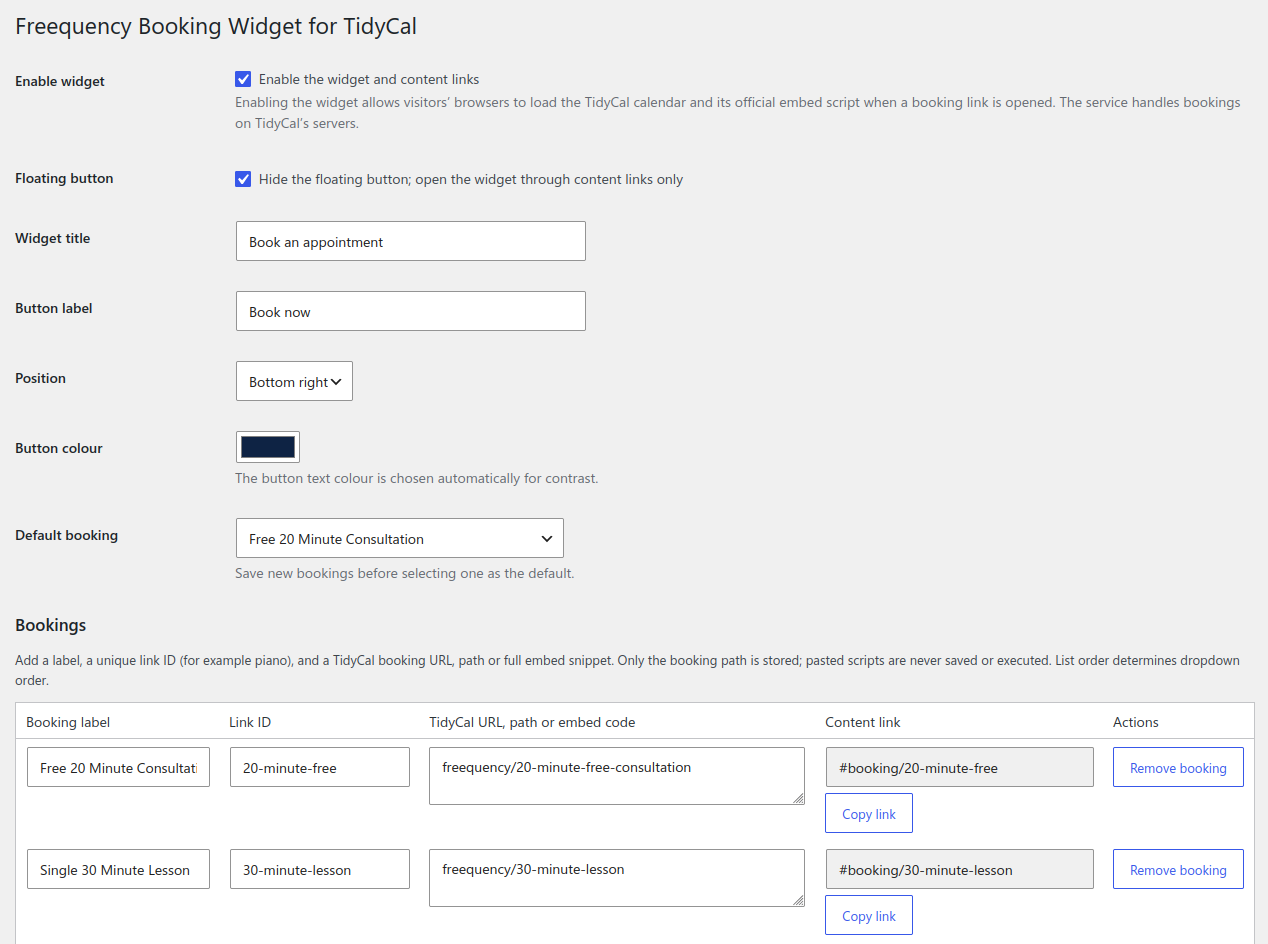
Plugin settings
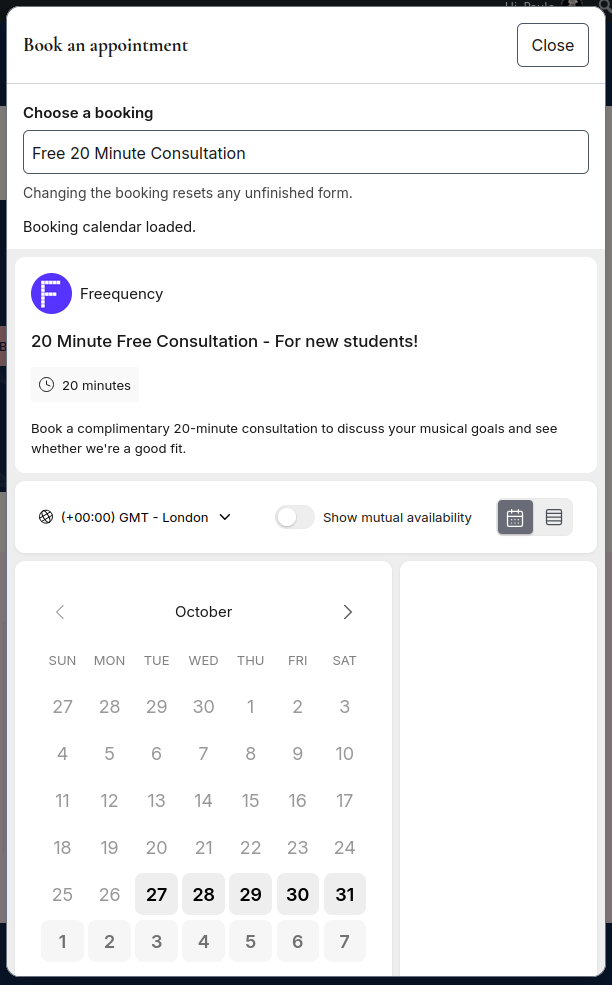
Open booking widget with loaded TidyCal booking page
Installasjon
- In WordPress, go to Plugins > Add New Plugin > Upload Plugin.
- Upload freequency-booking-widget-1.0.0.zip, install it and activate Freequency Booking Widget for TidyCal.
- Go to Settings > Freequency Booking Widget for TidyCal.
- Click Add booking. Enter a label, a unique link ID and a TidyCal booking URL, path or embed snippet. Repeat for additional bookings, then save.
- Select a default booking, configure appearance and explicitly enable the widget. Enabling it permits the documented TidyCal service requests. Save.
- Deactivate any earlier booking-widget plugin to avoid duplicate widgets.
The theme must call wp_footer().
Vurderinger
Det er ingen omtaler av denne utvidelsen.
Bidragsytere og utviklere
«Freequency Booking Widget for TidyCal» er programvare med åpen kildekode. Følgende personer har bidratt til denne utvidelsen:
Bidragsytere
Oversett «Freequency Booking Widget for TidyCal» til ditt språk.
Interessert i utvikling?
Bla gjennom koden, sjekk ut SVN-repositoriet, eller abonner på utviklingsloggen med RSS.
Endringslogg
1.0.0
- First public release as Freequency Booking Widget for TidyCal.
- Multiple bookings, content links, lazy loading and accessible dialog controls.
- WordPress.org metadata, automatic translations and service documentation.
- Invalid settings preserve the previous configuration.
- Independent per-site settings cache on multisite.