
Beskrivelse
GCal Events List retrieves events from Google Calendar and shows data in a widget.
To make GCal Events List work properly, you have to activate the plugin and paste your Google Calendar API key and a public calendar ID in the widget admin panel.
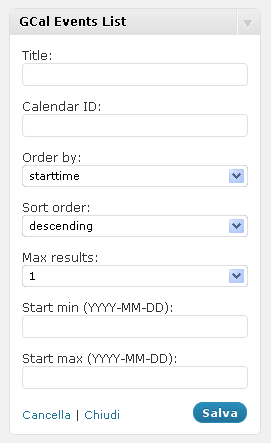
It requires some other options. Here is the full list of params:
- Title (widget title)
- Calendar ID (you can find it in the option panel of your Google Calendar)
- Google API key
- Start from (a valid date in YYYY-MM-DD format)
- Max results
For a detailed description of calendar settings, read the Google Calendar Data API documentation
REMEMBER: your Google Calendar must be public, otherwise the widget won’t show any event!
Skjermbilder

Installasjon
- Extract gcal_events_list.zip
- Upload the plugin folder to the
/wp-content/plugins/directory - Activate the plugin through the ‘Plugins’ menu in WordPress
- Configure your GCal Events List widgets through the widgets admin page.
Ofte stilte spørsmål
- Installation Instructions
-
- Extract gcal_events_list.zip
- Upload the plugin folder to the
/wp-content/plugins/directory - Activate the plugin through the ‘Plugins’ menu in WordPress
- Configure your GCal Events List widgets through the widgets admin page.
Vurderinger
Det er ingen omtaler av denne utvidelsen.
Bidragsytere og utviklere
«GCal Events List» er programvare med åpen kildekode. Følgende personer har bidratt til denne utvidelsen:
Bidragsytere
Oversett «GCal Events List» til ditt språk.
Interessert i utvikling?
Bla gjennom koden, sjekk ut SVN-repositoriet, eller abonner på utviklingsloggen med RSS.
Endringslogg
2.1
- Fixes several errors
2.0
- New version release
1.1
- Minor changes
1.0
- Fix: deprecated PHP4 style constructors in WP 4.3 read more
- Upgrade: support to Google Calendar API V3
0.1
- Initial plugin release