

Beskrivelse
RockIt SEO & AEO Auto-Fixer uses Claude AI (via the RockIt Web service) to analyze your WordPress posts and pages and automatically fix the most common SEO and Answer Engine Optimization (AEO) issues.
How it works:
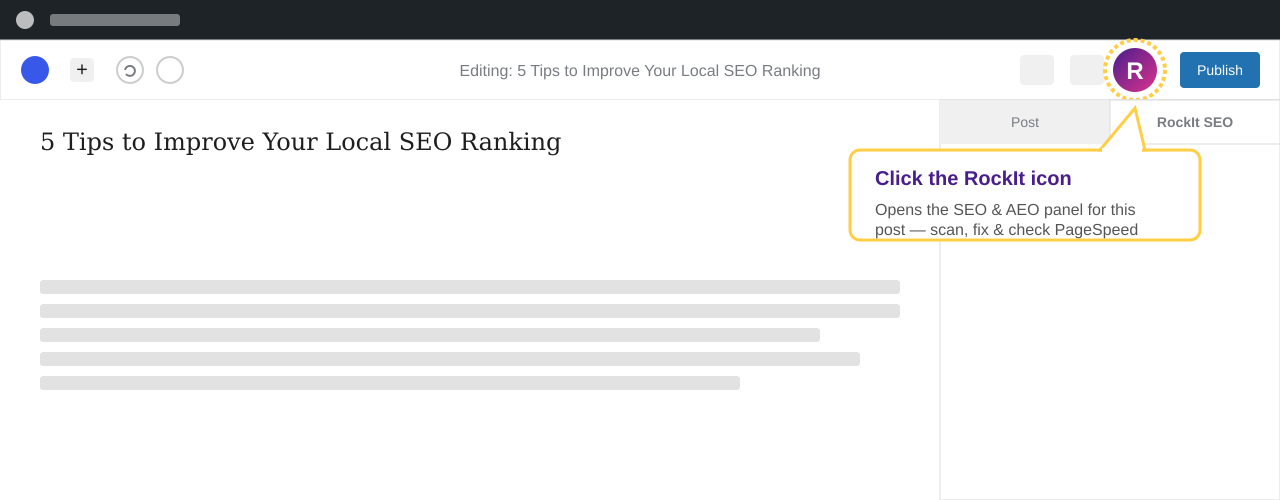
Open any post or page in the WordPress editor and click the ⚡ RockIt icon in the top bar. The plugin will:
- Scan your content and show a before score with a list of issues
- Fix — sends your content to the RockIt AI service which generates optimized meta titles, meta descriptions, focus keywords and FAQ schema
- Show the after score so you can see exactly how much improvement was made
Features:
- AI-powered meta title and description generation (compatible with Yoast SEO, AIOSEO, Rank Math, SureRank)
- Focus keyword identification and writing
- FAQPage JSON-LD schema injection for AEO / featured snippets
- Article schema for blog posts
- PageSpeed analysis with real Core Web Vitals (FCP, LCP, CLS, TBT)
- Automatic lazy loading, font-display swap and DNS prefetch fixes
- Before/after score comparison on a consistent scoring scale
- Fix log showing all optimization history
- Free plan: 20 AI fix runs per day per site
No API keys needed. The plugin connects to the RockIt Web service which handles the AI analysis. Create a free account directly inside the plugin panel.
External Services:
This plugin connects to the RockIt Web API (rockit-web.in/plugin-api/) to perform AI content analysis and PageSpeed testing. By using this plugin you agree to the RockIt Web Terms of Service and Privacy Policy.
Data sent to the RockIt Web API includes:
– Post title, meta description and content excerpt (first 2500 characters)
– Heading structure, word count and readability metrics
– Your site URL (for rate limiting)
– Name and email when you register for a free account
The AI analysis is powered by Anthropic’s Claude AI. PageSpeed analysis uses the Google PageSpeed Insights API. Both are accessed server-side through the RockIt Web service — your site never communicates directly with Anthropic or Google.
- RockIt Web: https://rockit-web.in
- Source code: https://github.com/s1ranand22/rockit-seo-aeo-fixer
- Terms of Service: https://rockit-web.in/terms
- Privacy Policy: https://rockit-web.in/privacy
- Anthropic: https://www.anthropic.com
- Google PageSpeed Insights: https://developers.google.com/speed/docs/insights/v5/about
Skjermbilder


Installasjon
Option 1: Install from your WordPress dashboard (recommended)
- In your WordPress admin, go to Plugins Add New
- Search for RockIt SEO & AEO Auto-Fixer
- Click Install Now, then Activate
Option 2: Upload the plugin zip
- Go to Plugins Add New Upload Plugin
- Choose the downloaded
rockit-seo-aeo-auto-fixer.zipfile and click Install Now - Click Activate
Option 3: Manual (FTP/SFTP)
- Upload the
rockit-seo-aeo-auto-fixerfolder to/wp-content/plugins/ - Activate the plugin through the Plugins menu in WordPress
After activation
- Open any post or page in the editor
- Click the RockIt icon (circle with R) in the top editor bar
- Register with your name and email — it’s free
- Click Scan to analyze your content, then Fix All to apply AI improvements
Ofte stilte spørsmål
-
Do I need any API keys?
-
No. The plugin connects to the RockIt Web service which handles all AI and PageSpeed analysis. Just register with your name and email inside the plugin panel.
-
Is there a free plan?
-
Yes. The free plan includes 20 AI fix runs per day per site. Upgrade at rockit-web.in for unlimited scans.
-
Which SEO plugins does it work with?
-
RockIt writes meta titles and descriptions to Yoast SEO, AIOSEO, Rank Math and SureRank automatically. It detects which plugin you have installed and writes to the correct fields.
-
Does it modify my post content?
-
No. RockIt only writes to post meta fields (SEO plugin fields and schema data). It never modifies your post title, content body, or slug. All changes are reversible.
-
What data is sent to the RockIt API?
-
Your post title, the first 2500 characters of content, heading structure, word count, meta description and your site URL. Personal post data beyond this is never transmitted. See our Privacy Policy for full details.
-
Is it compatible with Gutenberg?
-
Yes. The plugin uses the native WordPress Gutenberg plugin sidebar API and appears as a panel in the right-hand sidebar of the block editor.
-
What is AEO?
-
Answer Engine Optimization (AEO) refers to optimizing content for AI-powered answer engines and featured snippets (Google, Bing, ChatGPT, Perplexity). The plugin generates FAQPage schema markup which helps your content appear in these results.
Vurderinger
Det er ingen omtaler av denne utvidelsen.
Bidragsytere og utviklere
«RockIt SEO & AEO Auto-Fixer» er programvare med åpen kildekode. Følgende personer har bidratt til denne utvidelsen:
Bidragsytere
Oversett «RockIt SEO & AEO Auto-Fixer» til ditt språk.
Interessert i utvikling?
Bla gjennom koden, sjekk ut SVN-repositoriet, eller abonner på utviklingsloggen med RSS.
Endringslogg
1.0.5
- Removed mandatory registration — all features now accessible immediately after install
- Added 3 free fixes per site; registration (free) unlocks unlimited fixes
1.0.4
- Changed text domain to rockit-seo-aeo-auto-fixer to match plugin slug
- Replaced inline style echo with wp_add_inline_style() for font-display swap
- Removed JSON_UNESCAPED_SLASHES from FAQ and Article schema outputs
- Updated contributor username to s1ranand
1.0.3
- Fixed Plugin URI and Author URI conflict
1.0.2
- Fixed all WordPress plugin checker warnings
- Removed deprecated load_plugin_textdomain call
- Improved input sanitization throughout
1.0.0
- Initial release
- AI-powered meta title, description and focus keyword generation
- FAQPage and Article JSON-LD schema injection
- PageSpeed analysis with Core Web Vitals
- Before/after score comparison
- Compatible with Yoast SEO, AIOSEO, Rank Math, SureRank
- Free plan: 20 AI fix runs per day