

Beskrivelse
SkyServers EAN Barcode Finder helps you quickly find and assign EAN-13, EAN-8, and UPC barcodes to your WooCommerce products by searching barcode databases using the product name.
This plugin is completely free to use. It connects to external barcode databases to search for product barcodes. Some of these databases offer free access tiers, while others may require a free registration to obtain an API key (see External Services below for full details).
Perfect for store owners who need to add barcodes to hundreds of products without manually looking up each one.
Features
- Automatic barcode search by product name across multiple databases
- Bulk search — process all products without barcodes automatically
- Individual search — search for each product one by one
- Manual entry — enter barcodes manually when not found in databases
- Barcode validation — verifies EAN-8, UPC-12, and EAN-13 checksum
- Advanced filtering — filter by category, barcode status, search by name or SKU
- Flexible sorting — sort by name or SKU (alphabetic or numeric)
- Pagination controls — adjustable products per page (20/50/100/200) with jump-to-page
- Progress tracking — real-time progress bar and activity log for bulk operations
- Native WooCommerce field — saves to the built-in GTIN/EAN field in WooCommerce
- Statistics dashboard — see how many products have barcodes at a glance
- HPOS compatible — fully compatible with WooCommerce High-Performance Order Storage
External Services
This plugin connects to third-party barcode databases to look up product barcodes by name. Only the product name is sent as a search query. No personal, customer, or order data is ever transmitted.
1. Open Food Facts — Free, no registration required
- Website: https://world.openfoodfacts.org/
- Used automatically to search for product barcodes by name
- Open-source, community-maintained database (primarily food products)
- No API key required, no usage limits for reasonable use
- Privacy Policy | Terms of Use
2. UPCitemdb — Free tier available, registration required for API key
- Website: https://www.upcitemdb.com/
- Used as an optional additional barcode search source
- Free tier: 100 API requests per day (sufficient for most stores)
- Requires free registration at upcitemdb.com to obtain an API key
- The plugin works without this API key — it is entirely optional but improves search coverage
- Privacy Policy
Note: The plugin is fully functional using only Open Food Facts (no registration needed). Adding the optional UPCitemdb API key expands the barcode database coverage to non-food products.
How It Works
- Go to WooCommerce Barcode Finder
- Browse products without barcodes
- Click «Search» next to a product to find its barcode
- Select the correct result or enter the barcode manually
- Or use «Auto-search all» to process everything at once
Tips for Better Results
- Ensure product names include the brand and exact product name
- Products with English names have higher chances of being found
- For local or niche products, manual entry may be required
- A USB barcode scanner (~$10-15) can speed up manual entry significantly
Skjermbilder
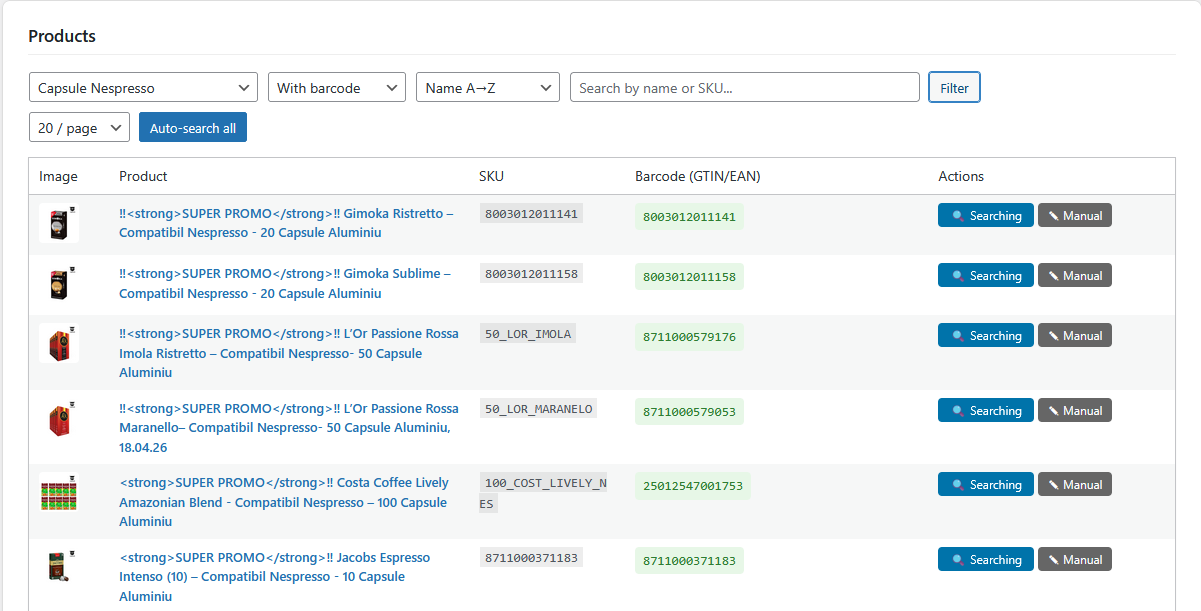
Main dashboard with product statistics 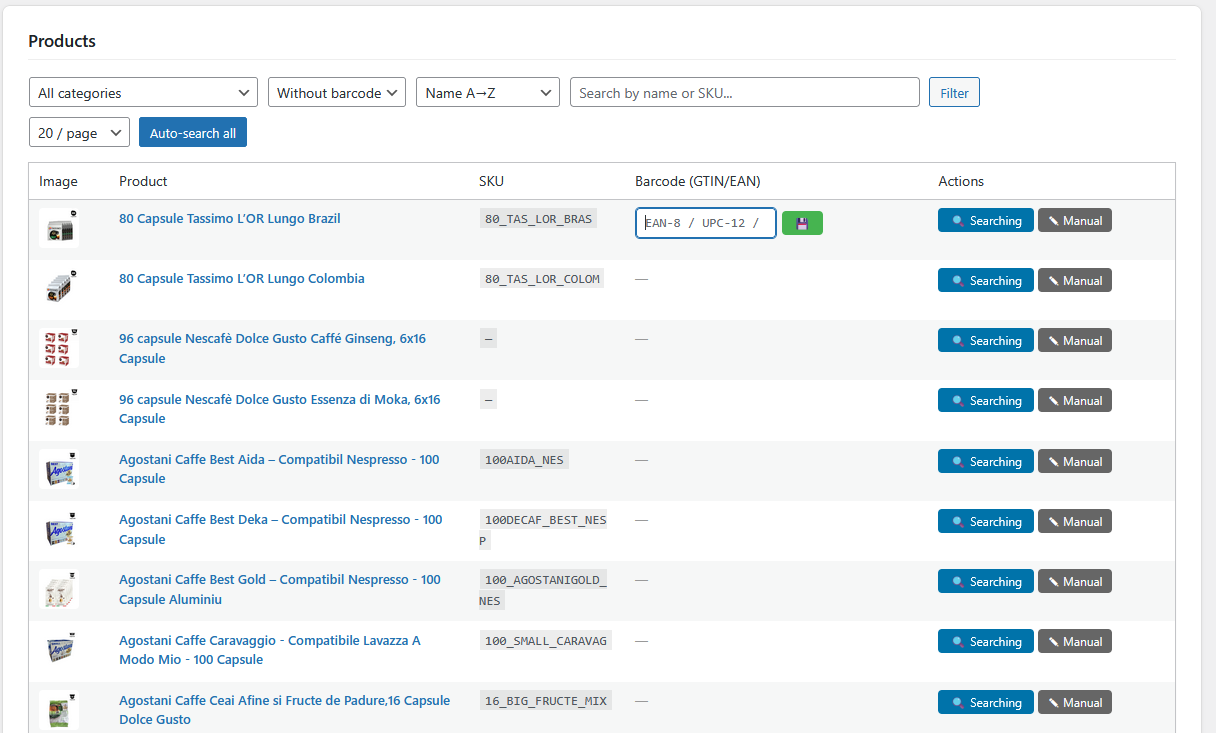
Product list with search and filter options
Installasjon
- Upload the
skyservers-ean-barcode-finderfolder to/wp-content/plugins/ - Activate the plugin through the ‘Plugins’ menu in WordPress
- Go to WooCommerce Barcode Finder
- (Optional) Add your free UPCitemdb API key in the settings
Ofte stilte spørsmål
-
Where are the barcodes saved?
-
Barcodes are saved to WooCommerce’s native GTIN field (
_global_unique_id), the same field you see in the product editor under Inventory «GTIN, UPC, EAN or ISBN». -
What barcode formats are supported?
-
EAN-13 (13 digits, EU standard), EAN-8 (8 digits), and UPC-A (12 digits, US standard). All formats include checksum validation.
-
Will removing this plugin delete my barcodes?
-
No. Barcodes are stored in WooCommerce’s native product fields and remain even after the plugin is removed. Only the plugin’s settings (API key) are cleaned up on deletion.
-
Why are some products not found?
-
The free databases primarily contain food products and internationally distributed items. Local, niche, or regional products may not be in these databases. In those cases, use the manual entry feature.
-
Does this plugin work with WooCommerce HPOS?
-
Yes, the plugin uses WooCommerce’s product API when available, which is compatible with High-Performance Order Storage.
Vurderinger
Det er ingen omtaler av denne utvidelsen.
Bidragsytere og utviklere
«SkyServers EAN Barcode Finder» er programvare med åpen kildekode. Følgende personer har bidratt til denne utvidelsen:
Bidragsytere
Oversett «SkyServers EAN Barcode Finder» til ditt språk.
Interessert i utvikling?
Bla gjennom koden, sjekk ut SVN-repositoriet, eller abonner på utviklingsloggen med RSS.
Endringslogg
1.3.1
- Compatibility: tested with WordPress 7.0.
1.3.0
- Renamed plugin to SkyServers EAN Barcode Finder for trademark compliance
- Removed trademarked terms from plugin slug and text domain
- Updated text domain to skyservers-ean-barcode-finder
- Updated all URLs to use consistent domain format
- No functional changes — all features remain the same
1.2.0
- Renamed plugin to SkyServers EAN Barcode Finder for WooCommerce for distinctiveness
- Updated all prefixes to skyean_ (minimum 4+ characters) to avoid naming collisions
- Updated text domain to skyservers-ean-barcode-finder-for-woocommerce
- Fixed Plugin URI to point to a valid URL
- No functional changes — all features remain the same
1.1.0
- Full compliance with WordPress.org Plugin Directory guidelines
- Declared HPOS (High-Performance Order Storage) compatibility
- Internationalization (i18n) — all strings translatable
- Added proper uninstall cleanup
- Added settings link on plugins page
- Improved security: proper nonce handling, safe filter removal
- Optimized database queries with meta cache preloading
- Separated admin template from main class
- Added comprehensive readme with external service disclosures
- GPL-2.0-or-later license
1.0.2
- Improved search: now searches by product name AND SKU
- Better error handling with timeout messages and retry button
- Optimized queries with fields => ids and meta cache preloading
1.0.1
- Added pagination controls: first/last page, jump to page
- Added products per page selector (20/50/100/200)
- Added SKU sorting (alphabetic and numeric)
- Multi-format barcode support: EAN-8, UPC-12, EAN-13
- Branding update
1.0.0
- Initial release
- Barcode search via Open Food Facts and UPCitemdb
- Bulk and individual search
- Manual barcode entry
- Category and status filtering