
Beskrivelse
Jetpack is an awesome plugin bundle provided by the Automattic, but it requires WordPress.com account
even for those modules previously work as independent plugins. The marketing banners are very obtrusive too.
I smashed the bundle to remove the annoying parts and keep the awesomeness. Slim Jetpack will track the updates of Jetpack modules,
but is definitely INCOMPATIBLE with its original version because a lot of API functions had been mocked or removed.
All credit goes to original developers @
Jetpack!
SlimJetpack 2.1.1.x is corresponding to Jetpack 2.1.1 and the x is the bugfix mark.
If you find any bug, please submit a ticket here: https://github.com/HowardMei/slimjetpack/issues
Or just fork the repository and send me pull requests 😉
Please deactivate Slim Jetpack and use the original Jetpack instead if you need the wordpress.com likes/stats,
subscription and push notification services etc.,
Modules Included
- Beautiful Math
- Carousel
- Contact Form
- Custom CSS
- Extra Sidebar Widgets
- Gravatar Hovercards
- Holiday Snow (Put back since v2.4.2)
- Infinite Scroll
- Minileven Mobile Theme
- Omnisearch
- Sharing
- Spelling and Grammar (Partly Available)
- Tiled Galleries (Partly Available)
- Widget Visibility (New from v2.4.2)
- WordPress.com Connect (New from v2.4.2)
Modules Removed
- Photon (Supported)
- WordPress.com Stats
- Wp.me shortlinks
- Publicize
- Varslinger
- Google+ Profile
- VideoPress
- Jetpack Comments
- Likes
- Subscriptions
- Post by Email
- VaultPress
- JSON API
- Mobile Push Notifications
- Enhanced Distribution
Original Jetpack Changelog
2.7
- Enhancement: Google+ Publicize
- Enhancement: Add Cloudup as an oEmbed provider
- Enhancement: Subscriptions: Add subscribe_field_id filter to allow updated ids when using multiple widgets
- Enhancement: Infinite Scroll: TwentyFourteen Support
- Bug Fix: Contact Form: Fix warning when form is called outside the loop
- Bug Fix: Featured Content: Moving Settings to Customizer, provide option to set default tag as fallback, specify all supported post-types rather than just additional ones. Description Updates
- Bug Fix: Featured Content: Compat with ‘additional_post_types’ theme support argument. Comment updates
- Bug Fix: Featured Content: Make sure $term is an object before we treat it as one
- Bug Fix: GlotPress: Merge with latest GlotPress
- Bug Fix: Infinite Scroll: prevent Undefined index notice that can cause IS to fail when user has WP_DEBUG set to true
- Bug Fix: Infinite Scroll: Improved compatibility with Carousel, Tiled Galleries, VideoPress, and the
[audio]and[video]shortcodes - Bug Fix: Likes: Stop manually including version.php and trust the global. Some whitespace fixes, and if it’s an attachment, follow the post_status of the parent post
- Bug Fix: Mobile Theme: Display password field for Gallery format protected posts
- Bug Fix: Sharing: Add new translation width for share button, and Google Plus icons
- Bug Fix: Shortcodes: Support Ineternational Google domains for maps
- Bug Fix: Shortcodes: Facebook Embeds: Register alternate permalink.php URL for posts
- Bug Fix: Subscriptions: Moved inline styles from widget email input to seperate css file
- Bug Fix: Theme Tools: Fix glitch where random-redirect.php also showed as a plugin being deleted if you were deleting Jetpack
- Bug Fix: Misc: Internationalization & RTL updates
- Bug Fix: Misc: Prevent collisions with ‘Facebook Featured Image & OG Meta Tags’ plugin
2.6.1
- Bug Fix: minor styling fix in pre- and post-MP6/3.8 UI changes.
- Bug Fix: Stats: spinner gif url fix when the user is viewing it over https.
- Bug Fix: Stats: Switch to esc_html from htmlspecialchars in error message — better to be native
- Bug Fix: Media Extractor: some hosts don’t compile unicode for preg_match_all, so we temporarily removed the block that depended on it.
- Bug Fix: Media Extractor: Add in some error handling for malformed URLs.
- Bug Fix: Twitter Cards: treat single-image galleries as a photo-type.
- Bug Fix: Update conflicting plugins for OG tags and Twitter Cards.
- Bug Fix: Correct max supported version number — had been 3.6, update to 3.7.1
2.6
- Enhancement: WPCC / now called SSO: refactored.
- Enhancement: Monitor: new module which will notify you if your site goes down(http://jetpack.me/support/monitor/).
- Enhancement: Custom CSS: replace Ace editor with Codemirror.
- Enhancement: WP-CLI: add commands to disconnect a site and manage modules.
- Enhancement: Contact Form: new filters,
grunion_contact_form_field_htmlandgrunion_should_send_email. - Enhancement: Custom Post Types: new restaurant post type.
- Enhancement: Genericons: update to version 3.0.2.
- Enhancement: Infinite Scroll: many improvements and fixes.
- Enhancement: Likes: performance improvements.
- Enhancement: MP6: Jetpack icons are now compatible with WordPress 3.8.
- Enhancement: Open Graph: better descriptions, fallback images, and media extraction from video posts.
- Enhancement: Publicize: new background token tests for connected publicize services and display problems on settings sharing and add new post.
- Enhancement: Shortcodes: updated Bandcamp shortcode to support the
tracklistandminimalattributes, as well as moreartworkattribute values. - Enhancement: Shortlinks: add Custom Post Type support.
- Enhancement: Subscriptions: add more ways to customize the subscriptions widget.
- Enhancement: Twitter Cards: better media management and card type detection, and better handling of conflicts with other Twitter Cards plugins.
- Enhancement: better handling of conflicts with other plugins.
- Bug Fix: After the Deadline: add a typeof check for
tinyMCEPreInit.mceInitto prevent js errors. - Bug Fix: Carousel: speed improvements and several bugfixes.
- Bug Fix: Contact Form: remove nonce creating issues with caching plugins.
- Bug Fix: Featured Content: add additional post type support through the
additional_post_typesargument. - Bug Fix: Google Authorship: support apostrophes in Google+ profiles.
- Bug Fix: Google Authorship: use a regexp Instead of using
mb_convert_encoding - Bug Fix: Heartbeat: ensure that it never triggers more than once per week.
- Bug Fix: JSON API: add new
?meta=parameter that allows you to expand the data found in themeta->linksresponses. - Bug Fix: JSON API: add new
is_privateresponse to the sites endpoint andglobal_IDresponse to the reader and post endpoints. - Bug Fix: Mobile Theme: allow small images to display inline.
- Bug Fix: Mobile Theme: fix fatal errors for missing
minileven_headerfunction. - Bug Fix: Photon: fix errors when an image is not uploaded properly.
- Bug Fix: Shortcodes: improvements to Archives, Google+, Presentations, Vine and Youtube.
- Bug Fix: Tiled Galleries: improve display of panoramic images and fix errors when an image is not uploaded properly.
Skjermbilder
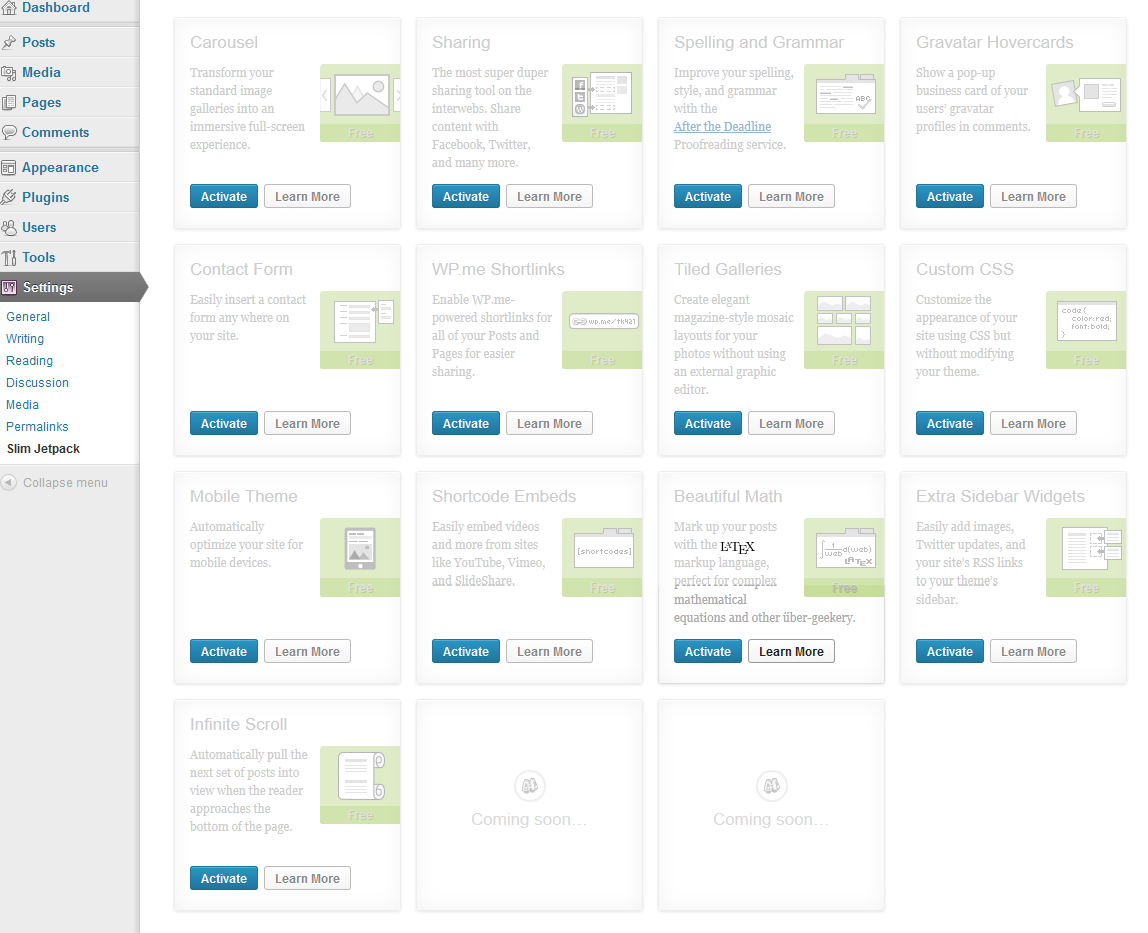
Installasjon
- Install Slim Jetpack either via the WordPress.org plugin directory or by uploading the files to your server
- Go to Settings–>Slim Jetpack and activate the modules you need. Configure them if the ‘configure’ buttons appear. You need at least ‘activate_plugins’ capability to access the configuration page. Click ‘toggle’ to show the ‘deactivate’ button and the infinite-scroll module is only for twenty-xxx series themes, you may extend it to support your own themes.
- That’s it. You’re ready to go!
Ofte stilte spørsmål
How many files are touched? Use a comparing tool to find out. But as I
remember, the list is:
Modified: jetpack.php(->slimjetpack.php), class.jetpack.php
Removed: files and folders of all removed modules
Not all unused blocks are removed from jetpack.php which might cause problems but if it works,just ignore them 🙂
I believe the functions I touched won’t cause security issues, but use at your own risk!
If you don’t like certain modules, just delete them 🙂
If you need a new module from Jetpack future releases, copy the files into Slim Jetpack and try.
It should work without problem 🙂
- Installation Instructions
-
- Install Slim Jetpack either via the WordPress.org plugin directory or by uploading the files to your server
- Go to Settings–>Slim Jetpack and activate the modules you need. Configure them if the ‘configure’ buttons appear. You need at least ‘activate_plugins’ capability to access the configuration page.
Click ‘toggle’ to show the ‘deactivate’ button and the infinite-scroll module is only for twenty-xxx series themes, you may extend it to support your own themes. - That’s it. You’re ready to go!
Vurderinger

Bidragsytere og utviklere
«Slim Jetpack» er programvare med åpen kildekode. Følgende personer har bidratt til denne utvidelsen:
Bidragsytere
«Slim Jetpack» har blitt oversatt til 11 språk. Takk til oversetterne for deres bidrag.
Oversett «Slim Jetpack» til ditt språk.
Interessert i utvikling?
Bla gjennom koden, sjekk ut SVN-repositoriet, eller abonner på utviklingsloggen med RSS.
Endringslogg
2.7.0.1
- Change custom-css editor back to ACE for better CSS Hint
- Completely remove photon to avoid confusion
- Remove the devicepx js calling back to s0.wp.com
- Fix the Akismet & Omnisearch menu dependency issue
2.7
- Skip Jetpack v2.6 and v2.61
- Update to Jetpack v2.7
2.5
- Update to Jetpack v2.5
2.4.2
- Update to Jetpack v2.4.2
- Lift the configuration page access capability to «activate_plugins»
- Put back «Holiday Snow» module, because holidays are coming 🙂
2.3.3
- Updated to Jetpack v2.3.3
2.2.2
- Added Jetpack check before activation
- Removed wp.me shortlinks module
2.1.1
- Removed and mocked the api authentication codes
- Removed the admin marketing banners
- Disabled the ‘Learn More’ slide box and make all screen clean
- Changed the Jetpack admin menu into Settings -> Slim Jetpack submenu
- Changed the default status of modules to be ‘inactive’