

Beskrivelse
Beacon Events is an events calendar that does the basics properly and doesn’t charge you for them. See it running on a stock Twenty Twenty-Five site: month grid with the filter bar, day view, event pages, venue pages.
Who it’s for. Churches publishing weekly services and a monthly potluck. Yoga, fitness and dance studios, gyms and music schools with a weekly class schedule, shown as a timetable. Libraries and schools with story times, term dates and board meetings. Cooking schools, paint and sip studios, pottery, glass and craft studios, art classes, makerspaces and nature centers selling workshop tickets. Wineries, breweries and farms with tastings, trivia nights, markets and seasonal events, and small museums with member and non-member tickets. Clubs, meetups and volunteer groups, bars and venues with a weekly music night, and anyone running online events on Zoom or Google Meet.
Recurring rules use the iCalendar RRULE standard, the same format Google Calendar and Outlook use, so a rule like «second Tuesday of the month» round-trips with calendar apps.
- Recurring events are free. Daily, weekly, monthly («second Tuesday», «last Friday», «the first and third Thursday»), yearly — with an end date or a count, dates you can skip, single dates you can cancel or move, and a ticket link per date when each date has its own registration page.
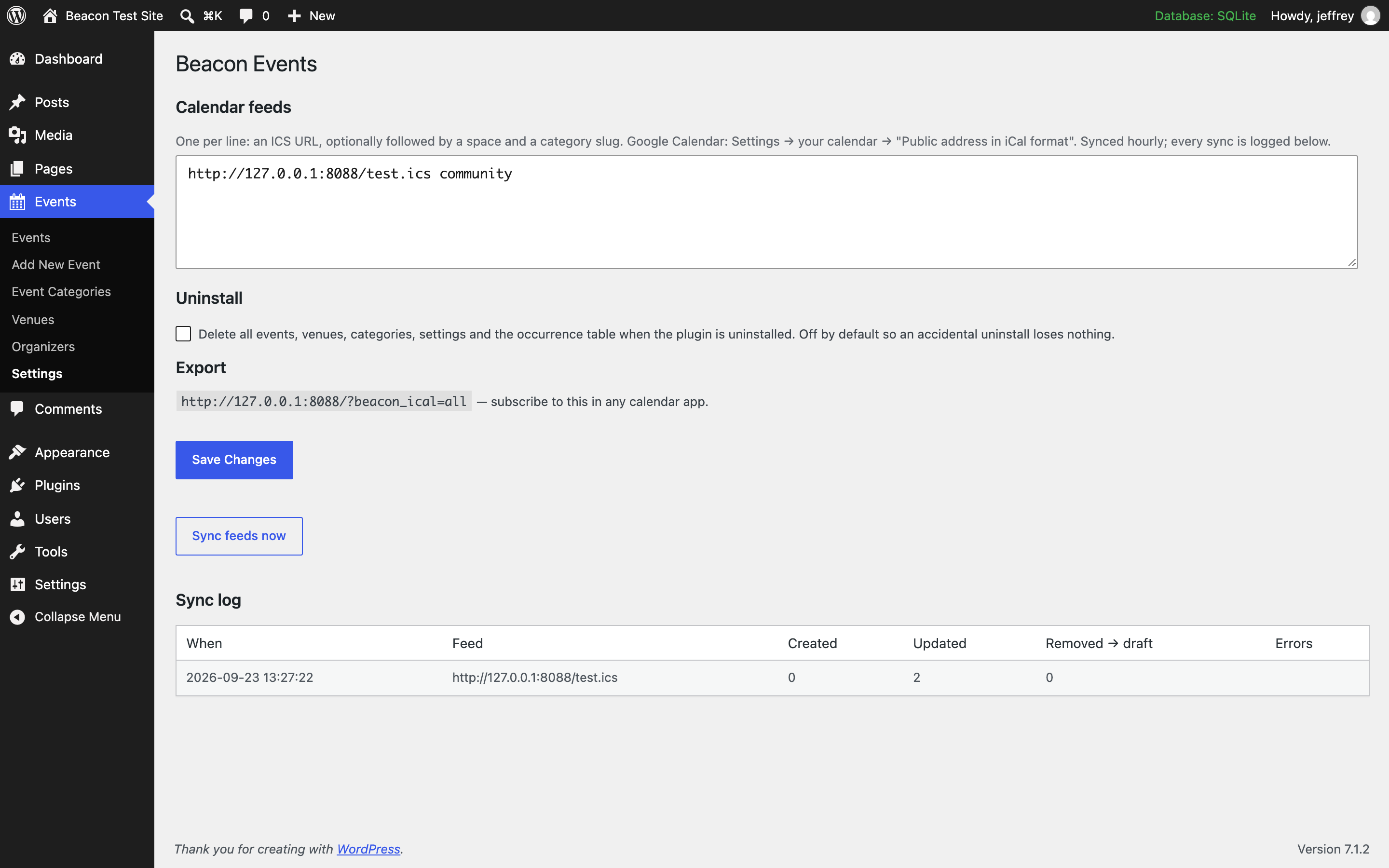
- Import from Google Calendar or any ICS feed, and stay in sync. Feeds are checked hourly. Every sync is logged — created, updated, removed — so nothing drifts silently. Events that disappear from a feed are set to draft, never deleted behind your back.
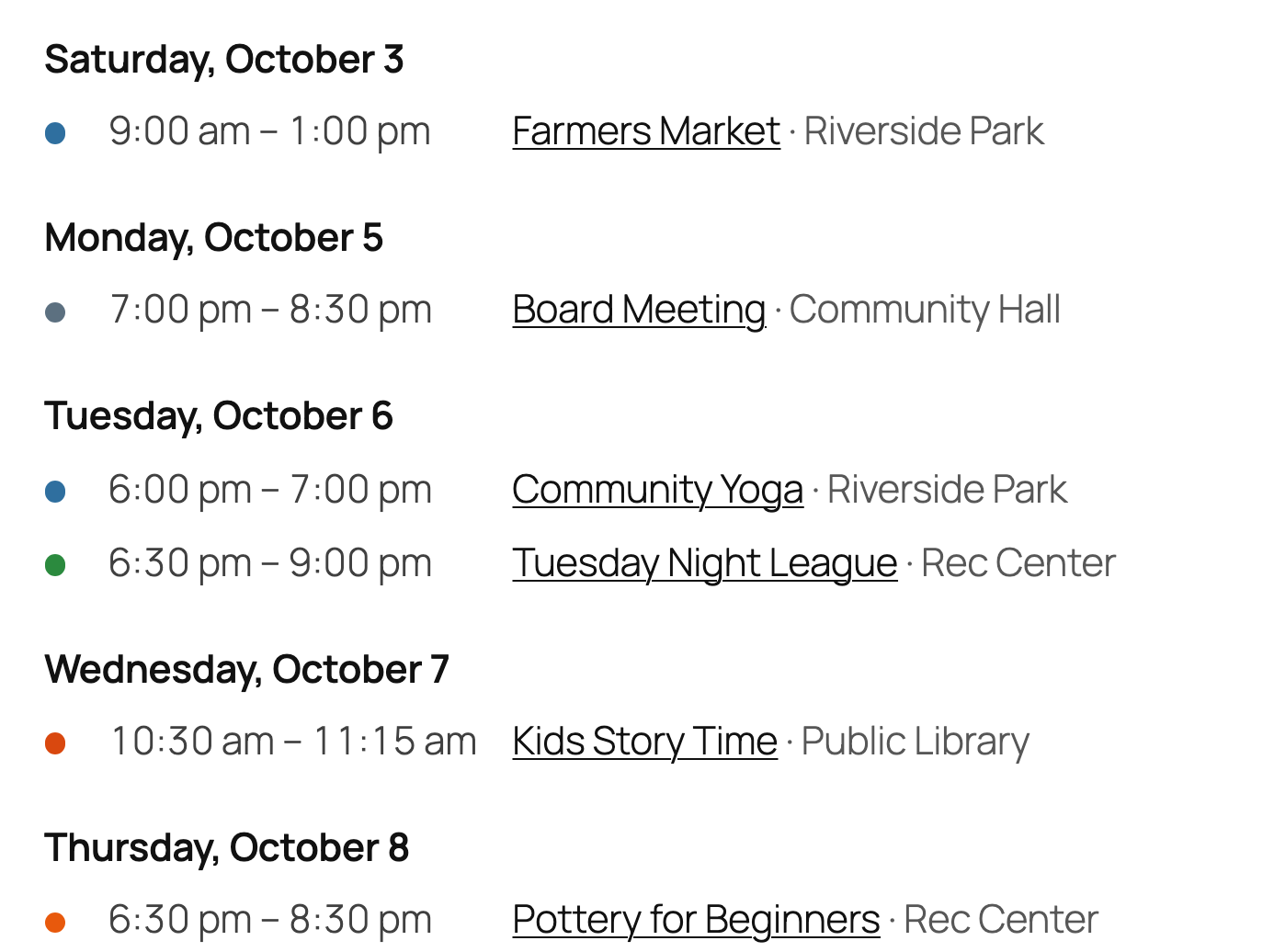
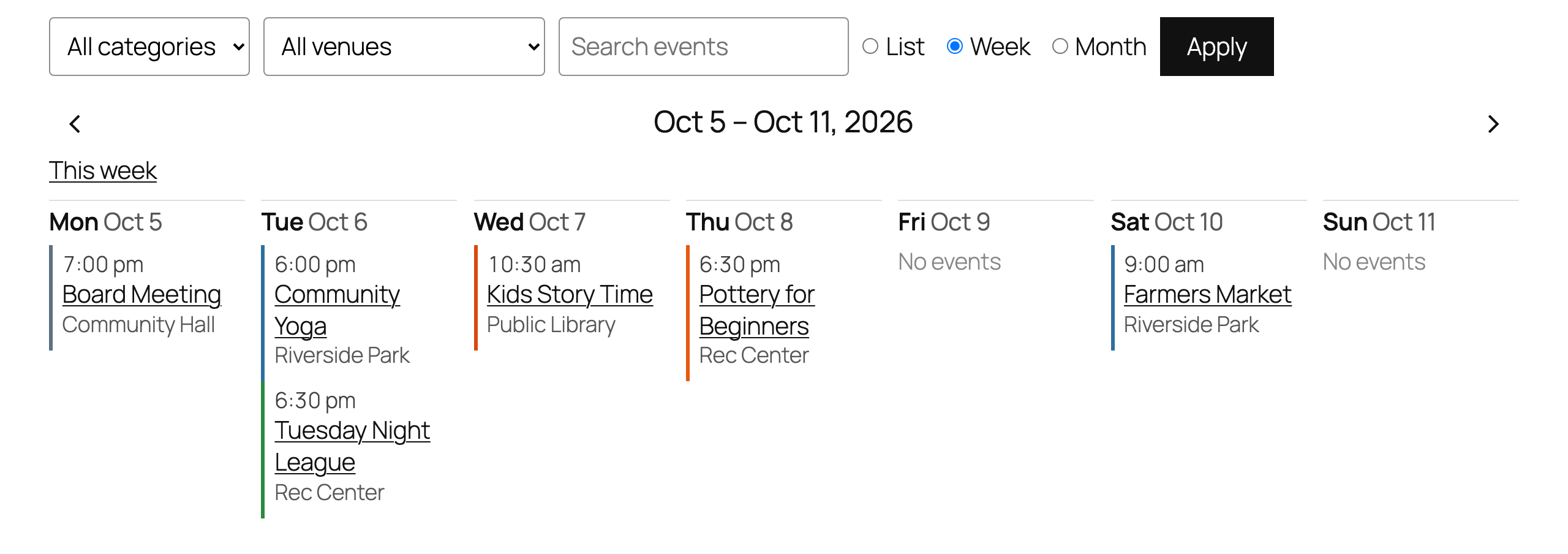
- Views that look like your site. List, week, month and day views as blocks, shortcodes or an Elementor widget, with an optional filter bar (category, venue, search). The week view is a class timetable: a column per day, stacked into rows on phones and narrow columns. Our stylesheet does layout only — colours and fonts come from your theme, and every element has a class you can target. Give a category a colour and its events get a dot or a bar.
- No bloat. Styles load only on pages that show events. No add-on store, no upsell screens, no nag notices.
- Accessible. The month view is a real table with column headers, each day link carries its full date for screen readers, and on Twenty Twenty-Five every view passes axe-core’s automated WCAG 2.1 AA checks, colour contrast included.
- Sell tickets where you like. Each event can link to its Eventbrite, Square or other ticket page with its own button text («Buy on Eventbrite», «Book now»). Or sell on the event page itself with the optional add-on, with no per-ticket fee.
- Up and running in a minute. Click «Get started»: add a few sample events to see the calendar working (one click removes them), and let it make a Calendar page for you.
- Every event in its own timezone. A class in Boston shows 10 am Boston time even if your site is set to Chicago, with the zone’s abbreviation when they differ.
- Online events. Flip «Online event», paste the meeting link, and visitors get a Join button; calendar apps get the link too.
- Search engines understand your events. schema.org Event markup on every event page, one entry per upcoming date.
- Venues with addresses. Each venue has a street address, shown on the event with a map link — no API key, no embedded map slowing the page down.
- Export. Every event has «Add to calendar (.ics)» and «Add to Google Calendar» links, and your whole calendar has a subscribable feed.
- Moving from The Events Calendar, Events Manager, Modern Events Calendar, EventON, WP Event Manager, WP Events Manager (ThimPress) or All-in-One Event Calendar? Events Import / Export copies events, venues, organizers, categories, images and recurring rules in one click, without touching the old plugin. Deactivate it when you are happy; old links are redirected. Weekly classes that were entered one date at a time (the only way in plugins that charge for repeating events) can be combined into one repeating event in a click. Anything else comes in through a CSV file, and every event can go out as one.
- Uninstalls clean. Turn on «delete all data on uninstall» and the plugin removes everything it created — events, venues, categories, settings, its table.
External services
Beacon Events does not phone home, track anything, or load scripts from third parties. Two things touch the outside world, both under your control:
- Calendar feeds you add. If you enter an ICS URL under Events Settings (for example your Google Calendar’s public iCal address), the plugin fetches that URL from your server once an hour to keep events in sync. Nothing is fetched unless you add a feed.
- Plain links. The «Map» and «Add to Google Calendar» links on an event are ordinary hyperlinks to google.com/maps and calendar.google.com. They open in the visitor’s browser; the plugin sends nothing itself. Google’s terms: https://policies.google.com/terms
Data the plugin stores
One database table, {prefix}beacon_occurrences, holding the expanded dates of each event. It is removed on uninstall only if you turn on «delete all data on uninstall» under Events Settings.
Shortcode
[beacon_events view="list" days="60" limit="20" category="workshops"] — `category` takes one slug or several, comma-separated (`category="workshops,talks"` shows events in either).
[beacon_events view="month"]
[beacon_events view="list" filters="1"] — adds the category / venue / search bar and a list / week / month switch.
[beacon_events layout="compact" limit="5"] — one line per event, for sidebars.
[beacon_events view="week"] — this week as a timetable, with previous/next links. It starts on the day set in Settings → General ("Week Starts On").
[beacon_events view="day"] — today, with previous/next links.
venue="slug" and `organizer="slug"` work like `category`.
Block
Add the Events block and choose list, month or day in the sidebar, or the Upcoming events variation for a short one-line list. Elementor users: the Beacon Events widget has the same options.
Tickets and RSVP
Free covers the calendar. If you need people to sign up or pay — RSVP with capacity per date, paid tickets through Stripe or your WooCommerce checkout, a waitlist when a date is full, reminder emails the day before, attendee lists with CSV export, QR tickets with phone check-in at the door, visitor-submitted events — there is a paid add-on, Beacon Events Pro, with a 14-day free trial that needs no card. Nothing in the free plugin is time-limited, crippled or nagged.
Setup in five minutes
Click Get started under the plugin’s name on the Plugins screen. The Events screen walks you through the three steps below, can add five sample events so you see a full calendar straight away (removed again in one click), and makes a «Calendar» page for you with a month view, filters and the next five events.
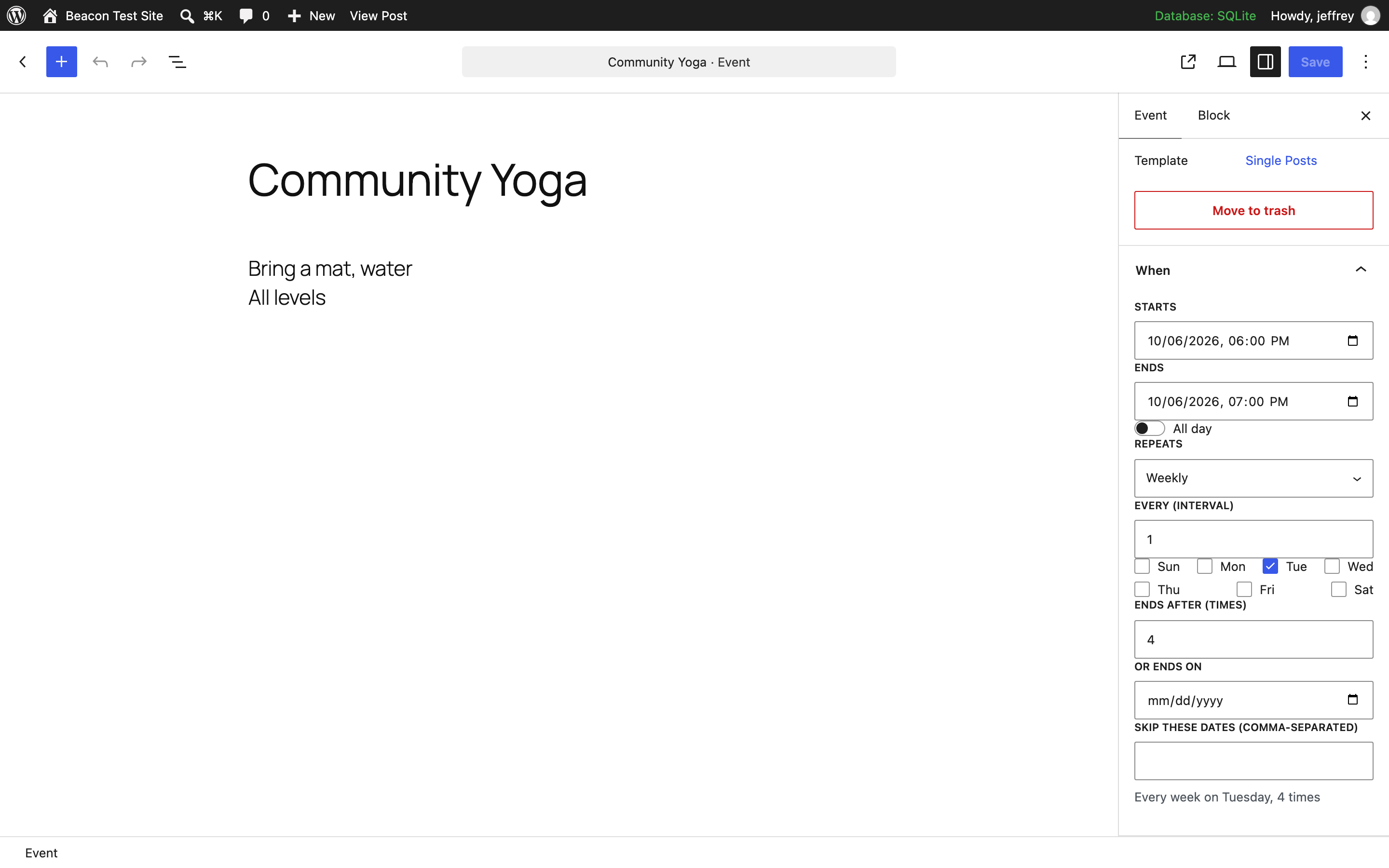
- Events Add New Event. Set Starts and Ends in the When panel; pick Repeats if it recurs (weekly on Tuesday, second Tuesday of the month, last Friday…). Add a venue and a category from the sidebar.
- Put the Events block on a page (or the shortcode below). Choose list, week, month or day, and switch on the filter bar if you have several categories or venues.
- Moving from another plugin? Events Import / Export. Have a Google Calendar? Events Settings paste its iCal address.
That is the whole setup. Everything else — colours, venues with maps, online events, per-date changes — is optional.
Roadmap
Next, in this order: a CSV import for attendees, per-event reminder settings, and translations. Requests and bug reports on the support forum get answered; the plugin is small enough that most fixes ship within days.
Skjermbilder

Blokker
Denne utvidelsen gir 2 blokker.
- Events
- Venue / category details
Ofte stilte spørsmål
Are recurring events really free?
Yes. That’s the point.
How is Beacon Events different from The Events Calendar?
Recurring events and a week view: free here. In The Events Calendar the free version has month, list and day views, and recurring events and the other views come with a paid plan; the cheapest, Essentials, was $259 a year when we checked in September 2026. Tickets: Beacon Events Pro is $49 a year and sells through your own Stripe account or WooCommerce, with no per-ticket fee from us. Moving: the importer brings your events, venues, organizers, categories and repeat rules across in one click (and with Pro, tickets and attendees), and redirects the old links.
What The Events Calendar does that Beacon doesn’t, so you can decide honestly: seven calendar views including photo and map (Beacon has list, week, month and day), Square and PayPal payments without WooCommerce, built-in coupons and fees, and add-ons such as its Event Aggregator for pulling in Meetup and Eventbrite events. If you rely on those, stay where you are.
Can I show a weekly class schedule (timetable)?
Yes. Put the Events block on a page and choose Week, or use
[beacon_events view="week"]. Each day of the week gets a column with its classes in time order, all-day events first; on a phone, or in a narrow column, the days stack into rows and empty days are hidden. Enter each class once as a repeating event («every Monday and Thursday at 6 pm»), cancel a holiday or move one class without touching the rest, and addfilters="1"so visitors can pick a category (yoga, spin, kids) or a studio. Each class can carry a «Book» button to the booking system you already use.Does it work as a church calendar?
Yes. Enter the weekly service once as a recurring event, add special services and holidays as single events, and cancel or move one date when plans change. The month view and the upcoming list go on any page, and members can add the whole calendar to their phone with the subscribe link.
How do I connect Google Calendar?
In Google Calendar, open the calendar’s settings, make it public («Make available to public»), and copy either its «Public address in iCal format» or its share link. Paste it under Events Settings Calendar feeds and save: the events come in straight away, and after that it syncs every hour («Sync feeds now» does it on demand). webcal:// links work too. If Google ever answers with a web page instead of the calendar (say the calendar was made private), the sync stops and changes nothing, and the log says why.
What happens if an event is removed from my Google Calendar?
It’s set to draft on your site and the removal is written to the sync log. You decide whether to delete it.
Will it change how my site looks?
No. The stylesheet only does layout. Colours, fonts and spacing inherit from your theme.
My old calendar had every weekly class as a separate event. Can I turn them into one repeating event?
Yes. After an import (or any time), Events Import / Export lists the events that look like one series entered date by date: same title, time, length and venue, on a regular pattern such as every Tuesday, every other Saturday, the second Tuesday of the month or three days in a row. Copies that carry their own date in the title («Pick Your Own Project – October 1, 2026», «Chef’s Table Class 10/2/26») count as the same title, and the repeating event is named without the date. Tick the ones you want and click Combine. The earliest copy becomes the repeating event, a missing week becomes a skipped date, the other copies go to the trash, and their old links redirect to the new event. Events with tickets or RSVPs are left alone. From the command line:
wp beacon combine --dry-run, thenwp beacon combine.Can I move my events from The Events Calendar or Events Manager?
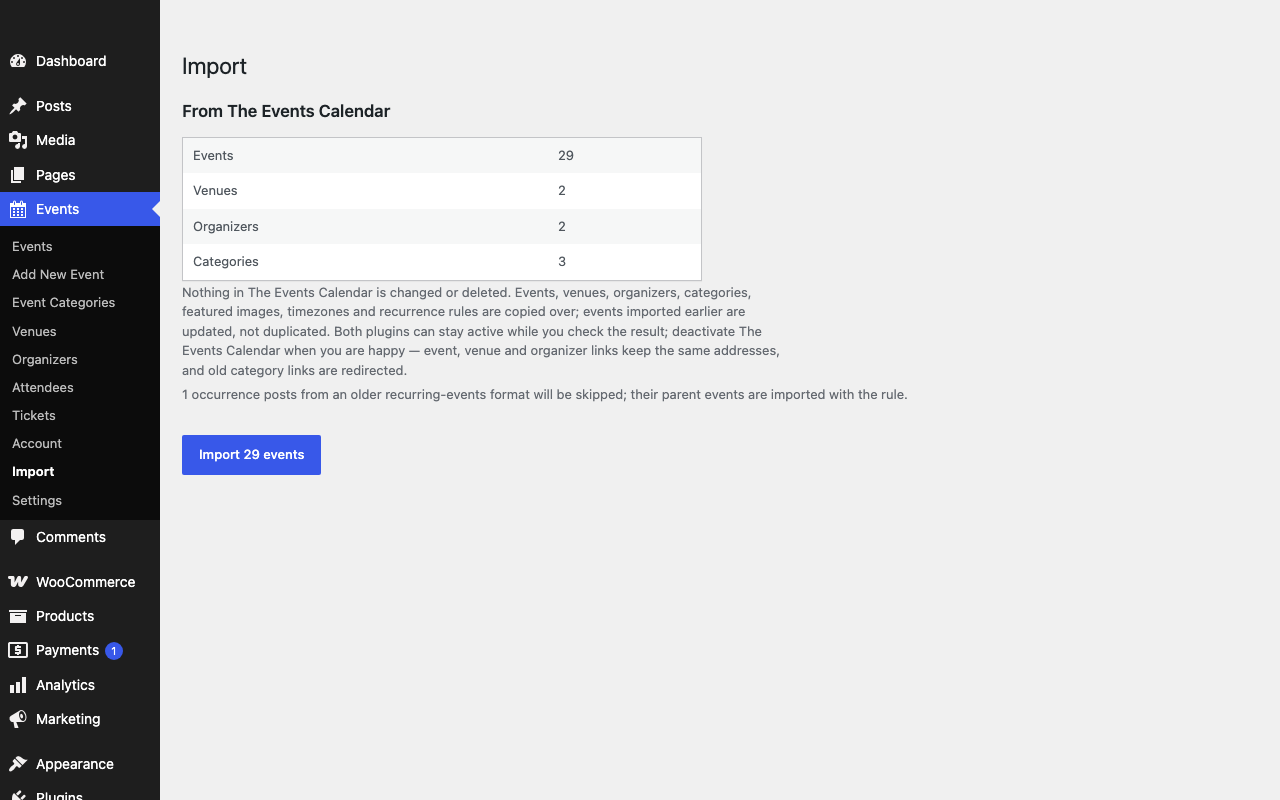
Yes, and the migration is one click. Events Import / Export finds what either plugin stored in your database (it works even if that plugin is already deactivated) and copies events, venues with addresses, organizers, categories, featured images, timezones and recurring rules across. Nothing is deleted. Run it again later and it updates what it imported instead of making duplicates. Old event, venue and category links are redirected to the imported items, including Events Calendar Pro’s page for each date of a series (/event/yoga/2026-10-06/) and its week, photo, map and summary views, which go to your calendar page.
Watch the import from The Events Calendar, tickets and attendees included:
Can I move my events from EventON?
Yes, from EventON or EventON Lite, with it still active or already deactivated. Events Import / Export copies events with their times and timezones, all-day events, locations with their addresses, organizers, event types (they become categories, and the event’s colour goes on the first one), featured images, «moved online» join links, and repeats: daily, weekly on one or several days, monthly by date or by «first Sunday»-style weekday, and yearly. EventON saves every date a repeat produces, and the importer only keeps a rule when it produces exactly those dates. Otherwise, and for custom date lists and hourly repeats, the first date comes across and the report names the event so you can check it. Old /events/…, /event-location/…, /event-organizer/… and /event-type/… links are redirected once EventON is deactivated.
Can I move my events from WP Event Manager?
Yes, with WP Event Manager still active or already deactivated. Events Import / Export copies events (past «expired» ones come across as past events), venues with the address you entered on each event, organizers, categories and event types (types become categories), featured images or banners, per-event timezones and the online flag. Its /event/… and /event-category/… links already match Beacon’s, and /event-type/… links are redirected to the category they became. Anything its paid add-ons created, like ticket sales and registrations, is not imported; the ticket type and price are kept on each event for reference.
Can I move my events from Modern Events Calendar (MEC)?
Yes, from MEC Lite or Pro, with MEC still active or already deactivated. Events Import / Export copies events, venues with their addresses, organizers, categories with their colours, featured images, timezones and repeat rules: daily, weekly or every few weeks, weekdays, weekends, chosen weekdays, monthly, yearly and «first/last weekday of the month», with the end date or number of repeats and the dates you skipped. Events marked «moved online» keep their join link. Two things don’t carry over fully, and the report tells you which events they affect: repeats on a hand-picked list of dates import their first date, and a month rule with several weekdays keeps the first one. MEC bookings and tickets are not imported. Once MEC is deactivated, its event and category links are redirected to the imported ones, including custom slugs you set in MEC’s settings.
Can I move my events from WP Events Manager by ThimPress?
Yes, with WP Events Manager (the ThimPress plugin that comes with themes like Eduma) still active or already deactivated. Events Import / Export copies events with their dates and times (older date formats are read too), all-day and multi-day events, the location as a venue with that address, categories and event types (types become categories), featured images, and past events. Tags are not imported. Once WP Events Manager is deactivated, its /events/…, /tp-event-category/… and /tp-event-type/… links are redirected. The number of seats and the price are kept on each event; Beacon Events Pro turns them into bookable tickets and imports every completed booking as an attendee, with its quantity and amount. Bookings still waiting for PayPal are left behind and no emails are sent.
All-in-One Event Calendar (Time.ly) was removed from wordpress.org. Can I move my events?
Yes. AI1EC’s events stay in your database, and Events Import / Export reads them directly, even with All-in-One Event Calendar still active or already deactivated. Events, categories with their colours, venues with addresses, contacts, featured images, timezones, recurring rules and skipped dates come across; «every weekday» rules become a weekly rule on those days. Events it pulled in from calendar feeds keep their feed IDs, so adding the same feed under Events Settings adopts them instead of duplicating them. Its old category and calendar-view links are redirected, and the report tells you which page used to show the calendar.
What about my tickets and attendees from Event Tickets or Event Tickets Plus?
The free importer moves events, venues, organizers and categories, and shows how many tickets and confirmed attendees it found. Beacon Events Pro, the paid add-on, imports those too: each event’s ticket price and capacity, every RSVP «yes», every attendee of a completed Tickets Commerce order, and every Event Tickets Plus attendee whose WooCommerce order is completed or processing, with the order linked. Unpaid orders are left behind and no emails are sent.
Can I run the import from the command line?
Yes, with WP-CLI, which helps when you are moving several sites.
wp beacon sourceslists what it finds from each supported plugin, andwp beacon import tec(or em, ai1ec, mec, wpem, eventon, wpems) runs the same import as the Import / Export screen, with a progress bar and the same report. Beacon Events Pro’s ticket and attendee import runs too when it is active. Running it again updates instead of duplicating.Can I import from a spreadsheet?
Yes. Save it as CSV with a header row (title and start are the only required columns; venue, address, organizer, categories, repeat rule, skip dates, online link and image URL are optional) and upload it on Events Import / Export. Export gives you every event in the same format, and an edited export comes back as updates.
Can I cancel or move just one date of a recurring event?
Yes. Under the rule in the editor sidebar (or the When box in the classic editor) the next few dates are listed; mark one cancelled and it stays on the calendar as cancelled, or move it to another time. Skipped dates, by contrast, disappear entirely.
Each date of my program has its own registration page (Blackbaud, Altru, Eventbrite). Can it still be one repeating event?
Yes. Every upcoming date in the editor has a «Ticket link for this date» box. The list view links each date to its own page, the event page lists the next dates with their links, and calendar files carry them too. When you combine events that were entered one date at a time, each date keeps the link it had, whether it was the event’s website link or a «click here to register» link in its description.
Can I sell tickets for cooking classes, paint and sip nights or workshops?
Yes, with Beacon Events Pro. Each class gets a capacity so it shows sold out on its own, a waitlist, and ticket types such as member and non-member prices. Buyers pay through your own Stripe account or your WooCommerce checkout, and every ticket has a QR code.
Is there a ticket scanner for check-in at the door?
Yes, in Beacon Events Pro. Every ticket email links to a ticket page with a QR code. Scan it with your phone’s own camera while logged in to your site and the guest is checked in, with a clear warning if the ticket was already used or cancelled. No separate app is needed, and you can also print a door list.
Can an event link to tickets I sell somewhere else, like Eventbrite or Square?
Yes. Every event has an optional «Tickets & info» link with its own button text («Buy on Eventbrite», «Book on Square», «Register»). It shows as a button on the event page, next to the event in lists, and in the calendar feed. When you import from The Events Calendar, All-in-One Event Calendar, Modern Events Calendar, EventON or WP Event Manager, the ticket or website link each event had comes across as this button, so nothing your visitors clicked goes missing.
Can I sell tickets without Eventbrite’s per-ticket fees?
Yes, with Beacon Events Pro, as an Eventbrite alternative for tickets you sell from your own site. Buyers pay through your own Stripe account or your WooCommerce checkout, so the only fee is your payment provider’s card fee. Eventbrite’s US pricing adds a service fee of 3.7% + $1.79 to every paid ticket. Pro is $49 a year for one site and includes a capacity per date, a waitlist, reminder emails, an attendee list, QR tickets you scan at the door with a phone, and a printable door list. Each event can have several ticket types, like early bird and VIP, with their own prices and capacities. There is no reserved seating, so it suits classes, workshops and small events.
What’s in the paid version?
Tickets and RSVPs with card payments, attendee export, and priority support. You can try it free for 14 days without a card. Nothing in the free version moves behind a paywall.
Vurderinger
Det er ingen omtaler av denne utvidelsen.
Bidragsytere og utviklere
«Beacon Events – Events Calendar with Recurring Events & Google Calendar Sync» er programvare med åpen kildekode. Følgende personer har bidratt til denne utvidelsen:
Bidragsytere
Interessert i utvikling?
Bla gjennom koden, sjekk ut SVN-repositoriet, eller abonner på utviklingsloggen med RSS.
Endringslogg
0.21.1
- The «Repeats» line on an event page gives the end date in your site’s date format («until October 25, 2026», was «until 2026-10-25») and lists weekdays in your week’s order («Saturday and Sunday», was «Sunday and Saturday»).
0.21.0
- Combining events entered one date at a time now recognizes copies that carry their own date in the title, such as «Pick Your Own Project – October 1, 2026», «Take A Spin – Sunday, October 4th, 3pm-5pm» or «Chef’s Table Class 10/2/26». They group by the rest of the title, and the repeating event is named without the date (its old address keeps working). Only the event’s own date comes out, so a title like «Talk: October 1918» is left alone. Tried on four studios’ real public calendars: 12 weekly cooking classes, 12 Sunday wheel sessions, 8 private lessons and 16 open-studio sessions each became one repeating event.
- One session on a different weekday no longer hides a series. Twelve Sunday sessions and one Saturday with the same title become a Sunday series, and the Saturday stays on its own.
0.20.6
- Accessibility, checked with axe-core against WCAG 2.1 AA. The month grid’s days from the next or previous month and the week view’s «No events» were too faint to read (3.0:1 and 3.5:1, against the 4.5:1 minimum). Each day number in the month grid now tells screen readers its full date («31» alone gave no month), today’s is marked as the current date, and the List / Week / Month switch is a named group.
0.20.5
- Fixed: on a busy calendar, an event page’s «Add to calendar (.ics)» file, or a category’s or venue’s calendar feed, could come out empty. The export read the site’s next 1,000 dates first and only then picked the event, category or venue, so other events could use up all 1,000.
- The whole-site calendar feed now carries up to 5,000 dates over the next 12 months, up from 1,000. A studio running a few classes a day ran past 1,000 within months, so subscribers stopped seeing classes further out.
0.20.4
- The filter bar (categories, venues, search) uses your theme’s font and size instead of the browser’s small default, and its fields and Apply button share one height. Block themes give Apply their own button style.
0.20.3
- A heading or paragraph above a list, week, day or compact list now gets your theme’s normal spacing. Before, only the month grid did, and the heading sat right on top of the first date.
- Titles line up in lists and the day view. The time column is now wide enough for times like «10:30 am – 12:30 pm», so rows with longer times no longer push their titles to the right. Sites with a 24-hour clock get a narrower column.
- A wrapped row no longer starts a new line with the «·» before the venue, or with the ticket link on its own.
0.20.2
- Lists with long event titles read cleanly. The title, venue and ticket link now wrap together beside the time, instead of breaking into separate lines where the venue line started with a stray «·». Phones stack the time above the event; the weekly schedule keeps its time column on phones too.
- An online event whose venue is already called something like «Online (Zoom Webinar)» no longer shows as «Online + Online (Zoom Webinar)» in lists, calendar files and Google Calendar links.
0.20.1
- Combining events entered one date at a time can take copies that sell tickets when Beacon Events Pro 0.9.0 or later is active: their bookings move to the same dates of the repeating event. Without Pro those copies are left alone, as before.
- A link to a combined copy keeps its query when it redirects, so a cancel or payment-return link in an older email still works.
0.20.0
- Monthly on two weeks of the month: «the first and third Thursday», «the second and fourth Tuesday». Choose it under Repeats Monthly, in the block editor or the classic editor. Calendar feeds and imports (Modern Events Calendar’s advanced repeats too) keep rules like these whole; before, only the first week was kept and half the dates went missing.
- Combining events entered one date at a time recognizes these schedules. Tried on a real historical society’s calendar: 15 tour listings on the 2nd and 4th Tuesday became one repeating event.
- The classic editor’s «Monthly on» is now a choice worked out from the start date («Monthly on the second Tuesday», «on the last Friday», «on the second and fourth Tuesday») instead of a box that wanted codes like 2TU and quietly ignored anything else.
- Fixed: a rule on a fifth weekday (the fifth Tuesday, say) put a date into the next month when a month had only four of them.
0.19.0
- A ticket link per date. Registration systems such as Blackbaud, Altru or Eventbrite sessions have a page for each date, which kept programs like these as one event per date. Now each upcoming date of a repeating event can carry its own link (block editor and classic editor): list rows link each date to its page, the event page lists the next dates with their links, and calendar files carry them.
- Combining events entered one date at a time keeps each date’s link, whether it was the event’s website link or a «click here to register» link in its description (that link then jumps to the list of dates). 0.18.9 left such copies uncombined. Tried on two nature centers’ real calendars: 15 daily hawk watches with a Blackbaud page each, and fortnightly children’s classes with an Altru page each.
0.18.9
- Combining repeating events now leaves alone copies that each have their own ticket link (a registration page per date, the way Blackbaud, Altru or Eventbrite sessions work). A repeating event has one link, so combining those would have sent every date’s visitors to the first date’s page.
0.18.8
- Combining repeating events entered one date at a time (Events Import / Export, or
wp beacon combine): copies entered without a venue now join the copies that have it, and the repeating event takes that venue. An event listed twice on the same day is folded in instead of stopping the combine. Copies at different venues are still kept as separate events. Found on a real nature center’s calendar, where only half of a fortnightly program combined.
0.18.7
- Fixed: events synced from Google Calendar or another feed had «&» saved as «&» in their titles (the editor showed «Q&A Night»), and a backslash was dropped («AC\DC» became «ACDC»). Titles are stored as written now.
- CSV import: ticket, online and image links typed without «https://» get it, as in the editor.
0.18.6
- Fixed: titles and venue names with «&» or an apostrophe showed as HTML codes («Paint & Sip») in «Add to Google Calendar», in .ics calendar files and feeds, and in the event data search engines read. They are plain text now.
- Fixed: with Beacon Events Pro, a ticket price typed with a thousands separator («1,500») reached search engines as 1.
- Hardening: the event data for search engines escapes «<» and «>», so no event text can end its script tag.
0.18.5
- Fixed: a Google Calendar address pasted into Events Settings was broken on save. The form stripped its encoded characters («%40» in «…%40group.calendar.google.com»), so Google feeds failed. The same happened to encoded characters in links saved from the classic editor.
- Fixed: if a feed answered with a web page instead of a calendar (a calendar made private, a login or error page), every event from it was moved to drafts. Now the sync stops, changes nothing and logs why.
- A Google Calendar share link (calendar.google.com/calendar/embed?src=…) and webcal:// links are turned into the calendar’s address. A new feed syncs as soon as you save it, lines that aren’t addresses are reported instead of dropped, and a category name with spaces is kept whole.
0.18.4
- Fixed: «Add to Google Calendar» on a repeating evening event could put the repeats on the wrong weekday (the time went over in UTC, so 7 pm Tuesday in Chicago counted as Wednesday). Times now go over in the event’s own time zone.
- The two «Add to calendar» links wrap tidily on phones.
0.18.3
- Security hardening: removing the sample events now needs the right to delete other people’s posts (it needed only the right to edit), and Google Calendar / ICS feed addresses are fetched the way WordPress fetches untrusted URLs, refusing local and private network addresses.
0.18.2
- Fixed: changing the time of an event could wipe its date while you typed (the «0» of «05» briefly isn’t an hour, and the empty value cleared the whole field). Dates are now only saved once complete, and never cleared by a half-typed value.
- All-day events get date-only fields (no time, no AM/PM), in the block editor and the classic editor.
- Skip dates can be typed the way you write them: 12/25/2026, Dec 25, 2026, 25 Dec or 2026-12-25 (day-first sites read 03/04/2026 as 3 April). The panel shows the dates it understood and flags anything it couldn’t read; before, other formats were kept as text and skipped nothing.
- Monthly repeats offer the choices that fit the start date: «Monthly on day 13», «Monthly on the second Tuesday», «Monthly on the last Tuesday», instead of a code to type.
- «Repeat ends» is one clear choice: never, after a number of times, or on a date. The interval and count boxes can be cleared and retyped (typing 2 used to give 12).
- Links typed without https:// get it. The block editor has a Time zone field, like the classic editor.
0.18.1
- Fixed: in Chrome and Edge, a date and time typed or picked without the AM/PM part (or any half-filled date) looked filled in but was saved as empty, so the event never showed on the calendar. The When panel and the classic box now say «Not saved yet» under the field and hold Save until it is complete, and the Events list shows «No start date: not on the calendar» for any event without one. Thanks to hollysears for the report.
0.18.0
- Combine repeating events that were entered one date at a time. Events Import / Export (and
wp beacon combine) finds groups with the same title, time, length and venue on a daily, weekly, every-n-weeks, nth-weekday or day-of-month pattern, proves the pattern against the real dates, and turns each group you tick into one repeating event: missing dates become skipped dates, descriptions, images, links and categories are kept, the copies go to the trash and their old links redirect. Importing again leaves combined events as they are.
0.17.2
- Fixed: on sites where WordPress lives in a subfolder (example.org/site/), none of the old links from other calendar plugins were redirected after an import. They are now.
0.17.1
- Moving from The Events Calendar Pro: its per-date URLs (/event/yoga/2026-10-06/) and «all dates» pages now redirect to the event, and its week, photo, map, summary and day URLs (/events/2026-10-06/) and tag pages to your calendar page (or the events list when there is none). Before, several of them returned «not found», and WordPress’s own guess could send /events/week/ to any event whose name starts with «week».
0.17.0
- Week view (
view="week", the block’s View setting, the Elementor widget and the filter bar’s switch): a timetable with a column per day, starting on your site’s first day of the week, with previous/next links. On phones and in narrow columns the days stack into rows. - Fixed: on a busy calendar, a list filtered by category, venue, organizer or search could say «No upcoming events» although matching events existed further out, because the filter ran after the row limit. Filtered views now keep reading until they have enough.
0.16.1
- FAQ: an honest comparison with The Events Calendar, including what it does that Beacon doesn’t.
- The Tickets & RSVP page links to the Pro setup guide and the live booking demo.
0.16.0
- New: WP-CLI commands for moving several sites:
wp beacon sourcesshows what each supported calendar plugin left on the site, andwp beacon import <source>runs the importer with a progress bar and its report (Beacon Events Pro’s tickets and attendees included when it is active). - Readme: ticket links, the getting-started screen and per-event timezones are now described on the plugin page.
0.15.0
- New: a «Tickets & info» link on every event, with its own button text, for tickets sold on Eventbrite, Square or anywhere else. It shows on the event page, in lists and in the calendar feed, can be set in both editors and in CSV files (link, link_label), and imports fill it from the ticket or website link each source plugin kept (before, those links were saved but not shown).
- Fixed: all-day events in the calendar feed (.ics) were dated a day early for sites in timezones ahead of UTC (Europe, Asia, Australia), and multi-day all-day events lost their end date. Feeds now use each event’s own local dates.
- The demo moved to https://beacon-events.duckdns.org/demo/.
0.14.1
- Fixed: events whose own timezone differs from the site’s were shown in the site’s time in lists, the month grid, the day view and on the event page (the one-line summary already used the event’s zone), and an all-day event could land on the day before in the month grid. Every view now shows an event in its own timezone, with the zone’s abbreviation (for example EDT) only when its clock differs from the site’s. The month and day views also catch events near midnight in other zones.
0.14.0
- Getting started without a single admin notice: a «Get started» link on the Plugins screen, and a short guide on the Events screen while you have no events of your own. From it you can add five sample events (titled «Sample:», published so you see the calendar working, removed in one click along with the venues and categories they created), create a «Calendar» page with a month view, filters and the next five events, or import straight away when events from another calendar plugin are found.
0.13.0
- Import from WP Events Manager by ThimPress: events with their dates and times (older date and time formats are read too), all-day and multi-day events, locations as venues with their address, categories and event types, featured images and past events. The seat count and price are kept on each event, and Beacon Events Pro 0.8.0 imports the bookings. Old /events/…, /tp-event-category/… and /tp-event-type/… links are redirected once it is deactivated.
- Old /events/… links are no longer redirected while Modern Events Calendar, EventON or WP Events Manager is still active and serving that page, so both plugins really can run side by side while you check an import.
0.12.0
- Import from EventON and EventON Lite: events, all-day events, timezones, locations with addresses, organizers, event types as categories (with the event colour), featured images, «moved online» links, and repeat rules checked against the dates EventON itself generated. Old /events/…, /event-location/…, /event-organizer/… and /event-type/… links are redirected once EventON is deactivated.
0.11.1
- WP Event Manager import: an event’s own timezone is used only when WP Event Manager was set to per-event timezones, the same way it displayed them; otherwise times stay in the site’s timezone.
0.11.0
- Import from WP Event Manager: events (including past «expired» ones), venues with the address from each event, organizers, categories and event types, featured images or banners, per-event timezones and the online flag. /event-type/… links are redirected once WP Event Manager is deactivated.
0.10.1
- Modern Events Calendar import: old event and category links are also redirected when the site used custom slugs in MEC’s settings (for example /classes/… instead of /events/…).
0.10.0
- Import from Modern Events Calendar (Lite or Pro): events, venues and addresses, organizers, categories with their colours, featured images, timezones, all-day events and repeat rules (daily, weekly, weekdays, weekends, chosen weekdays, monthly, yearly, first/last weekday of the month) with their end and skipped dates. «Moved online» events keep their join link. Old /events/… and /mec-category/… links are redirected once MEC is deactivated.
0.9.3
- FAQ: selling tickets for classes and workshops, and QR ticket check-in at the door.
0.9.2
- FAQ: a short video of the import from The Events Calendar.
0.9.1
- The Tickets & RSVP page and FAQ mention QR tickets with phone check-in (Beacon Events Pro 0.7.0).
0.9.0
- Fixed: a repeating event that began more than two years ago showed no upcoming dates. This hit series brought in by an import or a Google Calendar sync, like a weekly service that has run since 2019. Every series now keeps a year of past dates and always reaches two years ahead, and a daily task extends open-ended series so they never run out.
- Fixed: calendar sync overwrote a whole repeating series when a feed changed or cancelled one of its dates (Google Calendar sends those as separate entries). The date now shows as moved or cancelled on the series. A title-only change to one date is left out, since Beacon can’t show a different title for one date.
- Fixed: only the last skipped date survived when a feed listed several, and skipped dates or end dates written in UTC could land on the wrong day. A weekly series written in UTC now keeps its local weekday, so a Tuesday 7:30 pm class no longer shows up on Wednesday.
- Cancelled events in a feed are no longer imported. Monthly rules written with BYSETPOS (Outlook’s «second Tuesday») are read.
- The Tickets & RSVP page mentions check-in at the door and the printable door list (Beacon Events Pro 0.6.0).
0.8.5
- The Tickets & RSVP page and FAQ describe ticket types (early bird, general, VIP…), new in Beacon Events Pro 0.5.0.
0.8.4
- Import from The Events Calendar now also counts Event Tickets Plus tickets and the attendees of paid WooCommerce orders, so you can see what will come across. Beacon Events Pro 0.4.0 imports them.
0.8.3
- The paid add-on can now be tried free for 14 days with just an email, no card. The Tickets & RSVP page and the editor panel link to the trial.
0.8.2
- The block editor shows a collapsed «Tickets & RSVP» panel on events, saying what the paid add-on does and linking to its page. It only appears while the add-on isn’t installed. There are still no notices anywhere in WordPress admin.
0.8.1
- One database query less on every page load: the «flush rewrite rules» flag is now kept (set to 0) after activation instead of deleted, since WordPress looks a missing option up again on each request unless a persistent object cache is installed.
0.8.0
- Import from All-in-One Event Calendar by Time.ly (closed on wordpress.org in 2025): events, recurring rules and skipped dates, categories with their colours, venues and addresses, contacts, featured images and timezones. «Every day except weekends» rules become a weekly rule on the remaining days. Events that came from calendar feeds keep their feed IDs. Old category, calendar-view and event links are redirected once it is deactivated.
- Calendar navigation no longer hands search engines an endless set of dates: previous/next and day links are nofollow, date and filter pages are marked noindex, and the robots.txt WordPress generates asks crawlers to skip them (filter
beacon_robots_txtto turn that off). - Fixed: on a standalone day view, the previous/next arrows did not change the date.
- Fixed: «delete all data on uninstall» now also removes the import log and any unfinished import.
0.7.0
- Import from The Events Calendar now counts your Event Tickets data (tickets, RSVPs and confirmed attendees) and says what happens to it. Beacon Events Pro 0.3.0 imports it along with the events.
- An extension point after each imported event (
beacon_import_after_event) for add-ons.
0.6.1
- Readme: a five-minute setup section, the full block and shortcode reference, and the roadmap. The Tickets & RSVP page describes the current add-on (Stripe or WooCommerce, waitlist, reminders).
0.6.0
- Import from Events Manager (events, locations with addresses, categories, repeating events with their rule and excluded dates; generated occurrence posts are skipped). Old /events/… and /locations/… links are redirected once Events Manager is deactivated.
- CSV import and export (Events Import / Export): one event per row, with venue, address, organizers, categories, repeat rule, skip dates, online link and image URL. Export first and the file comes back as updates, not duplicates.
0.5.0
- Elementor widget («Beacon Events»): list, month or day view with the same options as the block.
- Filter bar on any list or month view: category, venue, search, and a list/month switch. Plain links, works without JavaScript.
- Day view (
view="day"), and the month grid’s day numbers open that day. - Compact layout (
layout="compact") and an «Upcoming events» block variation: one line per event for sidebars and footers. - Category colours: pick one on Events Event Categories; events show a dot in lists and a bar in the month grid.
0.4.0
- Change one date of a recurring event: cancel it (it stays listed as cancelled) or move it to another time, from the editor sidebar or the classic When box. Calendar feeds and the RSVP form follow.
- Online events: an «Online event» switch with a meeting link; a Join button on the event page, «Online» in the views, the link in calendar files.
- schema.org Event markup on event pages (one entry per upcoming date) so search engines can show your events. Filter
beacon_schemato change or disable it. - Venue, organizer and category pages on block themes: address and map link, description, a subscribe link and that term’s upcoming events. Per-venue, per-organizer and per-category .ics feeds.
- «Duplicate» on the events list.
- Block and shortcode:
venueandorganizerfilters next tocategory.
0.3.0
- Import from The Events Calendar (Events Import): events, venues with addresses, organizers, categories with their hierarchy, featured images, timezones and recurring rules (both the current rule-set format and the older serialized one) in one click. Nothing in The Events Calendar is changed or deleted; running it again updates instead of duplicating. Old category and view links are redirected once The Events Calendar is deactivated; event, venue and organizer links keep their addresses.
0.2.4
- Block editor: the monthly «On» field (e.g. 2TU for the second Tuesday) can be typed letter by letter again; it was being cleared after every keystroke.
0.2.3
- The
categoryattribute (block and shortcode) accepts several slugs separated by commas; an event in any of them is shown.
0.2.2
- A small review link in the footer of Beacon’s own admin screens. Still no admin notices anywhere.
0.2.1
- Event and archive URLs now work immediately after activation, instead of 404ing until permalinks were re-saved.
- Admin styles are enqueued properly and load only on the event editor.
- Calendar export hardened: carriage returns and control characters in a site name or venue can no longer break the .ics file.
0.2.0
- Events archive and single-event pages now use proper event templates on block themes (no more «Written by» on an event).
- Venues have a street address, shown with a map link and sent to calendar apps.
- «Add to Google Calendar» link alongside the .ics download.
- The «When» panel opens by default in the editor and fills in an end time for you.
- One «Tickets & RSVP» page describing the optional paid add-on. No banners anywhere else.
0.1.0
- First release: events, venues, organizers, categories; recurring rules; list and month views as blocks and shortcodes; ICS and Google Calendar import with hourly sync and a log; iCal export; clean uninstall.